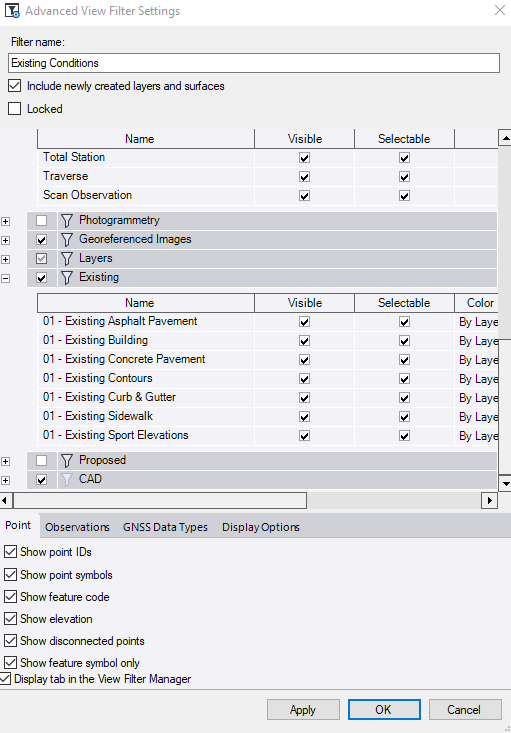
I should have maybe stated this before, I have created a layer called 'Existing Spot Elevations', which is where I want my points to be. I have gone through the Advanced Filter Settings and everything is checked visible. Again, I can see them when the "All" View Filter is selected, but not when my "Existing" View Filter is selected. Can you not create a new 'points' Layer?
------------------------------
Ryne Gibson
------------------------------
Original Message:
Sent: 04-19-2022 18:43
From: Ronny Schneider
Subject: View Points in TBC
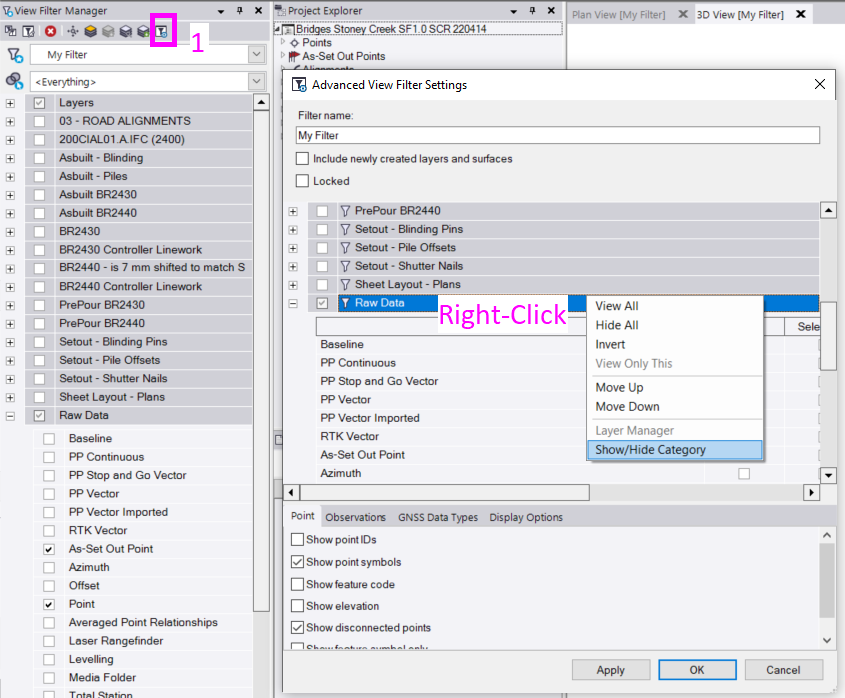
Under "Layer Group" "Rawdata" you also need to enable "Point" or "As-Set Out point".
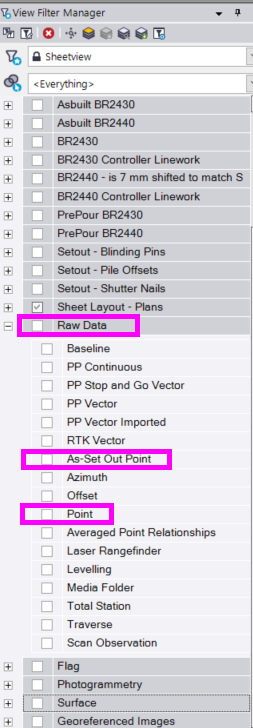
If you are missing "Raw Data" in that list.
------------------------------
Ronny Schneider
Original Message:
Sent: 04-19-2022 10:31
From: Ryne Gibson
Subject: View Points in TBC
When I create points or import points, I can not view them in my plan view or 3D view. They are listed under the project explorer and the layers the points are assigned to are turned on. Why can I not see my points?
------------------------------
Ryne Gibson
------------------------------