Hello TBC’ers! Did you know that TBC offers automated noise removal of tunnel point cloud data? Using TBC, you can automate the noise removal process to save significant office processing time, ensure that your point cloud data is clean and accurate, leading to higher quality deliverables, and provide precise and reliable data for construction projects, improving overall project outcomes.
To begin this workflow, import your tunnel point cloud data into TBC and follow these steps:
-
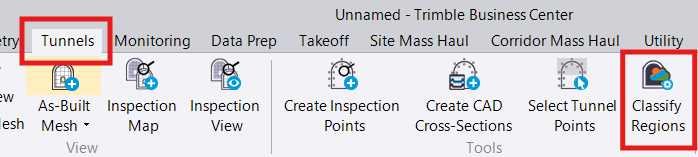
Click on the “Tunnels” tab on the top ribbon and click “Classify Regions” in the Tools group.
-
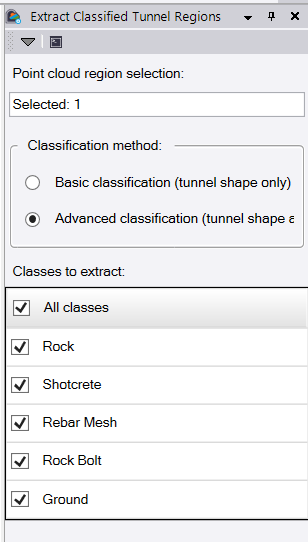
Select the point cloud region for the tunnel by clicking in the selection box and selecting the point cloud from the Plan View or Project Explorer.
-
In the “Classification method” section, select the “Advanced classification” option. This will open a menu for the classes you would like to extract. All classes are automatically selected, but you may edit this for your specific needs.
-
Click “Extract” and wait for the classification to run.
-
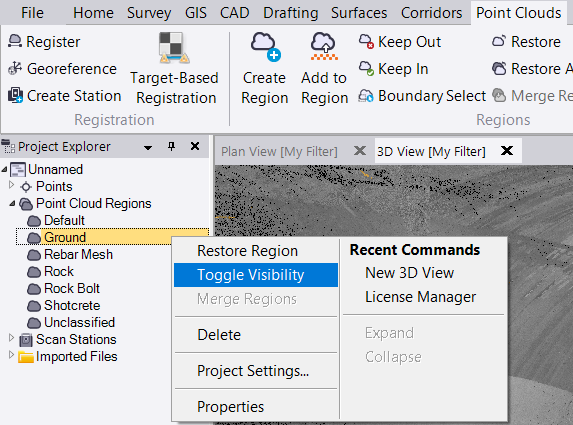
Toggle Visibility or select “Keep Out” to remove point cloud regions that aren’t useful in as-built scans or report creation.
You’re all set! Maximize your TBC experience and ensure smooth workflows by utilizing learning & support material most aligned with your needs and personal preferences.
To download the latest version of TBC, you can head to https://geospatial.trimble.com/en/products/software/trimble-business-center/download
Complete free self-paced workflow-based courses with hands-on guided software experiences on Learn.Trimble: https://learn.trimble.com/pages/422/trimble-business-center-tbc