Hi Richard
The Trimble Mobile Manager app lets you share the Catalyst GNSS with 3rd party applications using the 'Share' option In the GNSS settings page.
The first time you do this requires a small amount of setup which I've detailed below for you.
Note - This setup is only needed for third-party applications. Trimble Partner apps using Trimble Mobile Manager with the TPSDK (know as Catalyst enabled apps) do not need to use the Mock Locations service to work with Trimble Catalyst. For a list of Catalyst enabled apps take a look at the APPS page here
Enable Android Developer Options
You will need to enable developer options on your device before following the steps below. This allows you to choose TMM as the mock location provider.
- Follow the instructions on the Android developer page - enable developer options and debugging
- Alternatively refer to your device manufacturer's documentation on how to enable this mode through the device's Settings App
Enable other apps to use positions from Trimble Mobile Manager
- Select the GNSS menu in Trimble Mobile Manager
- Select the SETUP option

- Follow the on screen instructions and select OPEN SETTINGS

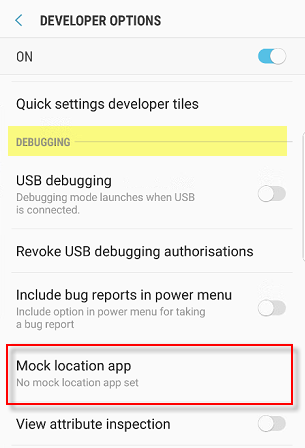
- Under the DEBUGGING section select Mock Location app
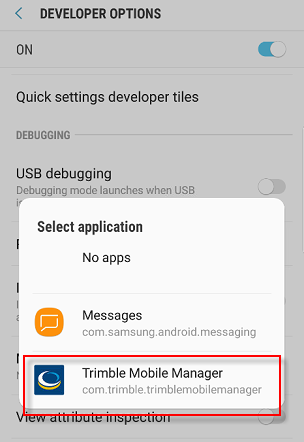
- Select Trimble Mobile Manager from the applications listed
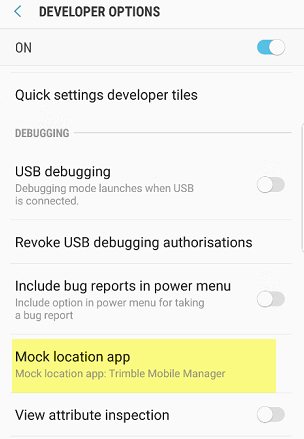
- Revert back to Trimble Mobile Manager - you can now CONNECT and enable the SHARE option to share the Catalyst positions with 3rd party applications.
The next time you start Trimble mobile manager you need only CONNECT and enable the SHARE option to do this
