WorksManager

 View Only
Expand all | Collapse all

AusGeoid2020v2 failing to sync with machines

  • 1.  AusGeoid2020v2 failing to sync with machines

    Posted 02-26-2025 19:21

    Hi, when selecting MGA2020 with AusGeoid2020v2 the Geoid doesn't sync even if you add the v2 geoid manually. Is anyone else having this issue?


    ------------------------------
    Tom Miller
    ------------------------------


  • 2.  RE: AusGeoid2020v2 failing to sync with machines

    Posted 03-21-2025 14:26

    We had an issue with geoid18 (conus) with some of our older machines. From what I can tell, EW doesn't directly reference the geoid file, but goes through a database file (coordsystemdatabase.xml OR xintcoordsys.xml). The DB file was missing the reference to 18 and just had to be added by hand. The "name" line is what the .cal calls it, and the "gridfilename" is the name of the actual geoid file. Had to be done in person on each machine.


    ------------------------------
    RIchard Barreto
    ------------------------------


  • 3.  RE: AusGeoid2020v2 failing to sync with machines

    Posted 03-28-2025 23:32

    Same issue Tom. We ended up just using the AusGeoid2020. Doesn't appear to be a difference


    ------------------------------
    Stuart Thomason
    ------------------------------


  • 4.  RE: AusGeoid2020v2 failing to sync with machines

    Posted 30 days ago

    This was resolved by updating the coordinatesystemdatabase.xml on the machines. 

    In my case, the previous coordinatesystemdatabase.xml in WorksManager was from 2020 and didn't contain AusGeoid2020v2. I couldn't see how to update this using WorksManager but I could upload the file using TCC:
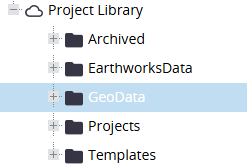
    Once the machine did a file transfer the coordinatesystemdatabase.xml was updated and the job using AusGeoid2020v2 worked.


    ------------------------------
    Tom Miller
    ------------------------------


  • 5.  RE: AusGeoid2020v2 failing to sync with machines

    Posted 29 days ago

    Tom, glad you were able to resolve it. Please refer this blog article to use WorksManager File Explorer (instead of TCC explorer) to achieve the same. You can add, delete, download, sort and search files in a simple explorer style; folder operations are work in progress, and should be available this quarter.


    ------------------------------
    Vijay Raghunathan
    ------------------------------