We're trying to move to a workflow that uses WorksManager exclusively, without relying on Trimble Connected Community (TCC), and we've run into a few challenges.
Our understanding is that the preferred method for managing jobs on field devices is to add and remove projects through WorksManager.
Before deleting a project from a controller, we can use the File Management feature in WorksManager to download the entire project folder as a ZIP file for archival purposes. We then use TeamViewer to remotely access the tablet and manually delete the project from the Trimble SCS900 Data folder.
The issue arises when a project is archived in WorksManager before the files have been cleaned up on the field devices.
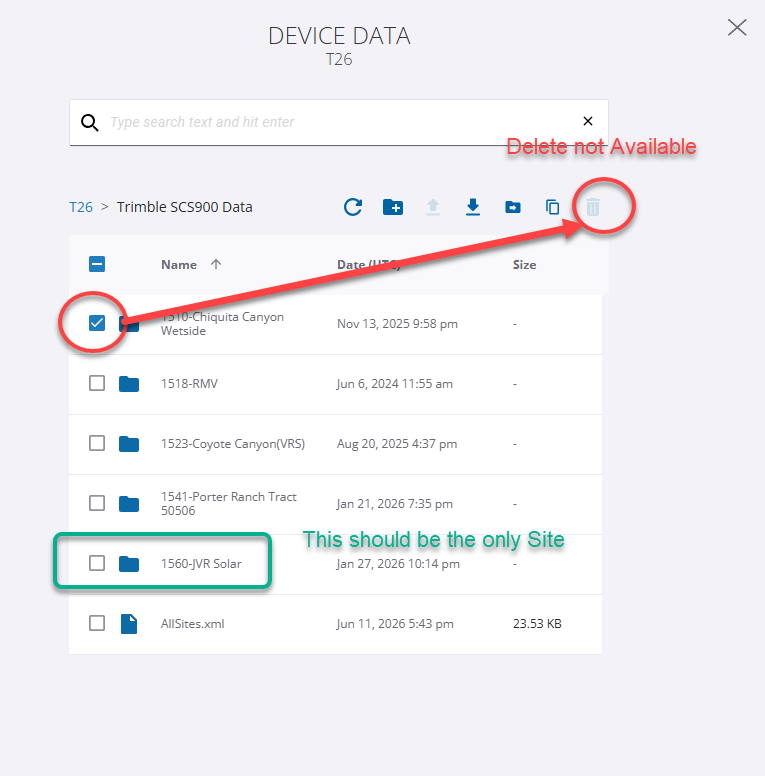
When using File Management in WorksManager, it appears that I cannot delete an entire project folder at once. The system requires that all files and subfolders be deleted individually before the parent folder can be removed. For larger projects, this can be extremely time-consuming.
With TCC Explorer no longer available, what is the recommended SOP for managing and cleaning up project files on field devices?
Specifically:
- Is there a way to delete an entire project folder from a device through WorksManager?
- How are others handling project archival and file cleanup on Earthworks, Siteworks, and SCS900 devices?
- Is there a Trimble-recommended workflow for maintaining device storage and removing obsolete projects?
I'd appreciate hearing how other organizations are handling this transition.
------------------------------
Matt Eklund, PE
GPS Program Manager
Sukut Construction
California, USA
------------------------------