Thank you for the in-depth explanation, Matthew. I will keep that end mind going forward.
I produce custom base maps projected to the coordinates system I want to work in in order to keep everything simpler. My current accuracy requirements are well within the circular error between NAD83 and 2011 and the transformation that is being done so I should not have problem.
Original Message:
Sent: 02-14-2023 12:33
From: Matthew Morris
Subject: Geoid EGM 2008 in TMM
Hi @Carson Garver. I'll try to give you a bit of an explanation as to why we don't have other NAD 1983 realizations in the list. This is a common question - and indicative of a common real-world problem.
- For at least the last 5+ years if not more, virtually all publicly available correction sources (real-time and post-processed) in the US have been using NAD 1983 (2011) as the reference frame. As a result, collected (and corrected) field data will use the NAD 1983 (2011) reference frame by default. If a different reference frame is needed to get the data into the system-of-record, the best way to handle this is at the point the data is integrated into the system-of-record and not necessarily at the point of capture.
- Through support cases over the years and our long relationship with Esri, we've observed that it's very, very common for organizations to establish a schema once and then to continue to collect data into that schema over time. Changing the coordinate system on an existing schema and set of data is not commonly done and is limited by the tooling. There are many customers who have a NAD 1983 (original, CORS96, HARN, etc.) schema that they've been collecting GNSS data into for many years. In all likelihood, the data in that NAD 1983 (x) schema is not purely NAD 1983 (x) but rather a mix of realizations (and more importantly, epochs) depending on when the data was collected and what realization was being used with the correction source at that time. For example, most US correction sources used to use CORS96 and then switched to 2011. Depending on the field workflow being used, it may not have even been possible to handle this and so all data got stored in the NAD 1983 (x) schema without any adjustment. For example, if you were using TerraSync or Pathfinder Office with the NAD 1983 (Conus) setting - you'd be getting data in the reference frame of the correction source without any transformation. Over the years, many people have equated NAD 1983 (Conus) with NAD 1983 (original) and that's incorrect - what NAD 1983 (Conus) really means is - data in-whatever-the-reference-frame-of-the-correction-source-is. So that could be CORS96 one day and 2011 the next day if (when) the RTK provider has changed their settings.
- Yes, Esri provides composite transformations for working between most older NAD 1983 realizations and NAD 1983 (2011) - these basically combine two static 7 parameter transformations using WGS84 as an intermediary reference frame. It's an approximate solution - and not geodetically precise. If you're looking to be within a couple centimeters, it's probably close enough. The correct solution (as you'd see through NGS HTDP tool) is to apply a time-dependent datum transformation and take local deformation into account. While still fixed to the North American tectonic plate, there are 24 years (epoch 2010.00 - epoch 1986.00 = 24) of relative tectonic movement and deformation that come into play. While the most accurate solution, it may not be what most customers want - which would be compability and consistency with data previously collected.
- We have the capability to do time-dependent datum transformations with local deformation models in the TMM + Field Maps workflow - but are currently only using it when transforming between global reference frames used for RTX and SBAS (e.g., ITRF2014/ITRF2020 current epoch) and local reference frames (e.g., NAD 1983 (2011) epoch 2010.00). This was necessary in order to deliver the spec accuracy of the RTX service to the more tectonically active areas of North America (e.g., California).
- While it would be good to understand the geodetic lineage of the data in your government customer's system-of-record and to know how rigid the geodetic handling has or hasn't been, it's probably reasonable to start with using the Esri composite transformation path to work between NAD 1983 (original) and NAD 1983 (2011) as you have started to do. Whenever Field Maps sees an RTK fix in the GNSS stream, it's going to enforce that you're using a Location Profile. Within the Location Profile, it's going to make you pick a transformation if the datum of the GNSS is different than the datum of the web map.
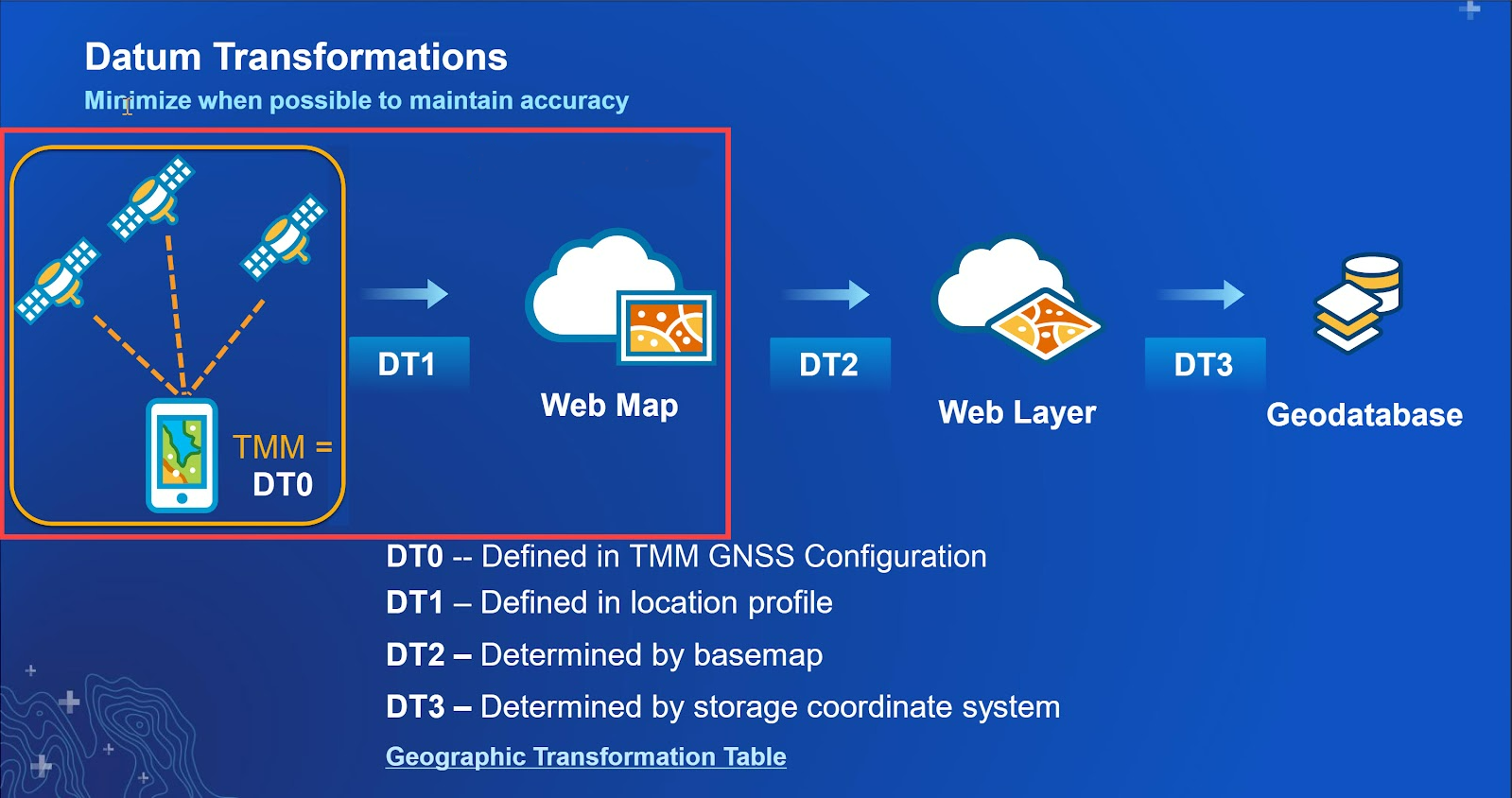
- In looking at the full transformation path of the data collected in Field Maps, there are a lot of permutations to consider given how the web map was authored, how the feature service was authored (underlying geodatabase?), and what base map is used. For example, let's say the feature service is published with NAD 1983 (original) and used with a standard ArcGIS Online base map. Because the standard web maps are all using WGS84 (with the Web Mercator projection), your Field Maps project will be in WGS84 Web Mercator and the Esri components will automatically pick a default transformation when sync'ing data from Field Maps back to the feature service/layer. Assuming you're using an RTK correction source configured in TMM, you'd still have to create that Location Profile in Field Maps to tell it that the GNSS is NAD 1983 (2011), the web map is WGS84 Web Mercator, and to apply a transformation at that step. The graphic below shows the various places transformations will come into play:
That's more of a deep dive than maybe I had intended but hopefully it gives you a better picture of why the solution is implemented the way it is. Happy to follow-up more offline if it helps.
------------------------------
Matthew Morris
------------------------------
Original Message:
Sent: 02-09-2023 17:31
From: Carson Garver
Subject: Geoid EGM 2008 in TMM
It would be great if I get could the original NAD 1983. My gov client still maintains a significant portion of their data in the original NAD 1983 Datum. I understand that I should be able to use NAD83 2011 without issue, however, ESRI Field maps requires a transformation to be used when the GNSS Coordinate system is NAD83 2011 and the map coordinate system is NAD 83. Currently I am using the following transformation.
~WGS_1984_(ITRF08)_To_NAD1983_2011 + WGS_1984_(ITRF00)_To_NAD_1983
In field maps I am unable to select none so I am not sure why I am being forced to choose a transformation.
------------------------------
Carson Garver
Original Message:
Sent: 02-09-2023 14:41
From: Mark Kellaway
Subject: Geoid EGM 2008 in TMM
Hi Carson,
It is not possible to side load reference frames into TMM. If there is a particular reference frame you require we can look into adding that, or assisting with appropriate selection.
Regards,
------------------------------
Mark Kellaway
Original Message:
Sent: 02-09-2023 11:58
From: Carson Garver
Subject: Geoid EGM 2008 in TMM
Thank you Matthew! I found the Trimble Grid Factory for modifying .ggf files @ Trimble Docushare. I'll try getting one loaded onto a device later.
Is there a way to side load Frames/Datums into TMM? Is there a location similar to the Geoids that I can find said Frames/Datums?
------------------------------
Carson Garver
Original Message:
Sent: 02-09-2023 11:20
From: Matthew Morris
Subject: Geoid EGM 2008 in TMM
Hi @Carson Garver. Yes, this is possible on iOS as well and we are overdue for updating the post. Here's the procedure for you to try (two possible routes):
- Using Mobile Device
- Download the geoid file
- Open the 'Files' app and go to the Downloads folder
- Hold on the downloaded file until the context menu appears
- Select 'Move'
- Navigate to the Mobile Manager folder
- Select the GeoData folder
- Select 'Copy'
- Restart TMM
- The geoid should now be visible in the Geoid menu
- Using Computer (Mac OS)
- Download the file
- Navigate to the file in the Finder
- In the context menu select Share, then select AirDrop
- Select the iOS device
- On the iOS Device select 'Open with Files'
- Follow the instructions from (5) above
------------------------------
Matthew Morris
Original Message:
Sent: 02-08-2023 11:39
From: Carson Garver
Subject: Geoid EGM 2008 in TMM
Unfortunately, our client requires EGM2008. The procedure you identified works for Android only I am assuming? Is there a process for iOS?
------------------------------
Carson Garver
Original Message:
Sent: 02-08-2023 10:57
From: Matthew Morris
Subject: Geoid EGM 2008 in TMM
Hi @Carson Garver. For most purposes, we recommend GEOID18 for high-accuracy orthometric heights in the continental United States. That's the latest geoid for the NAVD88 datum. If you need to use a global EGM model for compatibility or multi-region reasons, we include EGM96 but do not include EGM2008 by default due to its large size (and the general preference for most users to use a more appropriate regional model - like GEOID18). You do have the option of sourcing the EGM2008 ggf file online and then side-loading it on the device using the procedure described in this post in the Library.
------------------------------
Matthew Morris