Hello, I have managed to resolve this issue.
You can try uploading the model while being on a 3D view. And chosing the highest level of detail possible in that view on Revit:
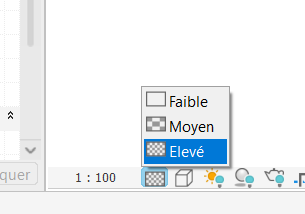
Then upload like normal. I didn't even need to tick this box. It still worked without it:
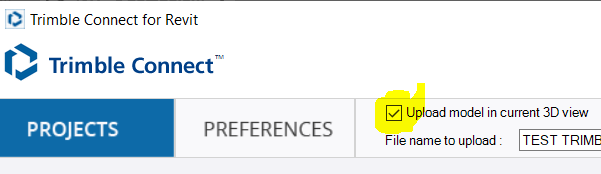
But if it still doesn't resolve the issue for you, you can try ticking the box before upload.
Hope this helps,
Best regards
-Liliane
------------------------------
Liliane - Evangelia BOMPOLOU
------------------------------
Original Message:
Sent: 02-15-2024 10:37
From: Miguel Frazão
Subject: Pipes and Conduits not loading correctly when updating the model to Trimble Connect
Hi Darshan,
Any update for this issue? I'm having the same one.
Regards
------------------------------
Miguel Frazão
------------------------------
Original Message:
Sent: 01-25-2024 06:10
From: Darshan Rajaram Kamat
Subject: Pipes and Conduits not loading correctly when updating the model to Trimble Connect
Hi Liliane,
Could you please share the model with our Support team (connect-support@trimble.com) so that we can investigate.
Regards
------------------------------
Darshan Rajaram Kamat
Original Message:
Sent: 01-25-2024 00:24
From: Liliane - Evangelia BOMPOLOU
Subject: Pipes and Conduits not loading correctly when updating the model to Trimble Connect
Hello Joe,
I have the same exact issue as you. Have you found a solution by any chance?
Thank you in advance,
- Liliane
------------------------------
Liliane - Evangelia BOMPOLOU