That helps a bunch. Really well put together. Thank you.
So, of course, I have a follow up. I just want to state what you've written in my own words and see if I've gotten it right:
I generally get information in from Civil 3d from the owners/engineers. I then take their data (linework and surfaces) and massage it to show what we're actually building and then create a surface out of my linework. When I'm creating a design for a works manager project, I select the "road surface" option, which allows me to include an alignment. This is in turn is pushing out a TTM file to my rovers through the vcl because it is not a template surface. If I want my surface and my alignments to speak to one another in siteworks, I must create a Template surface. When creating a design for works manager, I would still select the "road surface" option and include the alignment. This would push out a Template surface and siteworks would reconize it as such and then I would be able to use the the STA & OFF capabilities of our rovers.
So if I have that correct (and please correct me if I'm wrong), what I need to find out is what I'm doing incorrectly in building my surfaces. I am just taking my linestrings and creating a surface out of them. Generally I leave my surface classification as "unclassified". Would this be the step I'm missing for creating a template surface? If I selected Design in the surface classification, would that turn it into a template surface?
Thank you again. If you can't answer my follow up, you've still pointed me in the correct direction. I'm going to be diving into the TBC help menu to see if I can get my answer that way as well. Half the battle is having the correct terminology.
------------------------------
Anthony Smith
------------------------------
Original Message:
Sent: 05-25-2022 09:07
From: Steve DiBenedetto
Subject: Stationing in rovers
Hi Anthony,
You can get the Sta + Off values to populate if you use a VCL file and load in a the "template surface" into Siteworks. That type of design is shown by the little road icon next to the surface name in the Surfaces pulldown in the Open Project Window. If you're using WorksManager and exporting to WM from TBC that should produce the VCL file for you. When in Siteworks the alignment associated to the surface will appear as a line with blue arrows on it.
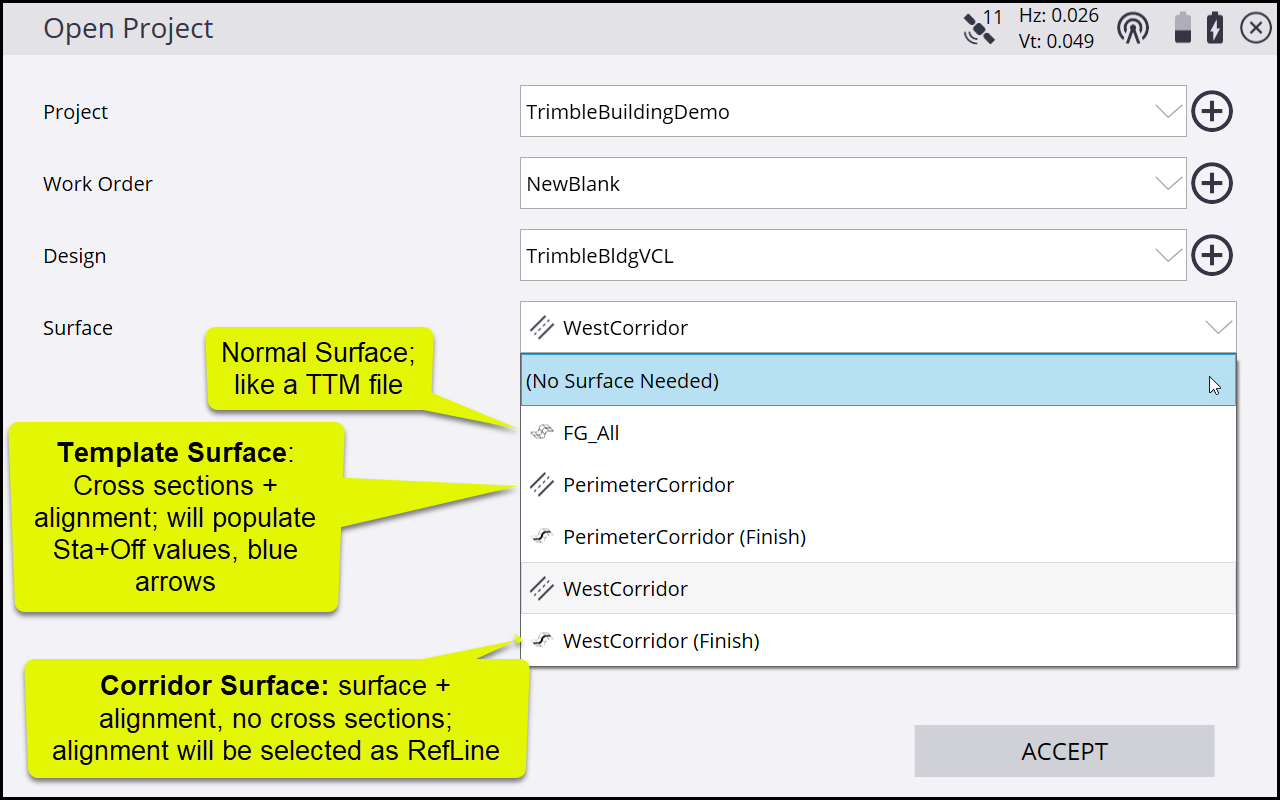
Otherwise if you're using a PRO file for your alignment + road surface, when you open the PRO the alingment will be selected automatically as the Reference Line, which populates the R. Sta + R. Off. In that case the Sta+Off values only become active once you have selected the alignment for stakeout, I.e., the Sta+Off only appear when a line or alignment is selected for staking.
Check out the attached document for a little more info on the differences between the different kind of ref-lines and how they colors show up in Siteworks,
------------------------------
Steve DiBenedetto
------------------------------