The model is always loaded with zoom extend (like when you reset model).
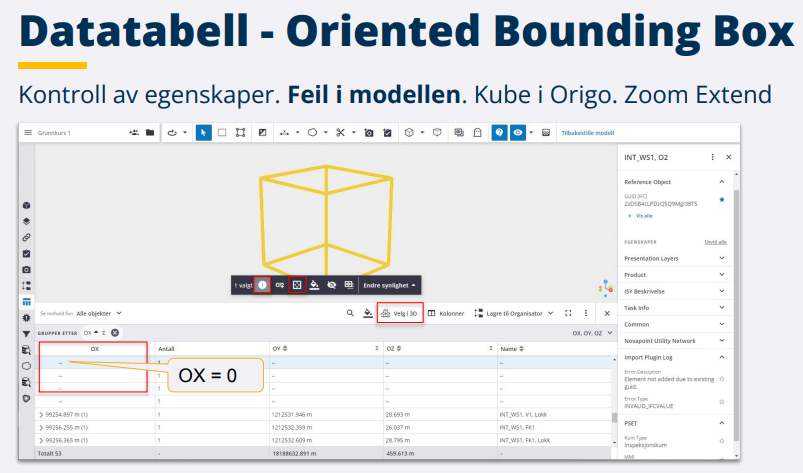
The problem is when one or more objects contains errors, these objects are drawn as a cube at origin, and when the model is far from origin, we are not able to se the loaded model. Zoom extend is too far out. Trimble Connect add a property set named "Oriented Bounding Box". Picture attached. Tips: Use the Datatable to sort/group objects by this property set, and group objects by property OX. The properties/point (OX,OY,OZ) is the object middle point used to zoom in object, and objects with errors ends up in origin (OX,OY,OZ are not calculated). Use the Datatable to select objects with OX=0 (i.e. objects with errors) and Zoom to these objects (from the object menu). This is how you are able to find objects with errors (object missing geometry, object with errors). The picture is a snap from a presentation in Norwegian, hope you are able to understand.
------------------------------
Ole Christian Eidhammer
------------------------------