Trimble Connect User Forum

 View Only

 How to relink model in BCF topics?

Marius Žygaitis's profile image
Marius Žygaitis posted 03-08-2023 01:47

Hi, I send several issues from Solibri to TC BCF topics. It went quite well, however it asks to relink the models:

If I click relink and find the models I get all models grayed out.

I have tried making issues with solibri with elements attached and with no elements attached. That does not change a thing.

Do you have a working solution? 

Regards.

Sander Eikelboom's profile image
Sander Eikelboom

For me the same problem here. What is the development on this?

Raimo Lust's profile image
Raimo Lust

I have the same problem. is there any solution available?

Raimo Lust's profile image
Raimo Lust

The problem occurs when filename is different than FILE_NAME value in ifc file

Jari Juntunen's profile image
Jari Juntunen

Hello,

The "Relink" button becomes visible in the Trimble Connect Topics panel if the imported .BCF file, or the BCF data uploaded by an application via the API, refers to model name that cannot be found in the Trimble Connect project, or if the model name is missing completely. The "Relink" button enables the Trimble Connect user to fix the invalid or missing model reference by selecting the correct model in the Trimble Connect project.

Marius Žygaitis:

Now, when clicking the "Relink" button user can select any model file in the project and relink that to the Topic:

Please note that the Relink operation cannot be undone.

See the user guide for more details: https://docs.browser.connect.trimble.com/bcf-topics/relinking-models-to-topics 

Kind regards,

Jari

Jari Juntunen's profile image
Jari Juntunen

@Raimo Lust

The problem you're observing is similar, but slightly different. In this case, the Solibri application is not sending the correct model file name ("SA_PP_AH6.ifc") to Trimble Connect, which means that Trimble Connect  cannot locate the correct model file in Connect project. In this case, the Relink button is displayed so that user can fix the problem by selecting the correct model in the Connect project.

In order for the model in the Trimble Connect project to get matched automatically during the import or live sync / data upload, the model file name and the IFC File Name attribute must be the same in Solibri before data upload / live sync:
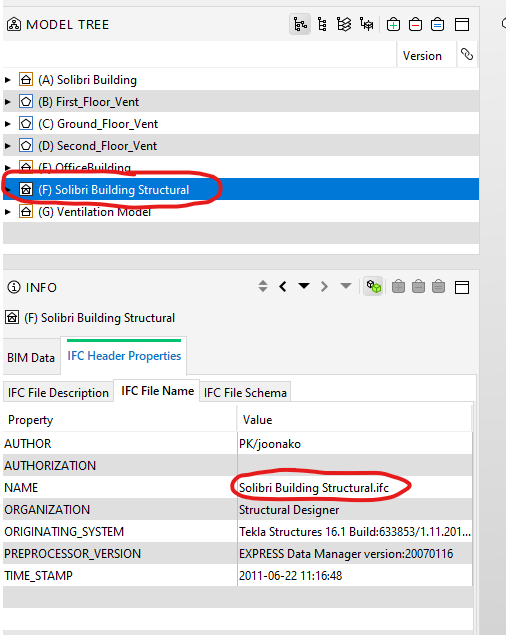
Kind regards,

Jari

Sander Eikelboom's profile image
Sander Eikelboom
It is remarkable that only trimble connect suffers from this. Dalux and BIMcollab do not experience this. (in the live connector with Solibri)
And this also happens when you bring in the models through the integration with Trimble