TILOS

 View Only

 Issues opening the "Named user" mode of Tilos

Tierney Brouillet-Lee's profile image
Tierney Brouillet-Lee posted 08-03-2023 09:02

Hi,

I have recently acquired a license (currently the sole license) for Tilos on behalf of my company and installed the software today. I am facing several issues when running this software.

When I run the "Start License Manager" programme the "Named user" option is greyed out. I have been able to make the "Next" button clickable through clicking through the other options and opening/closing this and the actual Tilos programme several times. It should also be noted that the help button "?" on this page does not work.

When I have managed to apply the "Named user" settings , Tilos opens in Demo mode anyway (see top-left of programme screen) and requests me to sign in. The sign-in is supposedly successful on my browser, but the programme screen does not update (I have waited several minutes) and the only option is to exit by clicking "Close" or the exit button X. Exiting the programme opens another window stating that there is no license mode set for Tilos. (continued after pictures)

I would greatly appreciate any advice on resolving this - is a Tilos administrator able to verify that I have the correct license? I can't see any issues with it from my side. Also the installing and licensing help (Tilos - Trimble Inc.) does not help much as the path Help > License Manager (page 2 of the pdf) does not appear for me (it is Help > Account Info instead).

Thank you in advance for any help,

Regards.

David Kosakowski's profile image
David Kosakowski

Hi Tierney,

It sounds like the issues and questions you have require an exchange with Tilos Support. Please contact them at:

Technical Support Hotline

The most up-to-date help appears here: https://tiloshelp.trimble.com/Installation-and-Licensing/License-Tilos

David

Tierney Brouillet-Lee's profile image
Tierney Brouillet-Lee

@David KosakowskiThank you for your answer, I just called the technical support hotline (within the hours you suggested) and was sent straight to voicemail... I will wait for an answer via the other means of contact you suggested.

Tierney Brouillet-Lee's profile image
Tierney Brouillet-Lee

I'm not sure what caused the change, but after playing around with the demo version and trying various things on the website I have managed to get to a new window when opening the software which states that I do not have a valid license. I don't quite understand how this can be as the last picture in my initial post seems to contradict this. Any ideas?
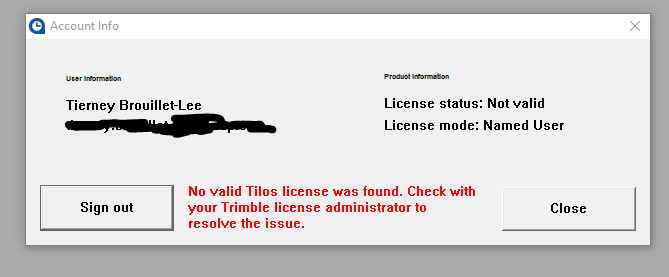
The emails (blacked out) do match.

David Kosakowski's profile image
David Kosakowski

Tierney,

Have you been contacted by Tilos Support? I will contact them directly tonight too.

David

Tierney Brouillet-Lee's profile image
Tierney Brouillet-Lee

Hi David,

Thanks for checking in on this. I have been in touch with Tilos support and it seems we are getting somewhere in terms of identifying the issue, the matter is currently with my company's IT team as they see if they can solve it on our side.

Regards,

Tierney