Trench
What
Use this function for designing new trenches for your WS design. There are several ways to design your WS system, and through this post, those methods are described.
Where
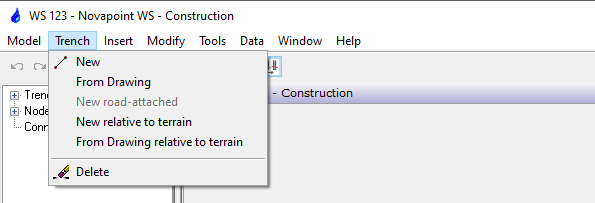
Sub selections explained:
New
Use this function for designing new trenches by picking node points in the drawing. With this method, you can freely design the location of your trench.
Run the function from the following location:
Menu: Novapoint WS Construction > Trench > New
The command prompts for:
First node:
Select the starting point for a new trench
Next node:
Select the next node point in the new trench. The command continues to prompt for new node points until the function is terminated by clicking the right mouse button or Enter on the keyboard.
The dialogue box Select Cross Section appears. Click the desired cross-section and quit by OK.
Use the CAD Object Snap functions where there is a demand for a more exact location of the node points.
From drawing
Use this function for designing new trenches by picking existing polylines in the drawing.
Run the function from the following location:
Menu: Novapoint WS Construction > Trench > From drawing
The command prompts for:
Pick a line,arc,polyline:
Pick the line to be used for the new trench
Ok
Pick a line,arc,polyline/Undo:
The command continues to prompt for “Pick a line, arc, polyline/Undo:” until the function is terminated by clicking the right mouse button or Enter on the keyboard.
The dialogue box Select Cross Section appears. Click the desired cross-section and quit by OK.
»Initiation is OK (4 elements)
Use the Undo function to cancel the previous selection.
Relative to Terrain
The functions described above are also possible to follow the terrain. Meaning the trace you either draw or choose from the drawing will automatically follow the top terrain. This function can be used when you want to design a pipe with a constant distance under top terrain.
Delete
Use this function for deleting the current trench from the WS project.
Run the function from the following location:
Menu: Novapoint WS Construction > Trench > Delete
Pick a Pipe :
Select a pipe in the trench to be deleted. The command prompts for you to confirm the selection
Ok ?
Confirm the selection by clicking the right mouse button or “Enter” on the keyboard. The dialogue box Delete trench appears. Delete the trench by clicking Yes, or cancel by clicking No.
The function may also be run from the following short cut menus: