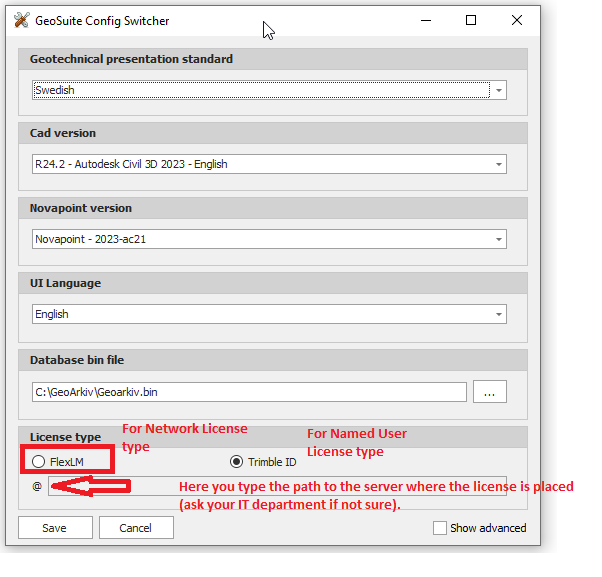
Config Switcher is the tool to change over all settings in Novapoint GeoSuite Toolbox for the Swedish and the Norwegian version - such as:
IMPORTANT! Before using the Config Switcher all Novapoint GeoSuite Toolbox applications have to be closed down - including any AutoCAD/Civil3D processes used by GeoSuite Presentation.
Novapoint GeoSuite Toolbox support Swedish and Norwegian geotechnical standards. Start by selecting one of these to alternatives.
AutoCAD version Expand the list to show any valid choices of installed AutoCAD/Civil3D plattforms to use in GeoSuite Toolbox:

Novapoint version In this list You will find any valid Novapoint versions to select. Only Novapoint versions valid for the selected AutoCAD/Civil3D will be available:

Note! Refer to the Novapoint Download for listing of the valid AutoCAD/Civil3D plattform supported by Your Novapoint installation(s).
UI Language For the Swedish version of GeoSuite Presentation You may prefer/select “English” UI. The Norwegian version of GeoSuite Presentation Norwegian is the only language supported.
Database bin file Select the path and filename for the database containing the shortcuts and data about the GeoSuite projects.
License Type For choosing the right license type to open Geosuite software. FlexLM is for Network Licensing and the path to the license server needs to be filled in here (@....). Trimble ID (TID) is for Named User License Type. A pop-up window will appear the first time Geosuite is opening to log in with TID username and password.
Show advanced Use this for restoring missing menu bars in Novapoint GeoSuite Toolbox.
Save Save changes when finished.
Restart Novapoint GeoSuite Toolbox.