[Update June 15th] Important!
All forms of user access to TCC has been revoked. This includes TCC user interface, TCC Legacy interface, TCC Explorer, TBC Office Synchronizer, and TCC FTP/ HTTP api access. Alternate features including File Explorer - Folder Operations (Upload, Download, Move, Copy, Delete), and IBSS 3rd party sharing have been already released in Trimble WorksManager. Note that TCC device integration with legacy devices like GCS will continue to work without any disruption.
----------------------------------------------------------------------------------------------------------------------------------------------------------------------------------------------------------------------------------
TCC End of Life on Jun 15th
Trimble Connected Community (TCC), the predecessor product to Trimble WorksManager, runs on legacy infrastructure that is vulnerable to external risks, and is non-scalable to future business/ technology improvements. In case you are a WorksManager user who doesn’t use TCC at all, this article DOES NOT apply to you and you can ignore reading further. For the others, Trimble is discontinuing any/ all forms of user access to TCC on Jun 15th 2026. Please find the slides version of the communication here.
Why We Are Deprecating TCC
The Trimble Connected Community (TCC) has served as a valuable tool for almost two decades, but it is reaching the end of its life because
- It operates on an older infrastructure that fails modern cybersecurity vulnerability tests, that pose a significant security liability.
- Furthermore, Trimble's cloud provider (AWS) is ending support for the specific platform version TCC runs on, meaning we will lose infrastructure support entirely.
- Finally, the platform lacks the scalability required for future growth.
TCC EOL Journey & Key Milestones
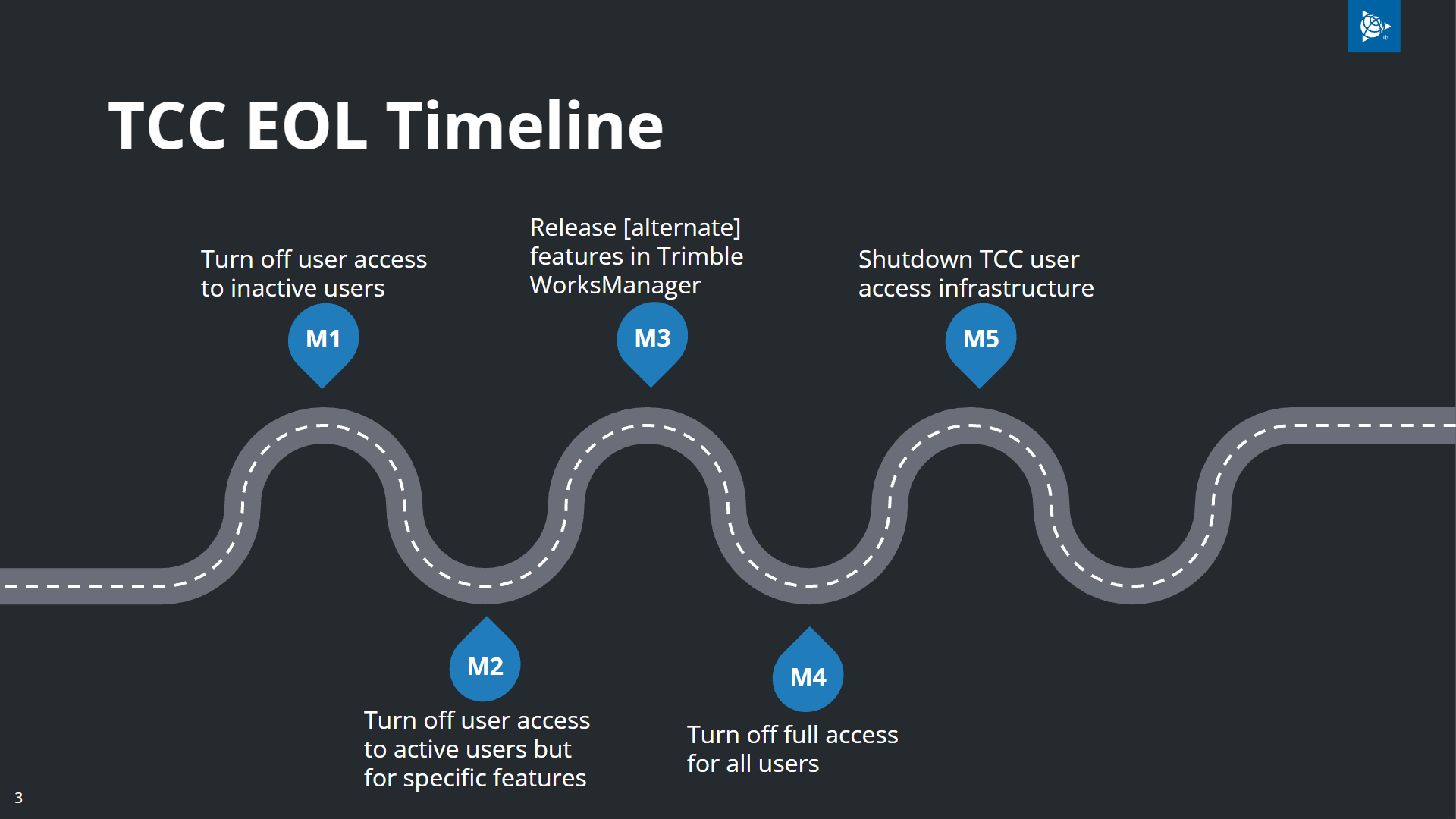
Milestone 1 (M1) & Milestone 2 (M2): Setting the Stage
Our decommissioning plan has been executed in phases.
-
Milestone 1 (Q3 ‘25): In this phase, we securely revoked access for all inactive TCC users who had not logged into the system since January 2024, significantly reducing our vulnerability footprint.
-
Milestone 2 (Q4 ‘25): We then disabled specific non-core features (like Contacts) and features with WorksManager equivalents (like Remote Access) for active users. During this phase, we also successfully migrated approximately 90% of our non-sharing Internet Base Station Service (IBSS) customers to a newer, more stable technology stack.
Milestone 3 (M3): New Transitional Features - May 22nd, 2026
Milestone 3 focuses on releasing alternative features within Trimble WorksManager to bridge the gap as TCC goes EoL.
What Is Becoming Available? (May 22nd)
-
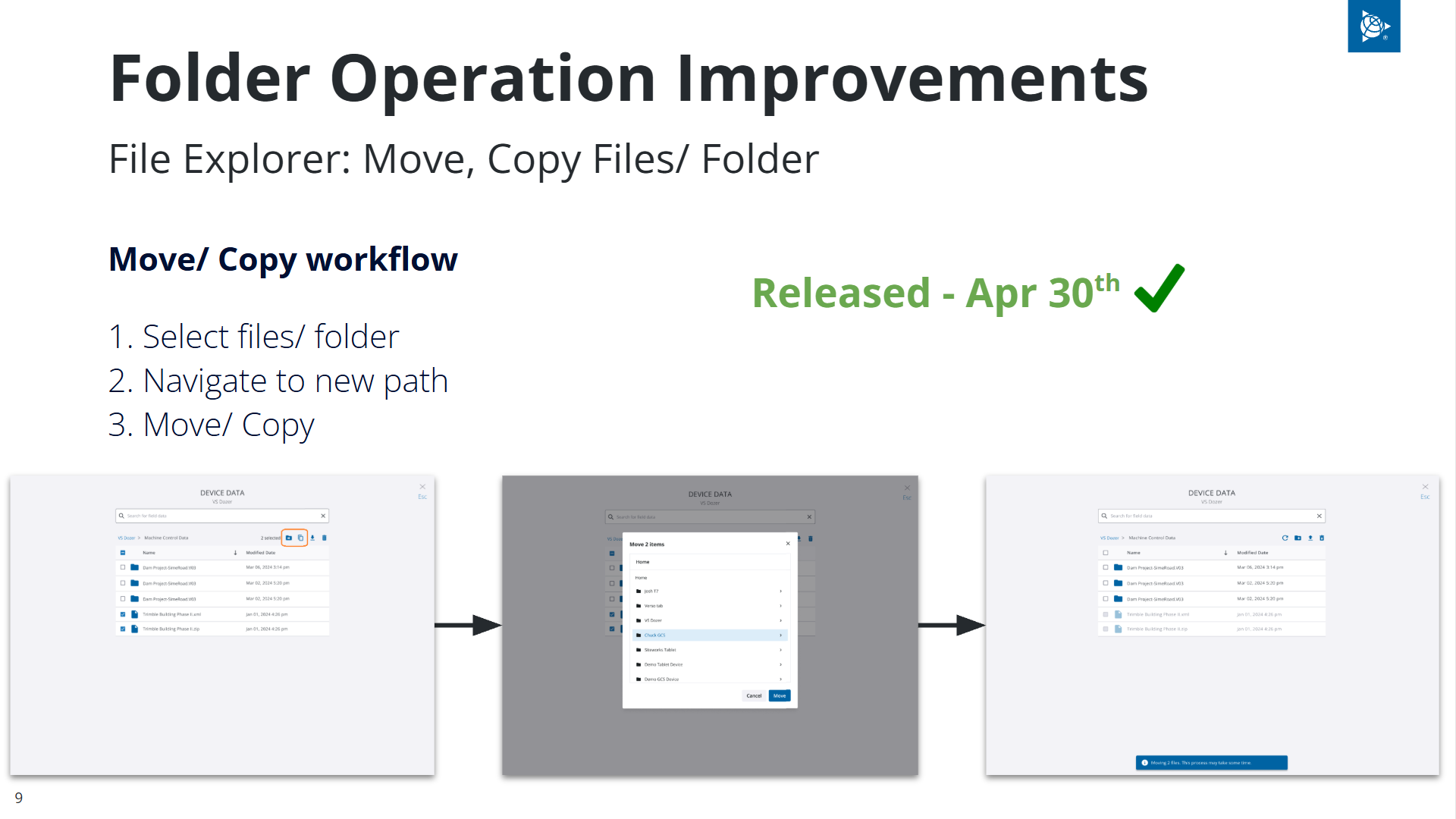
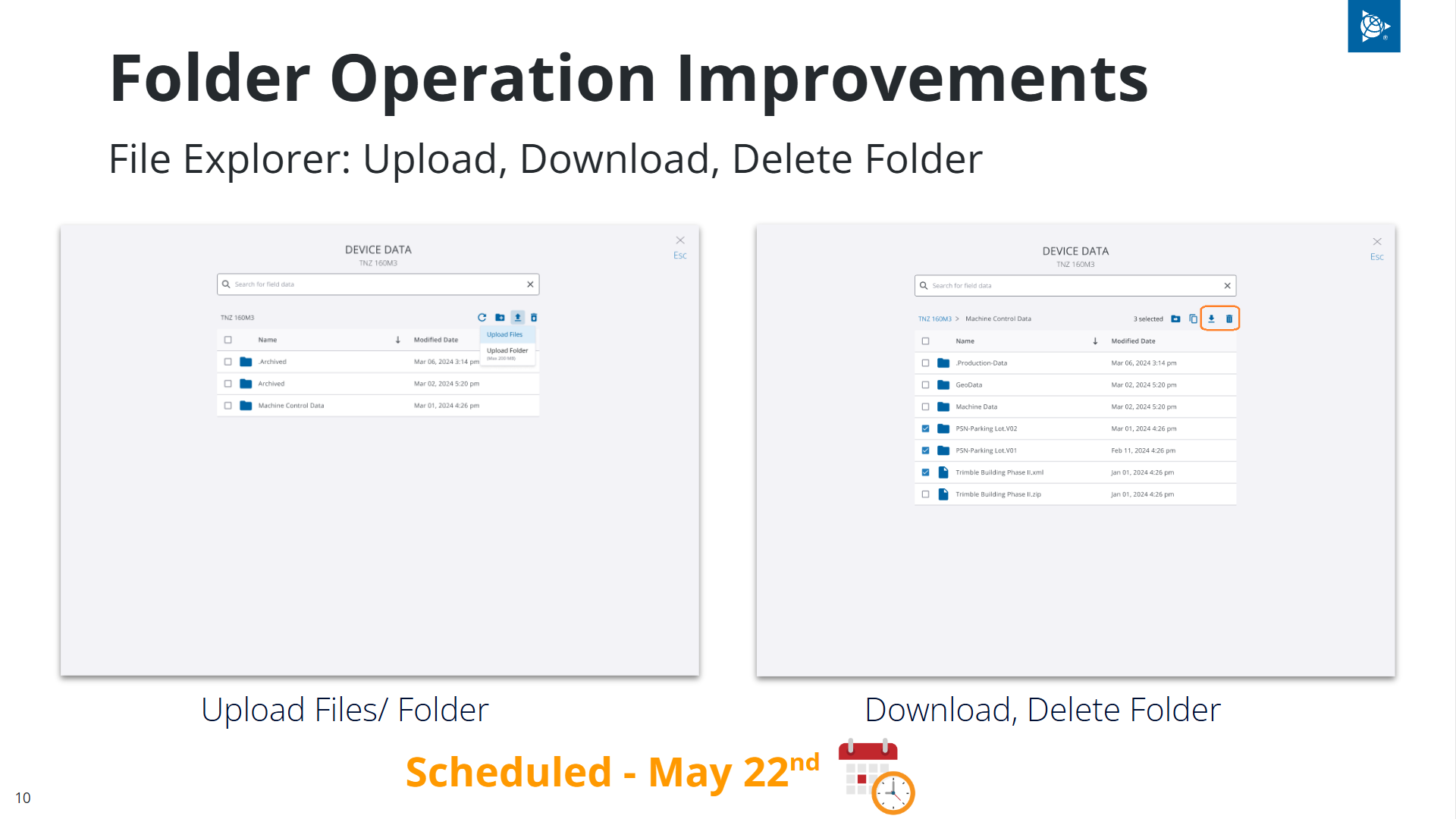
Enhanced File Explorer (Folder Operations): While basic file operations have existed in WorksManager, we are introducing folder-level operations. Users can now move, copy, and delete entire folders directly within the web interface. This acts as a direct wrapper around TCC, meaning any data stored in TCC is visible and manageable here. This is highly useful for use cases like moving work orders from one surveyor's data collector to another. The ability to upload, download folders is scheduled for release on May 22nd.
-
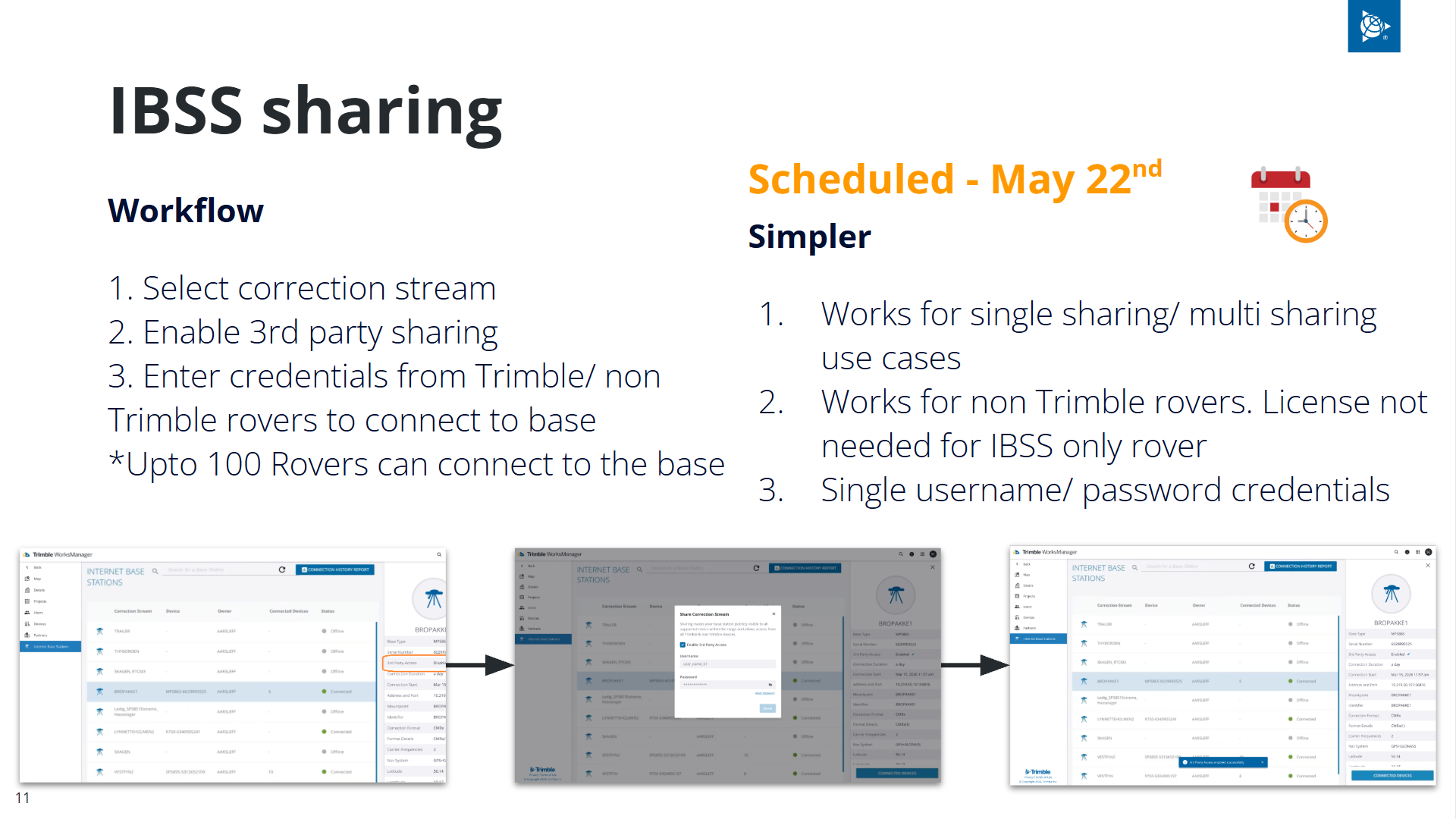
IBSS 3rd Party Sharing (May 22nd): For customers who share rovers/ bases across one or more accounts or use non-Trimble rovers, we are introducing a "3rd Party Sharing" feature. You simply enable this on your correction stream to generate a single username and password. This credential can then connect up to 100 rovers (either shared Trimble rovers or non Trimble rovers)
What Is NOT Directly Available:
-
No Automatic Synchronization: Unlike the Office Synchronizer, WorksManager File Explorer does not feature automatic background syncing between local folders and the cloud. Users must manually manage their uploads and downloads via the web interface.
-
No Offline Desktop App: There is no offline desktop equivalent to TCC Explorer being released; all file management must happen through the WorksManager web portal.
Milestone 4 (M4): Total Revocation of Access - June 15th
Milestone 4 will trigger the complete revoking of TCC user access across all platforms.
What Is Going Away:
-
TCC Desktop Tools: TCC Explorer and Office Synchronizer will completely stop functioning.
-
Web and API Access: The TCC User Interface, FTP access/ HTTP API access, and user notifications will be permanently deactivated.
-
TBC-to-TCC Links: Direct publishing to TCC from TBC will be removed entirely in TBC v2026.10. In older versions, the functionality will not work.
-
Historical Connection History Data: All access to V1 IBSS connection history reports will be gone. If you do not download them before June 15th, they will be gone.
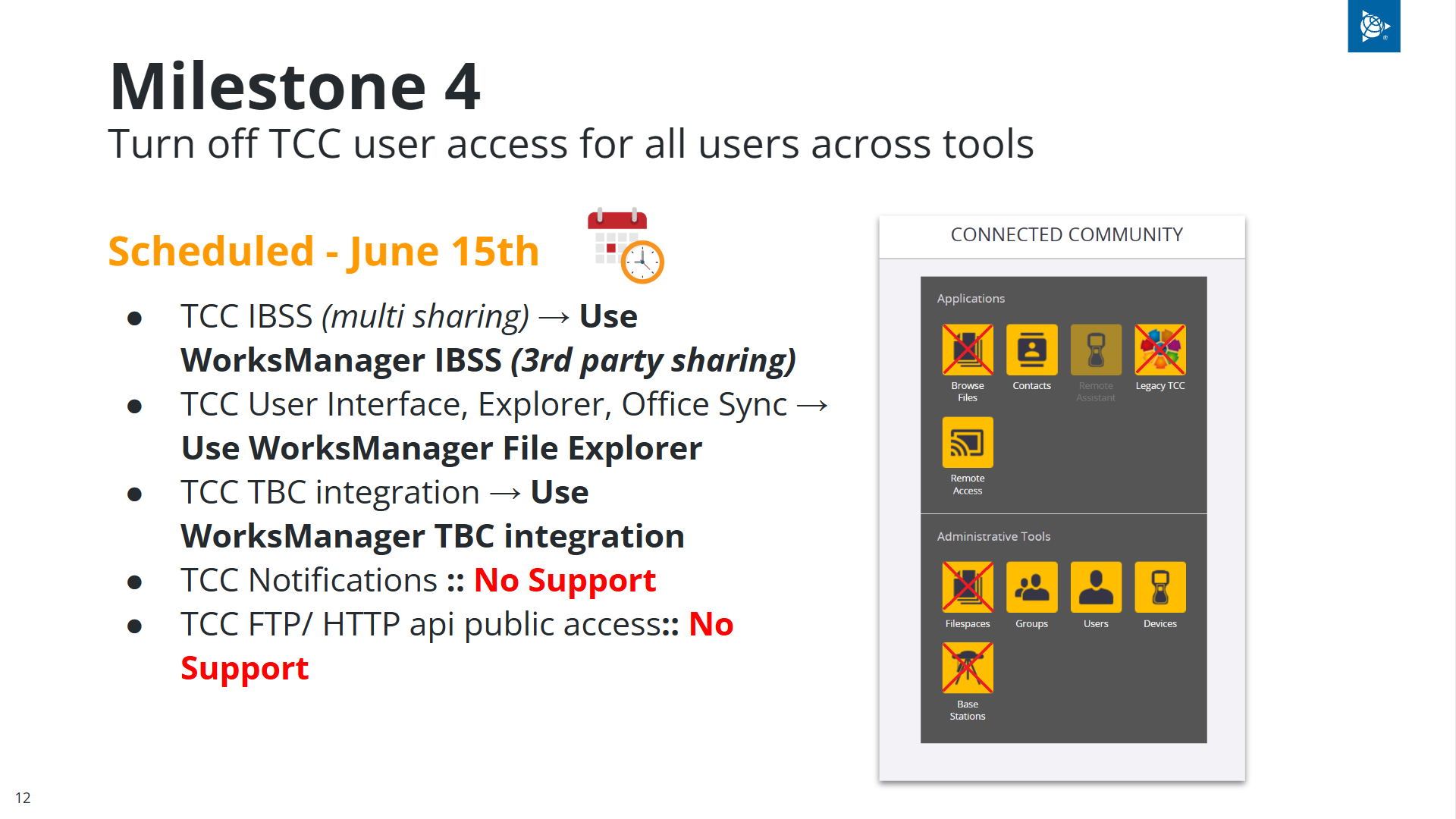
What Will Continue to be Available (Post-June 15th):
Milestone 5 (M5): Internal Infrastructure Shutdown
Milestone 5 is a final, strictly internal phase focused on shutting down the entire TCC user access infrastructure. During this phase, all remaining UI access will be revoked for our internal teams. This will be executed shortly after the external-facing shutdown, with the full infrastructure shutdown officially scheduled for June 20th.
Key takeaway: Any/ all forms of user access to TCC will be revoked on Jun 15th. This includes TCC user interface, TCC Legacy interface, TCC Explorer, TBC Office Synchronizer, and TCC FTP/ HTTP api access. Alternate features including File Explorer - Folder Operations, and IBSS 3rd party sharing are scheduled for release in Trimble WorksManager on May 22nd.
Frequently Asked Questions (FAQ)
Q: Will TCC Explorer for desktop PC stop functioning? Yes. Any user access to TCC in any form—including TCC Explorer, Office Synchronizer, and the web interface—will stop functioning completely on June 15th.
Q: Are there plans to add something similar to TCC Explorer? No, there are no plans to create an offline, installable tool like TCC Explorer. The system will function more like Google Drive, relying purely on the cloud-based WorksManager File Explorer to handle your folder and file operations.
Q: Would be nice with a create date and modify date so we can use WorksManager explorer to check tag files that were uploaded? If this metadata is currently available within TCC, we will look into pulling it up and providing that information within the WorksManager file explorer in future enhancements.
Q: Will there be a recycle bin if a file is accidentally deleted? A recycle bin will not be available by the June transition dates, but it is our immediate next priority.
Q: What happens to customers on old IBSS v1? Customers using shared rovers on v1 must use the new third-party sharing feature to create credentials and configure their rovers. Once confirmed, they will be migrated to v2.
Q: Is IBSS partnering cancelled? Legacy TCC IBSS sharing is indeed revoked. You must now use the new WorksManager "3rd party sharing" feature to achieve this workflow.
Q: Will the shift between v1 and v2 overlap, or will we be busy getting customers migrated? We are providing dedicated documentation with step-by-step instructions on how to migrate your IBSS sharing customers from v1 to v2 to ensure the shift is as smooth as possible, when we release the sharing functionality on May 22nd.
Q: Would you consider removing the hard sunset dates until proper testing and verification has been done? Unfortunately, we do not have the flexibility to offer an indefinite sunset date. Our deadlines are strictly dictated by external factors, primarily the end-of-life date enforced by our AWS cloud infrastructure provider and immediate cybersecurity risks. In very exceptional, critical customer scenarios, we may look at temporary grace periods on a case-by-case basis, but the June 15th shutdown is firm.
Q: We need to be able to invite ourselves to projects again if we are an admin. What is the plan? This issue was a side effect of the Trimble Connect integration, not the TCC end of life. We are actively designing a proper fix for this over the coming months. In the interim, if you have an urgent need, please send our support team your account and user list, and we can apply a backend workaround to restore that functionality for you.
Action Items
-
Configure IBSS 3rd Party Sharing: For any shared base/ rovers or non-Trimble rovers, enable the new "3rd Party Sharing" in WorksManager for the base correction stream and input the generated credentials into your rovers by Jun 15th. We will share step by step instructions as we release the 3rd party sharing capability on May 22nd.
-
Download Historical Connection Reports: Navigate to your connection history today and download any past connection reports from the v1 stack. This data will be permanently inaccessible after June 15th.
-
Adopt WorksManager File Explorer: Begin transitioning all your file management workflows to the WorksManager File Explorer immediately. Test the new folder upload/download and move/copy features to get comfortable before the old tools go dark.
For any questions/ concerns, please reach out to tcceol-ug@trimble.com