Update: My SITECH support rep was able to reproduce this and is submitting a ticket (combined with my other UI bug)
Using his 1080p monitor, he had to go to "Advanced scaling settings" and set the scale there to 150%, and when done that way, the very large text was seen.
On my 4K monitor setup, I just had to go to the normal "Scale and layout" area and choose the recommended setting of 150%. So my default 4K monitor experience exposes the bug.
------------------------------
Quan Mueller
Revenant Solutions - TML Development
------------------------------
Original Message:
Sent: 03-24-2021 19:14
From: Quan Mueller
Subject: UI Bug: View tab context menu - text size very large (v5.40 - 5.40.1)
Submitted to local dealer.
------------------------------
Quan Mueller
Revenant Solutions - TML Development
Original Message:
Sent: 03-24-2021 13:39
From: Quan Mueller
Subject: UI Bug: View tab context menu - text size very large (v5.40 - 5.40.1)
Steps to reproduce:
1. New Default Project
2. New Plan View
3. Right-click on tab of new Plan View
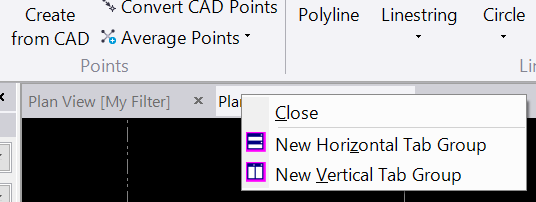
All text in the context menu is very large (see screenshots). Not a big bug, just seemed out of place.
Display: 4K monitor, Scaling = 150%, 2 monitors (only using 4K monitor)
Version found: v5.40, v5.40.1
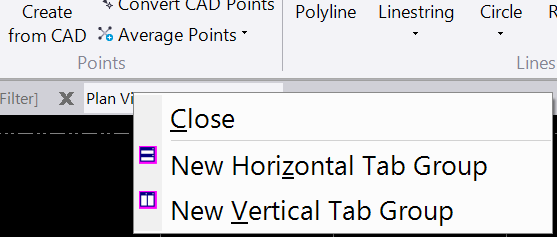
In TBC v5.31, the text is the same size as the ribbon text.
------------------------------
Quan Mueller
Revenant Solutions - TML Development
------------------------------