Trimble Business Center

 View Only

 Help with subgrade surface offset problem

Ben Wall's profile image
Ben Wall posted 12-17-2021 10:08
I've built an earthwork model and have used site regions to offset my finished surface to subgrade surface, but now I see spots where the subgrade surface dips down more than it should.  See screenshots below.  The finished surface is smooth and should be offset 11" down to subgrade but I'm getting a pie wedge shape dropping down an additional 10" below the bottom of subgrade. 

I'm not seeing any line work that could be causing it.  I've already tried deleting the subgrade surface and letting TBC rebuild it.  Did not work.

This is big enough to be picked up by our machine controllers so it needs to be fixed before I send it to the field.  Any help would be greatly appreciated.  

Francisco Guerrero's profile image
Francisco Guerrero
Possibly densify the surfaces and/or make them alignment base.  Setting in the surface properties.
Ronny Schneider's profile image
Ronny Schneider
You mean "Site Improvements"? They can be a real pain to debug.
You have to absolutely make sure that your outlines don't cross each other. If you have two outlines side by side, touching each other, every single node must be identical.
Also, make sure that the outline is not along a step in the FSL surface, i.e. a pavement step.
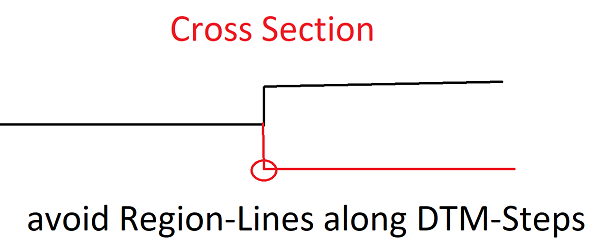
In that case offset them a few millimeters towards the alignment. In tight corners you have to make sure the outline doesn't cross the near vertical step triangles of the original surface.