Trimble Business Center

 View Only

 Elevating Text

Karen Anne De Guzman's profile image
Karen Anne De Guzman posted 06-30-2021 10:49
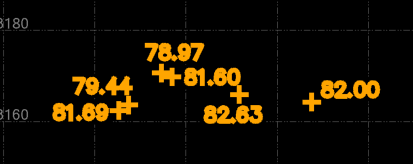
I'm just taking my chances here to see if it's possible, but is there a way to apply the written elevation on the text to the multiline text entity and elevate it? See example below.
If not, it would be nice to have the ability to do this. ;)

Gary Lantaff's profile image
Gary Lantaff
You don't need to elevate the text. The elevation is extracted from the string. If you are in an elevation control, you can "pick" the text object and it will extract the elevation from the string.
Karen Anne De Guzman's profile image
Karen Anne De Guzman
@Gary Lantaff


I am not quite following you but so I created my points from the block associated with the elevation text from the provided CAD file. It only generates the correct location but not sure what to do to easily elevate them based on the text. 

Gary Lantaff's profile image
Gary Lantaff
Oh, the text is inside a block. Could you attach the DXF the had the blocks?
Karen Anne De Guzman's profile image
Karen Anne De Guzman
@Gary Lantaff  I've attached the DWG. My goal is to create elevated points out of the spot elevation blocks. ​
Attachment  View in library
Gary Lantaff's profile image
Gary Lantaff
In this file the text is not part of the block. so you have a block to show the location and a piece of text to display the elevation. In this case, both the blocks and the text is on the same layer. Just use the "CreatePointsFromSpotElevations" command. I think that this does exactly what you want.

Please note that this file has some areas where the "nearest" text is not the correct one. You will need to check the points elevation in these areas. If needed, just use properties on the points and then select the correct text object for the elevation.