I'm assuming you figure out to go to Project Explorer > Imported Files > [your job file], and then change the "Point ID" in properties for each Station Setup entry?
Afterwards, I think you just need to go into the Backbearing and make sure your vectors are enabled. See below... I know you might've done some of this already but just to be sure I'm going through what I think is the correct resolution from step 1. Sorry for my messy screenshots, just wanted to remove some PII.
Locate & select the offending Station Setup entry(ies):
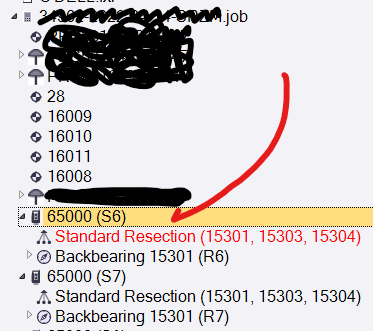
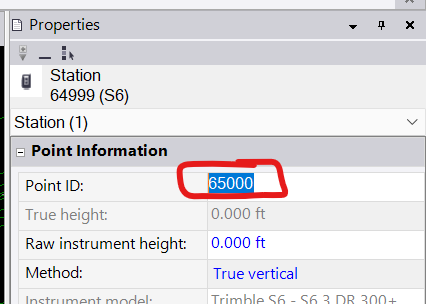
Change the "Point ID" field in Properties to something unique:
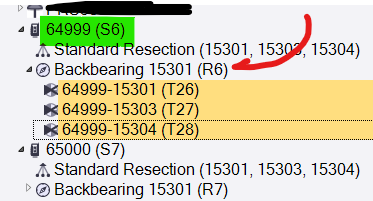
Then select the sideshots under the subordinate "Backbearing" entry(ies):
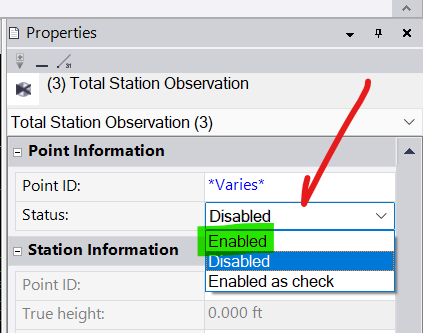
...and make sure they're "Enabled":
...and then recompute.
For me, after doing this, my identically named resection popped up in its own place.
Some additional notes/considerations:
- Resections are dependent on established points, obviously. So make sure those points have computed positions before getting too far into this.
- One resection might depend on the computed coordinates from another resection. Be careful that about the order in which you enable them, but also just know that you might have to make things worse before they get better (i.e. as you run through this things might appear more broken, or more flags might get generated, but it's best to persevere and see if it gets better as more things begin to come online).
- Be on the lookout for additional point ID mixup issues. For example, punching in the wrong point ID for one or more resect points, resulting in a failed resection. We all have those days...
- If you get into a situation where things are giving you a lot of grief, try to get at least some things working properly (that you can visually/technically confirm are in the correct location) and then "fix" those coordinates by right clicking on a point and selecting "Add Coordinate", then accept the default N/E/Z but change the coordinate type to Control Quality. This will make sure known good points don't get screwed up by subsequent bad data, and it helps a lot when sorting things out. Just don't forget to come back later and pull those coordinates back out so the project can become "elastic" again and adjust itself to fit all of your (now corrected) observations!
Good luck!