Trimble Business Center

 View Only

 Dini DAT File Import into TBC

  •   TBC-General
  •   TBC-Import_from_Trimble_Geospatial
Graham Spitzer's profile image
Graham Spitzer posted 06-29-2021 14:03

Hello, 

I get an import error from TBC with some DAT files from my Dini level. I can open the file no problem in Notepad, but when imported to TBC all the data shows up in the 'Bad Runs' area.

The error seems to come up when I have multiple runs or 'Lines' when line leveling using the Dini.

Any help or suggestions would be greatly appreciated!
James McWha's profile image
James McWha
I'd really need to see the DiNi Dat file in order to work out what the problem is. If you can please post a link to the file here.
Alternatively if you contact your dealer they may be able to help, and if they can't they can pass it on to Trimble Support
Graham Spitzer's profile image
Graham Spitzer
Thanks James, I think I figured out my issue. For some reason the Dini I am using sometimes doesn't record changes from NORMAL rod to INVERTED rod when measuring intermediate sites during line leveling.
I had to manually edit my DAT file to include 'TO Normal rod' lines where they were missing in the RAW DAT file from the Dini.
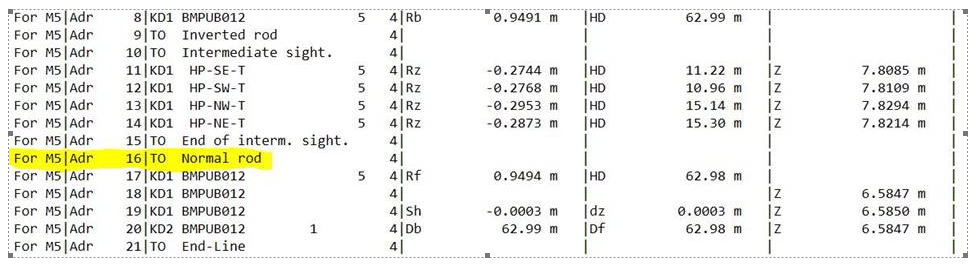

Is there a specific order I should be selecting 'Intermediate Sites' and 'Inverted Rod' in the Dini when I a leveling? I am thinking maybe I should update the firmware of the unit. 

Any ideas of what is going on?

Thanks.
James McWha's profile image
James McWha
Hi Graham
This is a known issue with the DiNi. It has been reported to development, however there is no fix yet. When you have finished the inverted measurement you need to set the Rod method back to Normal (i.e. set Invert Rod to No). Updating the firmware will not fix the issue.