Thats good to hear you cleared it up. Too bad they just don't tell you what the error actually is... Just some random info.
I use TBC 10+ hours a day 5+ days a week. I'm on a fresh install of Windows and clean install of TBC. I get random errors all day long. If I submitted my errors to Devs it would be pages long. I've submitted two tickets to my dealer and neither have ever been resolved. I just learn to deal with the errors and work around them.
Edit: One I just got this morning... Brand new project. All I did was add a coordinate system. Two gnss points, import a PDF. try to measure a distance. ALL DAY LONG.
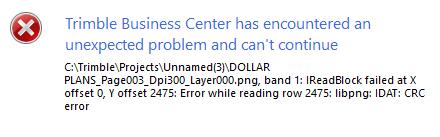
Exception Count 1
Exception Source gdal_csharp
Exception Type System.ApplicationException
Exception Message CTrimbleProjectsUnnamed(3)DOLLAR PLANS_Page003_Dpi300_Layer000.png, band 1 IReadBlock failed at X offset 0, Y offset 2475 Error while reading row 2475 libpng IDAT CRC error
Exception Target Site ReadRaster
---- Stack Trace ----
OSGeo.GDAL.Band.ReadRaster(Int32 xOff, Int32 yOff, Int32 xSize, Int32 ySize, IntPtr buffer, Int32 buf_xSize, Int32 buf_ySize, DataType buf_type, Int32 pixelSpace, Int32 lineSpace)
gdal_csharp.DLL N 00213
Trimble.Vce.GE.Imaging.Gdal.TextureSourceGdal.蚽(Band[] A_0, Int32 A_1, IntPtr A_2, Rectangle A_3)
Trimble.Vce.GE.Imaging.Gdal.DLL N 00235
Trimble.Vce.GE.Imaging.Gdal.TextureSourceGdal.GetBytes(IntPtr buffer, Rectangle textureCoordinatesPixels)
Trimble.Vce.GE.Imaging.Gdal.DLL N 00096
Trimble.Vce.GE.Base.Imaging.Texture.GetBytes(IntPtr buffer)
Trimble.Vce.GE.Base.DLL N 00083
Trimble.Vce.GE.Core.Imaging.TextureLoaderDefault`2.GetTexturePixels(IDelayedResource`2 texture)
Trimble.Vce.GE.Core.DLL N 00310
Trimble.Vce.GE.Core.Imaging.TextureLoaderParallel`2.喗(IDelayedResource`2 A_0)
Trimble.Vce.GE.Core.DLL N 00437
Trimble.Vce.GE.Core.Imaging.TextureLoaderParallel`2.嚲()
Trimble.Vce.GE.Core.DLL N 00117
System.Threading.ExecutionContext.RunInternal(ExecutionContext executionContext, ContextCallback callback, Object state, Boolean preserveSyncCtx)
mscorlib.dll N 00370
System.Threading.ExecutionContext.Run(ExecutionContext executionContext, ContextCallback callback, Object state, Boolean preserveSyncCtx)
mscorlib.dll N 00021
System.Threading.ExecutionContext.Run(ExecutionContext executionContext, ContextCallback callback, Object state)
mscorlib.dll N 00085
System.Threading.ThreadHelper.ThreadStart()
mscorlib.dll N 00085
Edit 2: Another one since the first
Had an image georeferenced to import PDF line work, deleted line work and ended up placing image to a scale because the first images scale is wrong.
Exception Count: 1
Exception Source: Trimble.Vce.GE.Base
Exception Type: System.NullReferenceException
Exception Message: Object reference not set to an instance of an object.
Exception Target Site: 뀁
---- Stack Trace ----
Trimble.Vce.GE.Base.Imaging.GeoreferencedImageRenderer.뀁(GeoreferencedImageRenderData A_0)
Trimble.Vce.GE.Base.DLL : N 00191
Trimble.Vce.GE.Base.Imaging.GeoreferencedImageRenderer.꿢(꿢 A_0, GeoreferencedImageRenderer A_1, GeoreferencedImageRenderData A_2)
Trimble.Vce.GE.Base.DLL : N 00238
Trimble.Vce.GE.Base.Imaging.뀁.뀿(꿢 A_0)
Trimble.Vce.GE.Base.DLL : N 00070
Trimble.Vce.GE.Base.PrimitiveProviders.꿢.뀠()
Trimble.Vce.GE.Base.DLL : N 00030
.꿢.꿢(Dictionary`2 A_0, 꿢 A_1, Func`1 A_2)
Trimble.Vce.GE.Base.DLL : N 00067
Trimble.Vce.GE.Base.PrimitiveProviders.PrimitiveProvider`2.GetPrimitives(TRenderDecider1 renderDecider1)
Trimble.Vce.GE.Base.DLL : N 00462
Trimble.Vce.GE.Base.PrimitiveProviders.PrimitiveProvider`2.GetPrimitives()
Trimble.Vce.GE.Base.DLL : N 00080
.꿢.꿢(꿢 A_0, IRenderEventHandler`2 A_1, Func`1 A_2)
Trimble.Vce.GE.Base.DLL : N 00330
Trimble.Vce.GE.Base.PrimitiveProviders.PrimitiveProvider`2.꿢(TRenderEvent1 A_0)
Trimble.Vce.GE.Base.DLL : N 00129
Trimble.Vce.GraphicsEngineHoops.GE.RenderEventManager`1.SyncRelease(TRenderEvent renderEvent)
Trimble.Vce.Hoops.DLL : N 00266
Trimble.Vce.GraphicsEngineHoops.GE.RenderEventManager`1.TrySyncRelease()
Trimble.Vce.Hoops.DLL : N 00129
Trimble.Vce.GraphicsEngineHoops.GE.CameraCache.Sync()
Trimble.Vce.Hoops.DLL : N 00350
Trimble.Vce.UI.HoopsControls.HoopsPlanView.FireWindowViewChangedEvent(Boolean SendModifiedEvent)
Trimble.Vce.Hoops.DLL : N 00916
Trimble.Vce.GraphicsEngineHoops.BaseOperator.OnMouseWheel(HEventInfo hevent)
Trimble.Vce.Hoops.DLL : N 12568
Trimble.Vce.GraphicsEngineHoops.SelectionOperator.OnMouseWheel(HEventInfo hevent)
Trimble.Vce.Hoops.DLL : N 00184
Trimble.Vce.UI.HoopsControls.HoopsPlanView.ForwardMouseWheel(IMouseEventArgsAdapter e)
Trimble.Vce.Hoops.DLL : N 00260
Trimble.Vce.UI.Hoops.Hoops2dView.ForwardWheelEvent(Control sender, IMouseEventArgsAdapter e)
Trimble.Vce.UI.Hoops.DLL : N 00026
Trimble.Vce.UI.MainFormBase.PreFilterMessage(Message& m)
Trimble.Vce.UI.Client.DLL : N 09049
System.Windows.Forms.ThreadContext.ProcessFilters(MSG& msg, Boolean& modified)
System.Windows.Forms.dll : N 00198
System.Windows.Forms.ThreadContext.PreTranslateMessage(MSG& msg)
System.Windows.Forms.dll : N 00073
System.Windows.Forms.ComponentManager.System.Windows.Forms.UnsafeNativeMethods.IMsoComponentManager.FPushMessageLoop(IntPtr dwComponentID, Int32 reason, Int32 pvLoopData)
System.Windows.Forms.dll : N 00799
System.Windows.Forms.ThreadContext.RunMessageLoopInner(Int32 reason, ApplicationContext context)
System.Windows.Forms.dll : N 00454
System.Windows.Forms.ThreadContext.RunMessageLoop(Int32 reason, ApplicationContext context)
System.Windows.Forms.dll : N 00081
Trimble.Vce.UI.UIManager.ProgramCommon.CommonMain(IProductInfo productInfo, String[] args)
Trimble.Vce.UI.UIManager.DLL : N 01047
Trimble.Vce.UI.TBCExe.Program.CodeAccessSecurityIsolatedMain(String[] args)
TrimbleBusinessCenter.exe : N 00115
Trimble.Vce.UI.TBCExe.Program.Main(String[] args)
TrimbleBusinessCenter.exe : N 00031