Trimble Business Center

 View Only
Expand all | Collapse all

Using Number Codes

  • 1.  Using Number Codes

    Posted 10-16-2020 19:10

    Hello,

    I am a new Trimble Access user..

    So far I was using Survey Pro on Ranger. I've already figured out how to make Featured Library and it is working.  

    In Survey Pro, I have number codes that will be convert to descriptions.

    Is there anyway to do the same in Trimble Access. 


    Thank you

    Farzin


  • 2.  Re: Using Number Codes

    Posted 10-19-2020 14:10

    Hi Farzin,

    You can continue using the number codes in TA. 

    Rui


  • 3.  Re: Using Number Codes

    Posted 10-19-2020 15:58

    Hi Rui,

    On the Featured Code, all I see is the space for Featured Code and Description. I tried entering numbers n the Featured Code, but when I store the Topo Shots, the numbers don't convert to the Description. Am I missing something.


    Thanks


  • 4.  Re: Using Number Codes

    Posted 10-22-2020 10:47

    Farzin,

    If you have build out everything in the feature library then it should carry over to TBC. 

    I have used 1 for start and 10 for a building line and 2 for close. So to start a building line my code is 10 1. I then continue to draw the building with just using 10 for points 2 and 3. I then close the building by coding 10 2.
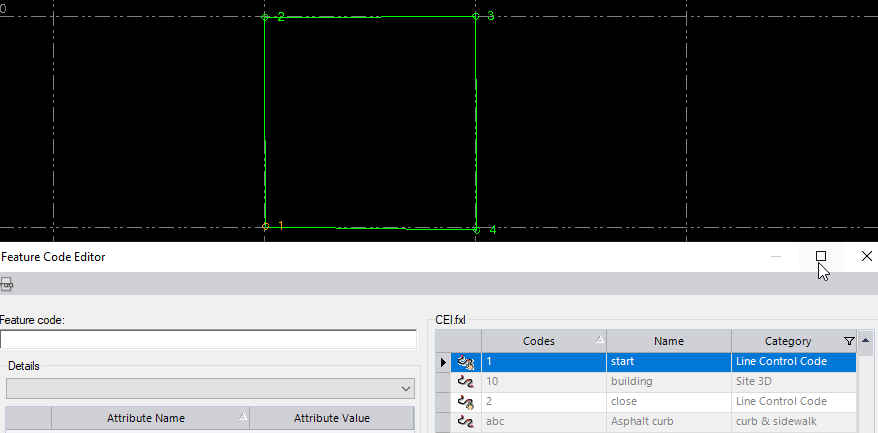
     

    Are you using the feature library inside TBC or the stand alone program? You can create and edit there.
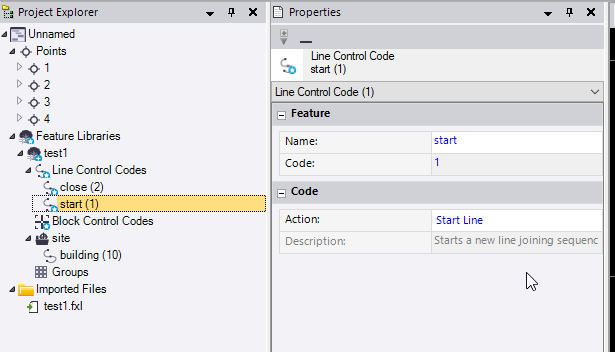
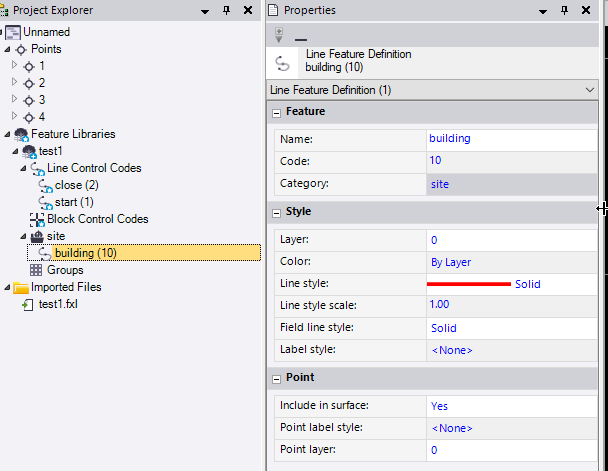
     

    It could also be your import settings. 

    I don't use the description tab unless I'm using attributes.


  • 5.  Re: Using Number Codes

    Posted 10-25-2020 15:35

    Hi Rui,Finally I figured out, and it is working for me.

    Thank you for your help best regardsFarzin


    Sent from Yahoo Mail for iPhone