I just had a look at your DXF. It contains 3DFaces, which you can easily use to create a surface.
Then select the surface and open the properties of it.
Change the "Maximum Edge Length" to something small, smaller then that gap in your triangles I showed you above.
I used now 0.0001. Small "Maximum Edge Length" don't always work as expected, but in this case it does.

Now you can also use the Surface "Edge Breakline" properly, and manipulate it, to create an inner/outer continuous line if necessary.
To be able to run macros you need at least a "Survey Advanced" licence of TBC.
If you have that, then you should install the TMLStatus from Rockpile Solutions.
Home - Rockpile Solutions
They sell own macro solutions but also keep the Trimble ones up to date.
Here is a list which ones are available right now. The Trimble ones are at the bottom of that list.
https://www.rockpilesolutions.com/TML/List
You have to install TMLStatus then run TBC and you'll have additional tabs in.

Run the TML Status Macro. It will ask you for your Trimble ID, use the one from this forum.
Then you can select which macros to install or update. Unfortunately they have removed the column "Licenced". Now you have to select manually which ones you can use free of charge. But you can also download all of them, they just won't run.
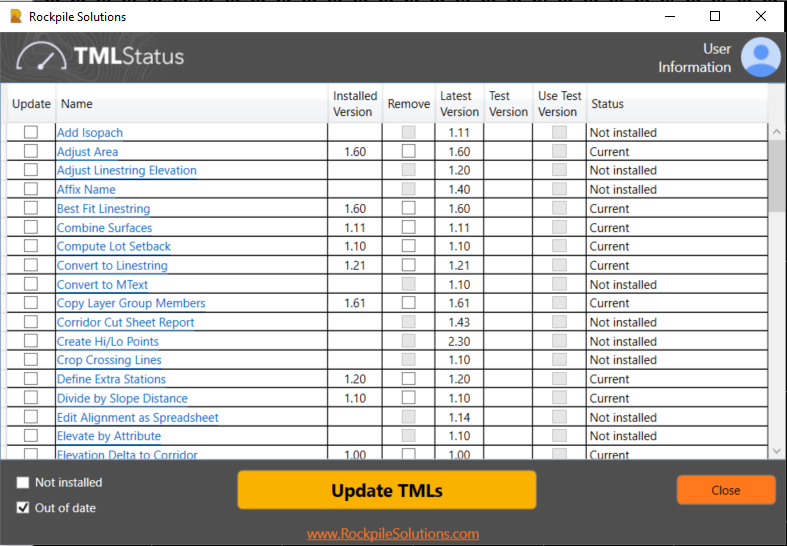
Restart TBC after downloading/installing new macros.