Hello Tyler,
This too annoyed me at first but I did find out some time ago that it is very possible to simply add the externally created surface (LandXML, TTM, ect) to the "Original Ground" as a surface member.
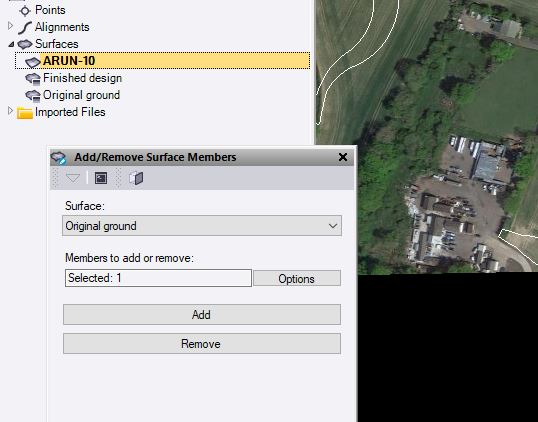
I use this workflow all the time, often I create my original ground surface in a separate TBC project to keep things clean (Often the topo survey has 1000s of layers) and then export it as a .VCL and assign it to original ground in my take-off project.
The attached screenshot shows a surface that came straight from Bentley OpenRoads (as a LandXML), I simply add it as a surface member to the "Original Ground" surface and then click "Build Surfaces". This copies the LandXML to the OG surface and you can go from there (topsoil, strata, in ground demo, ect).
I hope that solves your problem, let me know if you need any additional guidance on it.
Cheers
Sam
------------------------------
Sam Williams
------------------------------
Original Message:
Sent: 04-27-2022 15:42
From: Tyler Lindsay
Subject: Re: Pre Build Takeoff Surfaces
Nearly four years later, is it yet possible to use an imported TIN surface as a reference surface for site takeoffs?
It can be very cumbersome to explode a high-detail EG surface into individual lines (DXF faces) and re-import the result. Exporting a large EG surface into points and breaklines doesn't always yield a desirable or usable result. On the other hand, I'm not interested in losing original data by creating quick contours as a workaround. I would much prefer to just use the engineer's original surface and classify or layer it according to my needs.
Along these lines, it would also be exceedingly useful to be able to edit imported surfaces within Business Center; i.e. edit an imported surface node-by-node, like is possible in Civil3D.
------------------------------
Tyler Lindsay
Original Message:
Sent: 08-28-2018 14:38
From: Alan Sharp
Subject: Re: Pre Build Takeoff Surfaces
Thanks Erik - this is a way to do this - I agree that this could be easier - if the imported surface is made up from Points and Lines then you can use Add / Remove Surface Members to a Takeoff Surface (like Original ground) after the Takeoff surface has been created. That means as a minimum your Takeoff surface has to have one Layer Categorized but it doesn't have to contain any data. Once created it is like any other surface model, you can Add / Remove Surface Members to it and even though those objects may be on layers that are not categorized as Original for Takeoff, the objects will be added and can be used to form the surface. However you cannot do this with a TIN Surface and add the TIN to a Takeoff Surface - it needs to have source Lines and Points to do that at this time.
Note Point Clouds are the same - Point Clouds and Point Cloud Regions do not have a Layer Property, however once your Takeoff Surface has been created (even if it is empty), you can select a Point Cloud Region(s) and add it to the Takeoff Surface and it will then be used in every rebuild of the Takeoff surface thereafter. As it is added we use the Support - Options - Point Clouds settings to control how many points of the Point Cloud region will get added - if your setting for Max Points in a Surface is set to 100,000 then we will add 100,000 points to your Original Ground Takeoff surface through adding the Point Cloud. This applies to each Point Cloud Region that you add one at a time. If you pick 3 point Cloud Regions and add them at the same time then we take 100,000 points total vs 300,000 points doing them one at a time.
Hope this helps
Alan