Trimble Business Center

 View Only
Expand all | Collapse all

Registration on regions instead of complete clouds

  • 1.  Registration on regions instead of complete clouds

    Posted 06-15-2020 00:47

    Is it possible to only use cloud regions when registering point clouds pairwise? That way, you can clean up the point clouds before registering others. Handy for removing moving objects (cranes, trucks, cars, people), or even when monitoring to delete parts that have "evolved".

    Or simply only register on a part of a building. Registration on a complete building (leaving all the PC's on) gives (numericaly) less overlap than on the only part that matters (turning some PC's off).

    It would give a better view on how accurate the registration is. 


  • 2.  Re: Registration on regions instead of complete clouds

    Posted 06-15-2020 17:34

    Hi Nico, this is possible in TBC, but I'm not sure if that's the best way to process the data. Imagine this scenario, you have several scan stations. The point clouds will be imported and sit on top of each other. When they enter TBC, they are all in the Default region. If you classify them altogether, the result would be very bad because building walls can all be tilted or misaligned. If you classify them one by one, that takes quite some time and the result can be bad as well, because one scan may only captures a small portion of a wall, and TBC doesn't know if it should be classified as a building or a tree trunk. Under this circumstance, it makes more sense to classify the point cloud after you align/register all of them.


    As for the registration accuracy, TBC doesn't get much influence from noise or ghosting points. It tries to use large chunk of planes to do the registration. Therefore, even if it's a busy road with cars in it, it doesn't impact the result. As for the overlap percentage, it's not very accurate in many cases. I would absolutely trust the visual inspection more than that value.  

    Let me know if this makes sense. Thank you.


  • 3.  Re: Registration on regions instead of complete clouds

    Posted 06-29-2020 03:05

    Thanks for the response, Rui.


    For the moment I'm trying to register some scans. In this case it's from a building "in progress". Some time ago I've made a scan of the building with the walls only partially covered in isulation. The second time around the walls were more covered and there was an extra floor on top. Despite that I have several good overlaps, TBC does some very strange things (OK, things I find strange). Clearly, in the registration it is hard not to mix the concrete wall with the insulation (not for me, but for TBC). I'll keep on looking.


  • 4.  Re: Registration on regions instead of complete clouds

    Posted 06-29-2020 09:54

    Nico,

    Try exporting your region to LAS/LAZ format, the re-import it into TBC. This would effectively import as its own scan and allow you to use the registration tool on it.


  • 5.  RE: Re: Registration on regions instead of complete clouds

    Posted 02-16-2024 13:25

    This should work. I had a situation where there were 3 houses surrounding by large mature trees. Did a number of scan stations, but TBC couldn't register them correctly. It was painfully obvious how the houses overlapped (at least the upper half of each house was in each scan) and I picked obvious registration pairs, but I think it was looking at the millions of leaves and pairing them instead, overriding my points. But I didn't think of classifying the homes alone, exporting then importing them, then registering the original scans on the imported house scans. Great idea - thanks.


    ------------------------------
    david silverman
    ------------------------------


  • 6.  Re: Registration on regions instead of complete clouds

    Posted 06-29-2020 17:11

    Hi Nico, since the condition has changed from your initial scan to the current scan, it could be challenging for TBC to see the "common" plane. You can assist TBC by manually picking point pairs from the true common planes, i.e., the partial wall covered in insulation in both scans. The point pairs don't need to be at corners or on edges, they just need to be roughly at the same location in the plane. 

    Below is a typical scenario. Usually we would think the pier wall would be a good choice. But they are not the same actually. One is scanned from the left side, one is from the right side. In your case, it would be one with insulation and one without. So I would pick a point from a common plane, even though it's smaller than the ideal wall.


  • 7.  RE: Re: Registration on regions instead of complete clouds

    Posted 09-08-2024 12:54

    I can imagine many cases where it would be desirable to tag some region of a scan to be ignored for alignment. For example while scanning on a harbor deck where a huge ship is docked. The hull in my case dominates the scene fo each scan but clearly provides unwanted constraint to the alignment. Most programs I've worked with, provide a way to either delete unwanted points or to tag as ignored before the cloud to cloud registration. How can I do that in TBC?


    ------------------------------
    José Rubio
    ------------------------------


  • 8.  RE: Re: Registration on regions instead of complete clouds

    Posted 09-10-2024 09:42

    Keep out/keep in and add to region. I think creating your own region for it is safer though in case you want to use the people you once ignored.


    ------------------------------
    Robert Hoy
    ------------------------------


  • 9.  RE: Re: Registration on regions instead of complete clouds

    Posted 09-13-2024 00:29

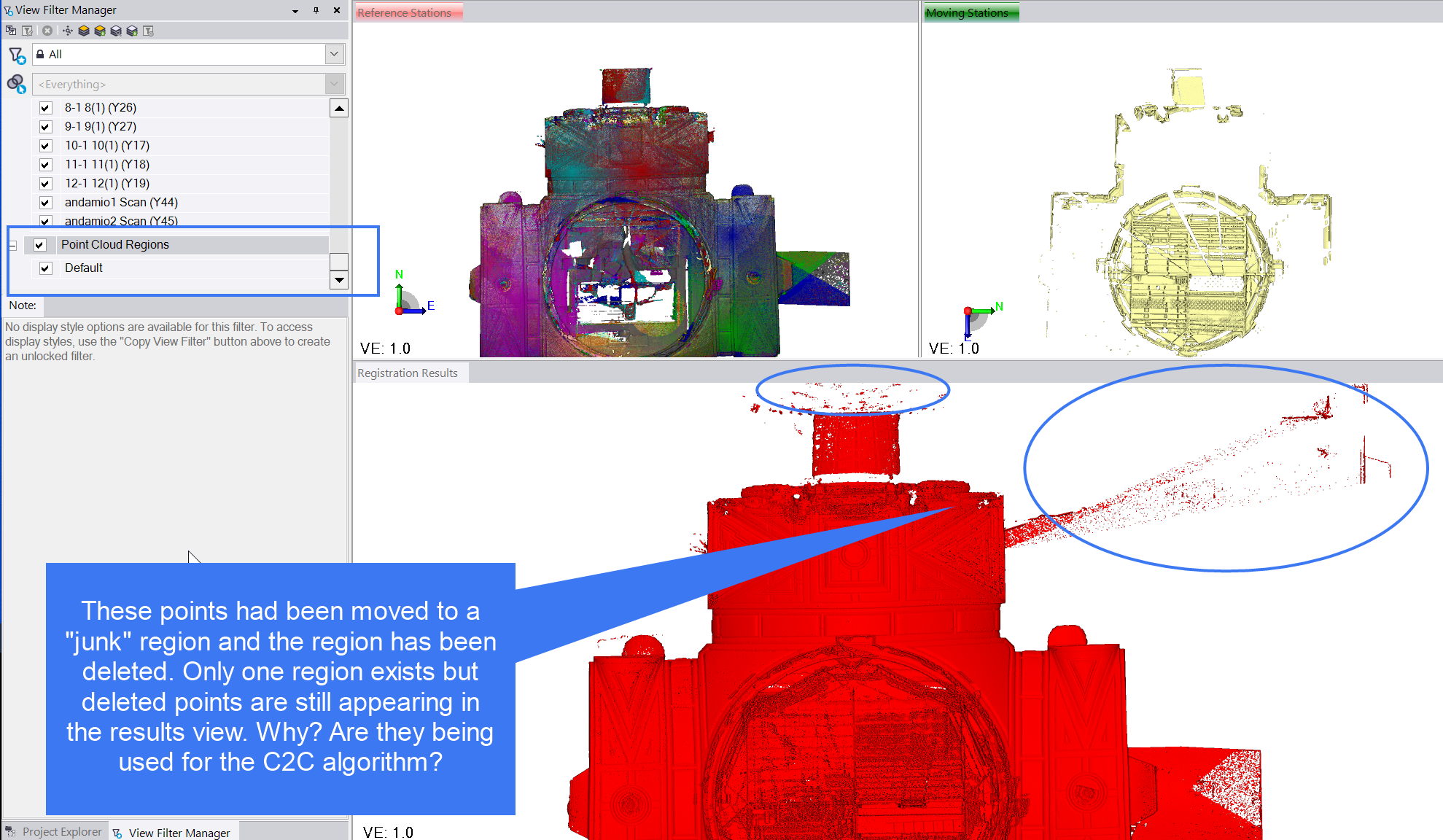
    Sounds like the way to do, BUT the points that I move to a "junk" region, even when I completely remove the region from the workspace, remain existing and visible in the cloud to cloud register interface as if they where still used for the cloud to cloud matching algorithm. Why can't we tell TBC to ignore a region for alignment as is common in other software tools.


    ------------------------------
    José Rubio
    ------------------------------


  • 10.  RE: Re: Registration on regions instead of complete clouds

    Posted 09-16-2024 07:42

    When registering the scans most software's I have used must use all of the points within the scan station because you are realigning all the data that is associated with that particular scan station. You can't move the orientation of a scan station without moving the orientation of the points associated with it. If you do not want to see a certain area of the scan during the registration process, I suggest using the "limit box" tool. 


    ------------------------------
    Brandon Elia
    ------------------------------


  • 11.  RE: Re: Registration on regions instead of complete clouds

    Posted 09-17-2024 00:56
    Edited by José Rubio 09-17-2024 00:57

    Thanks for your answer, Brandon, but as far as I know, limit boxes apply only to visualisation, and this is not what I need. What I wish is to exclude some parts of a scan from the cloud to cloud algoritm. Very often there are parts in a scan falling on moving elements, like cars, trucks etc that may cause bias in the alignment. Of course if they are only in one scan, they will not cause major problems, but what if a truck has just moved 4 cm from scan 1 to scan 2?
    Another very common case is when there are parts of a scan that are behind a glass or a mirror. They will come out in a wrong location due to refraction and or are reflections. You dont watn them to contaminate the scan alignment because they are not in the right position. All I want is to totally clean them or at least tag them to be ignored during alignment.

    Cyclone, which is possibly the most important competitor provides the ability to delete points excluding them from visualisation and/or from cloud to cloud algos.


    ------------------------------
    José Rubio
    ------------------------------