Trimble Business Center

 View Only
Expand all | Collapse all

Create Linestring start screen

  • 1.  Create Linestring start screen

    Posted 12-04-2019 15:54

    What do you all think about moving the Create Linestring start screen shown here to the following linestring creation screen similar to the other Create Points, Polyline, Circle and Rectangle commands do? It could also be made into a collapsible section or a detachable box so you don't have to restart the command to change layers or other settings. 


  • 2.  Re: Create Linestring start screen

    Posted 12-05-2019 11:42

    Hey Joe,


    While editing a linestring, you can open up the 'Properties' command (or press F11) and change these settings while in the second screen, then resume editing.


    The reason the menus are separate is because they are two different commands. The 'Create Linestring' command just defines the properties and the 'Edit Linestring' command is used to actually key in the coordinates.
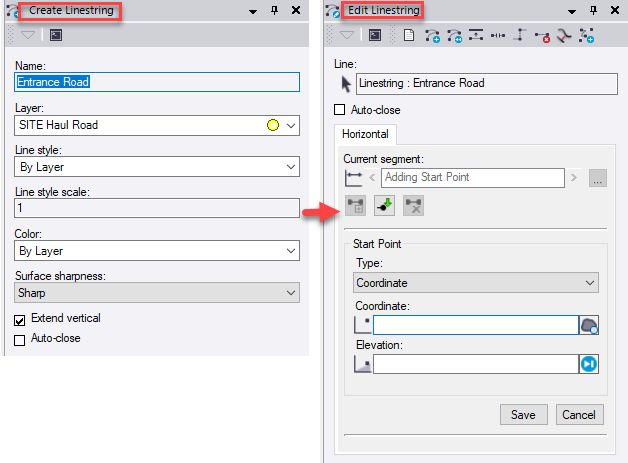
    It's a bit tricky to merge these windows into one, since we need a distinct command to edit linestrings (vs other objects such as polylines, circles, rectangles which don't require a separate 'Edit' command).


    -Josh