Trimble Business Center

 View Only
Expand all | Collapse all

TEMPLATE COPY AND PASTE PROBLEM

  • 1.  TEMPLATE COPY AND PASTE PROBLEM

    Posted 03-23-2020 09:54

    This is something I have been running into a lot of lately.  If you try to copy selected rows from a table to paste into another table for a template command the it doesn't come across clean or correct even though both tables are in the exact same format.  Here is an example of what I am talking about.  You can see that the slope ratio are just labeled with FT and the ratios are in the VC length.  One would think if you are copying rows from one table to another and as long as they are in the same format this should work.  I would like to see this get fixed since tables are a great way to reduce the number of templates required on a job.


    Thanks,


    Ben


  • 2.  Re: TEMPLATE COPY AND PASTE PROBLEM

    Posted 03-25-2020 06:52

    Ben

    I looked at this last night and it was working OK for me - here is a short video of what I am doing - maybe that will help


    If you are trying to copy a slope table that is a 3 column table into eg an Offset Table which is a 2 column Table that may well have a problem - if that is the case - paste into Excel and then copy the columns you want from Excel to the Offset Table .


  • 3.  Re: TEMPLATE COPY AND PASTE PROBLEM

    Posted 03-25-2020 07:28

    Alan,


    Yeah I was copy and pasting just like you did in your video with the one exception that all the VC length were 0.  I don’t know why it is doing what its doing.  One other thing, these are not shareable tables.  They are just tables I used to control a template for a special section.


    Thanks,


    Ben


  • 4.  Re: TEMPLATE COPY AND PASTE PROBLEM

    Posted 03-25-2020 17:01

    What’s with this lane edge, shoulder stuff?  It is really messing with my instructions to the point it over rides the and I have no idea why. These are major horizontal shifts and shoulder rollover changes. I need help bad.


    Ben Ryschon

    Paul Reed Construction

    308-631-3712


  • 5.  Re: TEMPLATE COPY AND PASTE PROBLEM

    Posted 03-25-2020 17:07

    Are you using Intersection Modeling Tools, if not then do not use the Lane

    Edge and Shoulder stuff - that only applies to the Intersection Tools.


    I can maybe help tomorrow?


    Alan


    On Wed, Mar 25, 2020 at 6:01 PM benr@paulreedconstruction.com <


  • 6.  Re: TEMPLATE COPY AND PASTE PROBLEM

    Posted 03-25-2020 17:13

    No I am not using any of those tools


    Ben Ryschon

    Paul Reed Construction

    308-631-3712


  • 7.  Re: TEMPLATE COPY AND PASTE PROBLEM

    Posted 03-25-2020 17:25

    Then leave Lane and Shoulder set to None - These affect how transitions

    from Corridor to Intersection Work and are not used anywhere else.


    Alan


    On Wed, Mar 25, 2020 at 6:13 PM benr@paulreedconstruction.com <


  • 8.  Re: TEMPLATE COPY AND PASTE PROBLEM

    Posted 03-25-2020 17:41

    I will go through and make sure I am not using any of them. But right at the beginning of I had a node just taking off and I couldn’t stop it unless I gave it a lane designation. I found it very odd. I totally over rode what my instruction was telling it to do. Are those designation global to the corridor?  Meaning if node 50 is a lane and somewhere down the road and in a different template that node is now a ditch or shoulder does it change it across all templates?


    Ben Ryschon

    Paul Reed Construction

    308-631-3712


  • 9.  Re: TEMPLATE COPY AND PASTE PROBLEM

    Posted 03-25-2020 18:26

    Sounds like you were having a Template Transition issue Ben, I dont think

    the Lane and Shoulder setting would have the effect that you are seeing


    On Wed, Mar 25, 2020 at 6:42 PM benr@paulreedconstruction.com <


  • 10.  Re: TEMPLATE COPY AND PASTE PROBLEM

    Posted 03-26-2020 09:32

    Alan,


    I think I got it fixed for now.  I made sure none of my templates instructions had anything assigned to them.  However, I must be missing something when it comes to template transitions.  I was under the impression the templates didn’t transition from one to the next.  I found my self having to force instructions to follow 2D lines just so the cross slope would work.  That seems weird.  I also used the connect command to tie the two foreslope toes in my median and once I deleted it things seemed to work better.


    Ben


  • 11.  Re: TEMPLATE COPY AND PASTE PROBLEM

    Posted 03-26-2020 11:40

    Templates do and will transition. I avoid using multiple templates without

    putting a Null between them so as to stop them transitioning.Itransition

    everything with tables and where possible I only build one template.


    Alan


    On Thu, Mar 26, 2020 at 10:32 AM benr@paulreedconstruction.com <


  • 12.  Re: TEMPLATE COPY AND PASTE PROBLEM

    Posted 03-26-2020 05:08

    Hi @Ben Ryschon and @Alan Sharp


    I have the same issues as Ben and even if i try your way in the video above Alan I get the same results.


    I work in meters and it seems all stations for me that are rounded out, no decimeters, centimeters or millimeters (0/000.000, 0/050.000, 0/100.000) work but when I have decimal numbers all these numbers transfers to the slope column and my slope transfers into the VC length column. So if I have something in the decimals that gets moved to the next colon (behaving like a *.csv file that is commabased)

    I tried using excel spreedsheets but keep getting the same results.

    Could this also be something with the OS settings? The sign for comma could be , or . depending on where you work in the world and how your computer settings are configured.


    An example in TBC when you want to write a coordinate say N10000 E10000

    For me in Northern Europe we Write it in TBC like this 10000;10000 (semi colon)

    And in the US, correct me if I'm wrong, you write it like this 10000,10000 (colon)

     Below I made 2 quick examples when using excel spreedsheets to bring into TBC in table format

    Example 1 (excel to TBC)
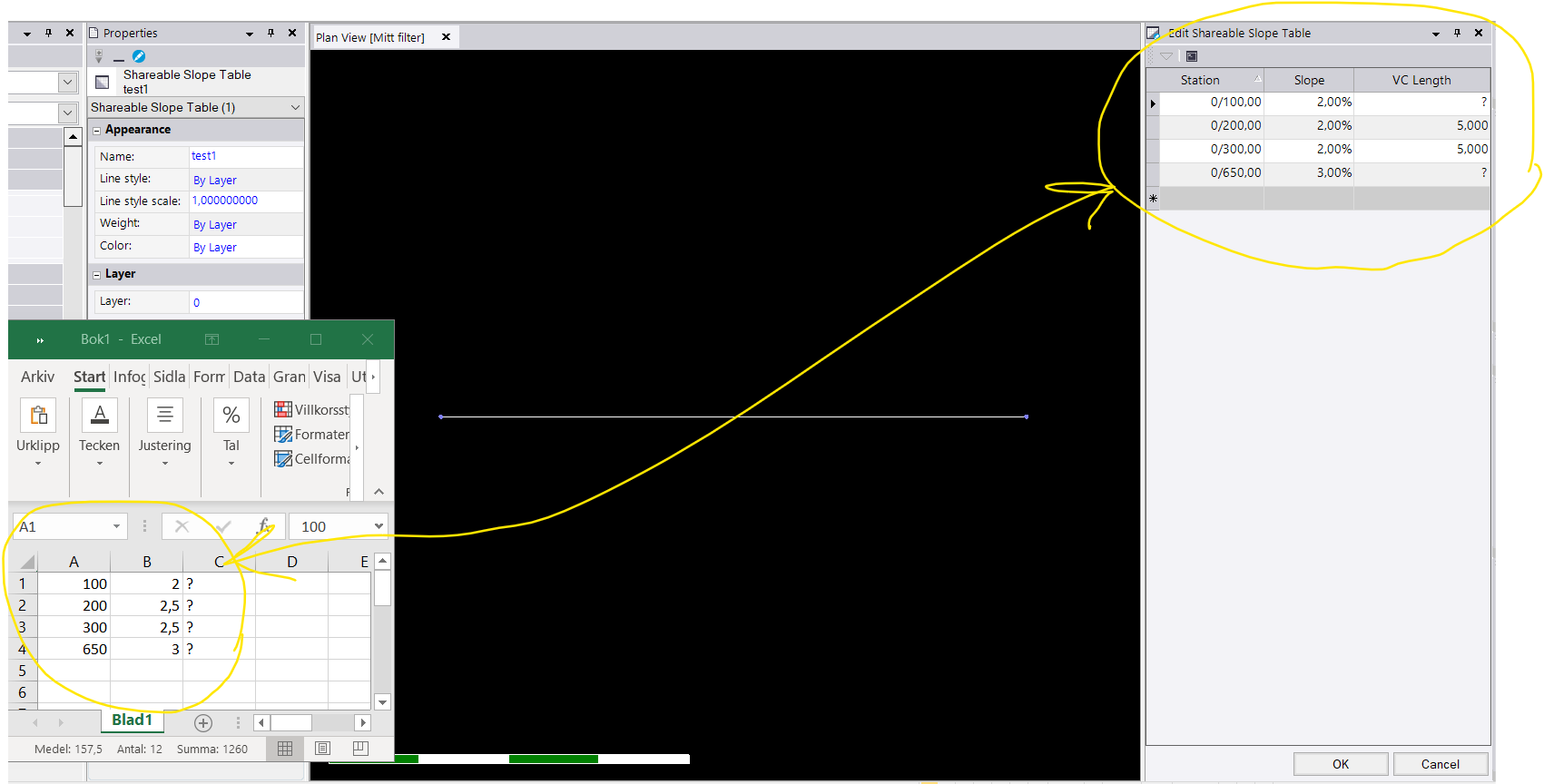
     

    Exmaple 2 (excel to TBC)
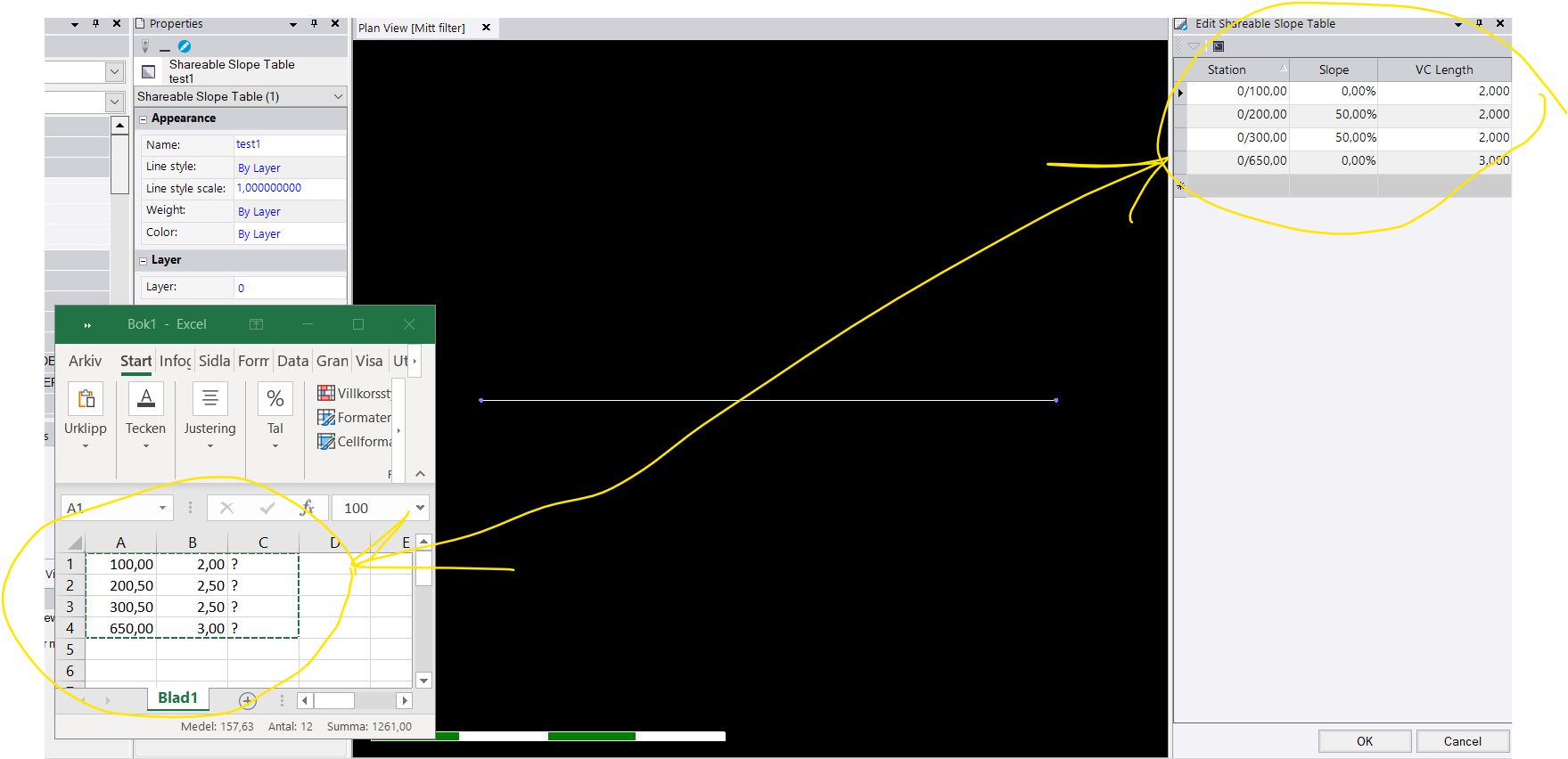
     

    Hope the TBC guys can get this sorted so I can start using tables, right now it's all manually typing in stations, slopes etc.