Trimble Business Center

 View Only
Expand all | Collapse all

Assigning designs to specific Earthworks Machines?

  • 1.  Assigning designs to specific Earthworks Machines?

    Posted 10-18-2018 06:21

    Hi all,


    Wondering if anyone could help me with this.


    I have a large residential project with a growing number of separate designs, all still relevant so can't be deleted.


    I have 10 earthworks machines working off of different designs and was wondering if there was a way to assign the designs to specific machines the same way you can to the field controllers.


    At present I'm struggling as I'm not sure how to create identities for each of the earthworks machines or if it is even possible.


    I get the feeling it has something to do with this screen, but am unsure how to do it.


    Any comments greatly appreciated.


  • 2.  Re: Assigning designs to specific Earthworks Machines?

    Posted 10-18-2018 11:10

    For the Earthworks System the dialog shown in your picture has zero impact - that applies to GCS900 and SiteVision Systems only. 


    Question - How are you getting data to the machines right now - Via a USB Stick or via TCC? If you are using TCC you currently have no choices at all - all machines get all project and all designs no matter what you do - appreciate that this is not what you likely want to happen. If you are using USB then there are some things you can do to manage this.


    The challenge with USB transfer however is that the USB stick has to have Project Library in the root folder of the USB Stick and then it has a list of Projects and the operator via the Earthworks Control Box can select which Projects they want on the control box after the transfer. There is a check box that when selected gives the operator the Project List and they can select which Project(s) they want to add. This means that if you want to do what you are asking - each machine has to be effectively setup as a Different Project i.e. the Project Names could be


    Site Name - Machine 1

    Site Name - Machine 2


    or


    Machine 1 - Site Name

    Machine 2 - Site Name


    This way you can create one Project Library, with different Projects for each machine and then only sync the ones that apply to the machine that you are loading.


    A second consideration is whether or not you have an SCS900 or Trimble Access or Siteworks or SitePulse device on site and also a GCS900 or SiteVision device on site. If yes that should not make a big difference in the workflow listed below - but I have not worked through all of the permutations here (so I hope I am not misleading you here


    I think the simplest approach is 


    1. Go through the creation of a Jobsite (eg Forum Test) and a Design (Design 1 and Design 2) in the normal way - if you have no SCS900 / SIteworks or GCS900 devices then you dont need to assign the SIte and Design to a Controller if Earthworks is the only destination
    2. In the Jobsite Manager - at the top of the dialog where it says Project Folder and there is a [Select] button - tap the Select Button. Select Type Folder and then Existing and Select Forum Test
    3. Now you can run the Publish to Library command and let it publish the Project / Site and all Designs to the Project Folder.
    4. Once you have a project in the Project Library - you can effectively make a copy of it somewhere on your PC using the Library to USB Drive command. Instead of sending it to a USB Drive, you can create a folder somewhere on your PC eg Desktop\USB STICK\
      1. Where the command asks you for the USB Flash Drive location - select e.g. \Desktop\USB STICK
      2. Make sure that your project Forum Test is selected
      3. Let it copy everything over (ie the Project and ALL Designs)


    You now have a couple of options


    Option 1 - Manual Copy, Paste, Rename, Delete

    1. Find the USB Stick folder and then browse down till you find the Projects List and the Project Called Forum Test
    2. You can rename the project Forum Test - All Designs
    3. Make a copy of the Project in the same location and name it Forum Test - Machine 1
    4. Find the \Office Data\Designs\ folder and then you can delete the designs that you don't want that machine to have
    5. Repeat steps 3 and 4 for each machine where you want different designs
    6. You can now take the USB Stick to any machine on site and when copying the data from the USB stick to the machine - just select the appropriate Project (Forum Test - All Designs or Forum Test - Machine 1 etc.


    Option 2

    1. Find the USB Stick folder and then browse down till you find the Projects List and the Project Called Forum Test
    2. You can rename the project Forum Test - All Designs
    3. In BC-HCE Run the Library to USB Drive command again. Send the data to e.g. Desktop\USB STICK\ again as before
    4. Where the command asks you for the USB Flash Drive location - select e.g. \Desktop\USB STICK
    5. Make sure that your project Forum Test is selected
    6. Select all the Project Data and ONLY the designs that you want for Machine 1
    7. Now go to the USB STICK folder and find the Project List and rename the Project Forum Test that you just wrote to Forum Test - Machine 1
    8. Repeat these steps for each machine required


    Neither option is great for what you are trying to do, but this will work to create the Projects List for the different machines on site. If you come back later and create an extra Design, that you want on certain machines only - write the design to one of the Projects (Forum test is likely best as the master) and then copy and paste the dsz file from the Designs folder to those Projects set up for each machine that needs the DSZ file.


    Sorry this is not easier


    Alan


  • 3.  Re: Assigning designs to specific Earthworks Machines?

    Posted 10-19-2018 00:06

    I am using the TCC as we currently have 13 machine control machines and it's not really a time efficient way to transfer them all by USB.


    Are there any plans to implement a feature where Earthworks machines can have an identity within TBC-HCE? Not sure if it would be able to interface/reference the devices tab on the TCC? It would be a very useful feature if it was implemented, at least for me.


    I have an engineer with  Siteworks on a T10 tablet on site that I can assign designs/work orders but cannot do the same with earthworks.


  • 4.  Re: Assigning designs to specific Earthworks Machines?

    Posted 10-19-2018 08:55

    The current TCC workflow only allows all Projects and All Designs to be transferred to All Earthworks Machines.


    Having said that - if you use WorkGroups for Project Segregation - when a Machine is on Project A you could have them assigned to WorkGroup A and then you could put a Project Folder in WorkGroup A for just the one project (I think this would work) but there is no way to stop all the machines in that Workgroup getting all the Designs other than doing what I explained yesterday.


    There is work going on today to make this better and easier - so at some point in the future it will be significantly better than today - but this is how they defined the work process for Earthworks in this first pass of support


    Sorry I cannot give better guidance around this


    I will take a look at the use of Work Groups today to see if that would assist


    Alan


  • 5.  Re: Assigning designs to specific Earthworks Machines?

    Posted 10-19-2018 10:52

    Matthew

    When running BC-HCE - as you create a Jobsite - in the top of that dialog you can select where you want to send the Sites / Designs for Earthworks machines - either send to your local PC or to TCC.


    If you select TCC then it creates a Filespace on TCC called Project Library. Then when you Publish to Library in BC-HCE it sends all the Sites, Designs for Earthworks to the Project Library on TCC. I just created a project called UK Test and then a Design called Design 1 and then published to TCC and this is what you get on TCC.
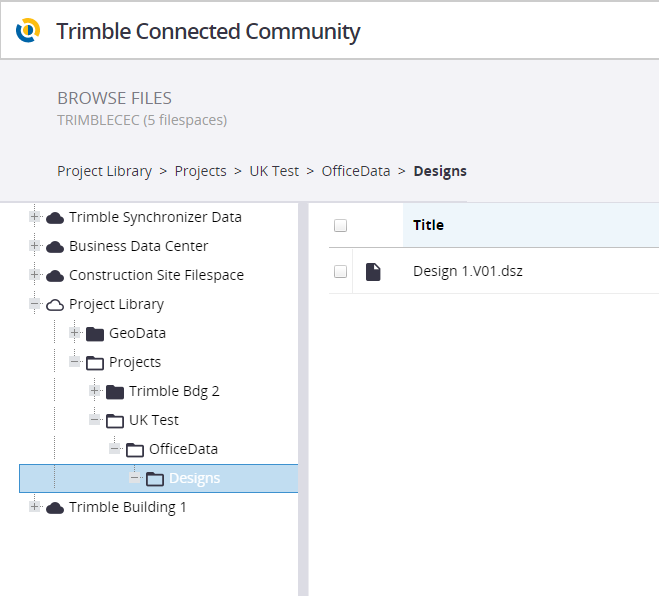


    As a partial solution to what you are trying to achieve - you could treat this Project as a Master and have all the Designs set up there on TCC. If your machines Sync then they will get All Projects and they will also get all the designs for all the projects. So no matter what you do here, you really cannot stop all your machines getting all the data - the best you could do would be to copy the folder system for the Project down and rename the Project as suggested yesterday to eg Machine 1 - UK Test, Machine 2 - UK Test etc. and then copy all of the project level data files to all machines, but only copy the designs that you want to the specific machine "Project". 


    That way - while all machines will get all the projects and all the designs, if they in Earthworks select the Correct Project (for their specific machine) then they will only get the designs in that project that you want them to have.


    I just copied the Site Folder system as shown below
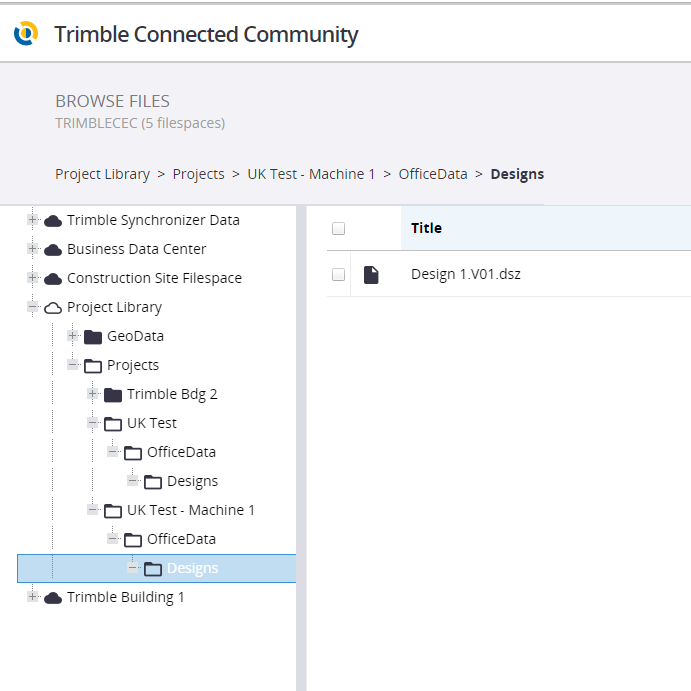


    So now when a Machine syncs, they will get two projects - but if they know they are Machine 1 then they could load that Project and then they would only have the designs that you give that particular project by Copy and Paste in TCC.


    While this will work for a few machines and a couple of projects - it likely will not scale to many projects and many machines. The team is well aware of the issue (based on (discussions this week) and there is work ongoing to make this better and faster for you as a manager.


    I guess watch this space Matt


    Hope this helps a bit at least in the interim period.


    Alan


  • 6.  Re: Assigning designs to specific Earthworks Machines?

    Posted 10-22-2018 06:02

    In the admin controls within Earthworks there is an option to select which TCC projects are synced so short term this could be a good option. Would be nice to get an option similar to that of rover controllers for Earthworks based machines in future if possible, but creating the file structure within the TCC and copy pasting individual designs is not an enormous amount more work.


    I'm thinking of labelling them either by driver name or fleet reference number, example:


    <Site Name> - Hitachi 36

    <Site Name> - John Doe


    Implementing the file structure would take some time, as there are a few floating machines, but once it's set up I can see this being a viable option.


    Also by using the TCC Explorer program I should be able to massively increase the speed I can create the file structure.


    Thanks for throwing ideas at me.


  • 7.  Re: Assigning designs to specific Earthworks Machines?

    Posted 11-14-2018 02:09

    Just thought I'd throw in a little update on this one.


    I took Alan Sharp's advice and used the 'Main' Project folder as a Master copy, from which I can cherry pick which designs to copy.


    The file structure ended up looking like this on the connected community website.


    I also use TCC Explorer which adds a TCC option to Windows Explorer, which I find is a much simpler way to organise the files, and within Windows Explorer it looks like this.


    Copying between folders is as simple as copy and paste in TCC Explorer and extremely user friendly.


    Within the actual Earthworks Machine backend, I set the project sync to only the appropriate driver, as I have labelled each of my TCC devices with fleet number and the operator.


    By selecting only the named project in the Operation menu, you can control which folders are synced with the machine. I found that this reduced a lot of confusion regarding which designs are meant for which operator and have generally heard good things back from site about this arrangement.