Trimble Business Center

 View Only
Expand all | Collapse all

Is it possible to use smart text to show the volume of a surface?

  • 1.  Is it possible to use smart text to show the volume of a surface?

    Posted 12-12-2018 08:12

    I am hoping to use smart text to cut down on the time it takes me to interrogate surfaces that I create for house foundations.


    I'm hoping that there might be an easier way than running a stockpile/depression report for every plot, as this takes a gargantuan amount of time.


    I use the stockpile/depression earthworks report after I have set up a trench model to clarify volumes of soil movement required on a per plot basis (as this is how we are paid).


    Is there a smart text command to extract depression volume from a surface at all?


  • 2.  Re: Is it possible to use smart text to show the volume of a surface?

    Posted 12-12-2018 08:40

    Yes there is a way to do this, however you need to have a Cut Fill Map for the Volume that you want to continually monitor - You have to have the Isopach or a Volume Grid that contains the Volume Information in order to do this. If you are looking for a Quick Update then I would use Volume Grid as the Volume Calcs / Isopach regeneration is much faster - you can always change the reference surface when you are ready to complete the project to a true surface to surface Cut Fill map, but while you are working using a Grid volume Calculation works faster.


    The enclosed Video shows how to do this using a surface to surface Cut Fill Map but the process is the same for the Volume Grid method.


    Hope this helps


    Alan


  • 3.  Re: Is it possible to use smart text to show the volume of a surface?

    Posted 12-12-2018 09:42

    This helps to streamline the process enormously, thank you.


    Following on from this is there a fast way to create multiple cut/fill maps from one reference surface.


    So I have created a "Reduced Dig" Surface at bottom of void below all of the plots, and using your null texture trick cut out the surface between the plots.


    I then have individual surfaces for all of the plot trenches, labelled by plot number.


    Is there a way to create separate Cut/Fill maps for each foundation without individually selecting each?


  • 4.  Re: Is it possible to use smart text to show the volume of a surface?

    Posted 12-12-2018 11:21

    Unfortunately not - this however raises an interesting enhancement request - to be able to label Volumes of a Master Cut Fill Map but based on Polygon Boundary so that you could label all these areas from one CF Map - Currently not possible but certainly doable.


    I will log it into the system as an enhancement request


    Alan


  • 5.  Re: Is it possible to use smart text to show the volume of a surface?

    Posted 12-13-2019 09:22

    Has the ability to label volumes of a master cut fill map based on a polygon boundary been created yet?  I would use this option often.  Or is there a way to create labels for areas of interest that list the cut, fill, and net?


  • 6.  Re: Is it possible to use smart text to show the volume of a surface?

    Posted 12-13-2019 19:40

    You can show the volume of an isopach which is the difference in volume between two surfaces - if one surface changes then the volume label updates automatically


    If you build a pad on an OG surface and do a vol between them then label the isopach - if you move the pad and the tie slopes update automatically and the volume label updates automatically - I will post a video early next week on this workflow for you


    Alan


    Sent from my iPhone


  • 7.  Re: Is it possible to use smart text to show the volume of a surface?

    Posted 12-16-2019 08:34

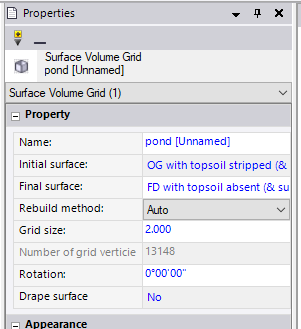
    When calculating multiple regions within two surfaces I recommend you use the "Grid Volume" command to calculate volumes between two surfaces and limit it to a boundary.  This creates a Grid Volume object that can then be labeled.  You can copy the following text into a text object to get all of the volume type properties.  You could also add other properties if desired.  As this type of label is smart, if you revise either of the surfaces the grid volume object will automatically update and the text will then reflect the new properties automatically.  It will also update if you change the boundary.  If you want the values to be static, then enter the text rather than use smart text codes.


    Note that cut/fill maps and surface volume grids have a property that allows you to turn off the automatic recalculation.  If you are making changes to the surfaces consider turning this off until done and then back on when complete.  That way you don't get an update with each change you make.


    Area of cut = @<OD,O,ac>@

    Area of fill = @<OD,O,af>@

    Area of zero volume = @<OD,O,az>@

    Depth to balance = @<OD,O,BD>@

    Cut volume = @<OD,O,vc>@

    Fill volume = @<OD,O,vf>@

    Net volume = @<OD,O,vn>@

    Initial surface = @<OD,O,nsi>@

    Final surface = @<OD,O,nsf>@

    tim