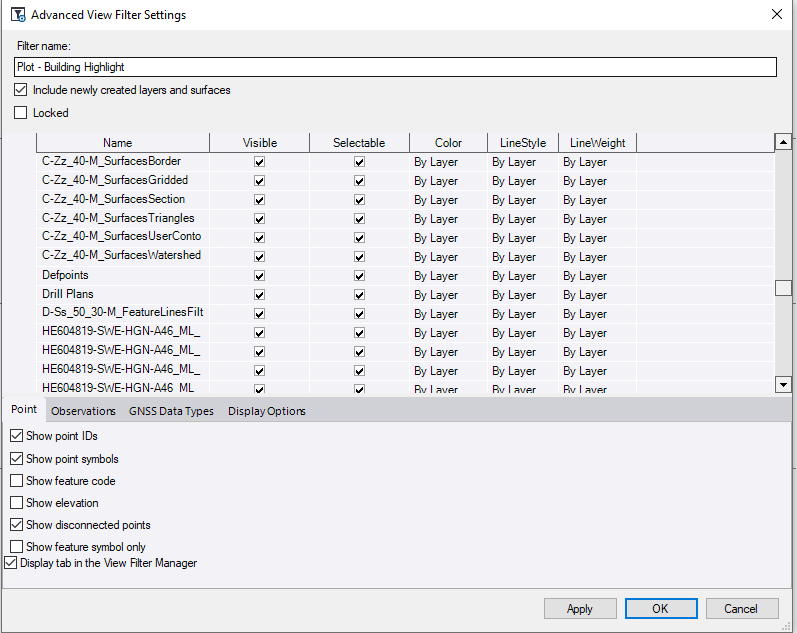
The idea of a View Filter Override is as follows.
Lets say that you have a project where all of the Layers have their defined Layer Colors, Linestyles and Lineweights etc. Now we have created objects on those layers and set the properties of those objects to "ByLayer" so that they inherit the Color, Linestyle and Lineweight of the layer that they are placed on.
Now I want to create a drawing where I want all of the linework to be drawn in Black with the exception of the data on the Buildings layer which I want to draw in Red and Bold Lineweight (0.8mm) for example to highlight the buildings on the drawings
So I create a View Filter called Plot Sheet - Building Highlight. I can now open the Advanced View Filter Settings dialog and in there we can now set the override Color, Linestyle and Lineweight in the Advanced settings for this specific View Filter - these will override the By Layer Settings for those layers that I change - so I can set all layers to Black Color and the Buildings layer to Red, I can set all Lineweights to 0.0mm and the buildings layer to 0.8 and I can set all linestyles to e.g. Solid apart from the Buildings Layer that may be Dashed. When I create my Plot Sheet - I can assign this View Filter and now I will get the all Black single weight lines apart from the bold Buildings layer linework which will be bold, red and dashed - but this only affects the drawing when this view filter is in play. It also affects the Plan or 3D views if you apply this View Filter.
This is the only way that I know we can change the way information is drawn in different views.