Fred
I think the way I would try to do this is as follows
1) In Plan View - for the surface in question, create a Contour (don't apply smoothing) at the Elevation at which you want to create the 20cm offset
2) Explode the contour to turn it into a Linestring
3) Break the contour as needed so that it is only running down the Right or Left side of the surface that you are using in the corridor and so that it doesn't cross the corridor alignment
4) You could just offset the contour 20cm to create the line that you need and then add that line as a reference line to the corridor model - then it will show up in the Template as a Node to which you can connect instructions
5) In place of (4) add the contour element as a reference line to your Corridor model - it will then show up in the Template editor and you can create instructions from it to create your 20cm offset point / node
This is the result that I got by this process
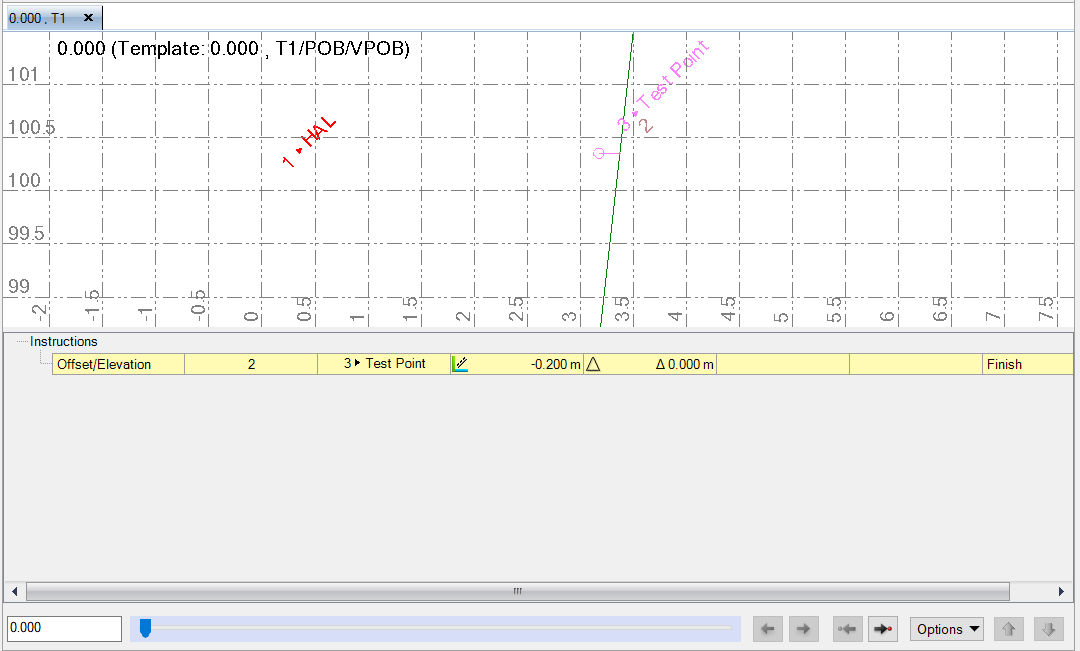
While I don't see an easy way to do this using a template instruction - this approach does what you want I think. In the example above - the Green Line is a reference surface that shows the surface that I created the Contour on. Point 2 is the contour line that I referenced into the Corridor Model. Point 3 the Test Point is the point that I created at 0.2m offset and 0 elevation delta to the contour reference line. You can creae any Template instruction from point 2 or point 3 now.
Hope that this solves your question
Alan