Fredrik
On the main Operator UI there is a Display Icon with a gear in the lower left hand corner.
 This is System settings.
Press this menu to get into System settings and you will see a choice for units.
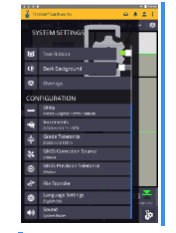
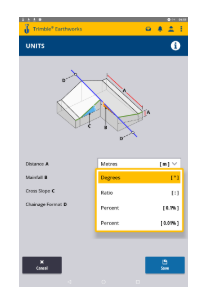
Choose units and you will be presented with the option to change Distance A, B, C, and D, depending on current work mode. Distance C is Cross slope, There is a drop down menu to change this to Degrees, Ratio, Percent to the 1st or 2nd decimal point.
Let me know if this answers your question. You are correct - this is the wrong forum for this so please do not keep asking MC questions here - I will always try to help but this is another team's responsibility and not my realm of operation. I pretty much know the SPS and GCS900 type products, but Earthworks I have kept out of that since it's release so I cannot (and nor can others in the BC-HCE Team) typically quickly answer MC questions. That product is moving so fast that we have little chance to keep up with that as well as what we are doing in the software world. Data and Data Flow is us, but once it hits the machine it is the Machine Control team domain.
Hope that is OK
Alan