Trimble Business Center

 View Only
Expand all | Collapse all

Trim/Extend Multiple lines to bounding lines remains broke in 5.31

  • 1.  Trim/Extend Multiple lines to bounding lines remains broke in 5.31

    Posted 08-11-2020 09:01

    after selecting the "Lines to trim or extend:" via the Select by Layer option, the selection set is lost when exiting the Select by Layer dialogue box. Please resolve asap.


    This issue was brought to Dev attention not too long after the initial release of 5.30.


    @Sanjeev Saha


  • 2.  Re: Trim/Extend Multiple lines to bounding lines remains broke in 5.31

    Posted 08-11-2020 09:08

    Same behavior using the Select Similar options as well. The selection set is lost when returning back to the Trim/Extend command dialogue. 


  • 3.  Re: Trim/Extend Multiple lines to bounding lines remains broke in 5.31

    Posted 08-12-2020 17:10

    On the Trim Extend lines issue - I don't believe that ever worked (I may be wrong here), because that process needs to know which ends of the lines to trim and just selecting by Layer will not tell you that - I think that is why it returns nothing because the command needs to know which end of the lines you want to trim off - if you take the example below - If I want to trim all the lines crossing the single line and just pick by Layer - how does it know which side to trim - this is not really a bug - it is just avoiding doing something wrong at least 50% of the time - the alternative is to select the lines and then Red Flag the selection to tell you that it is insufficient information to process the request.


    Select Similar when used in this command will have the same problem - while it can select a line, without knowing which end to trim off it is not useful data - again not really a bug in my view and I don't believe this would ever have worked either


    If you strongly disagree here and feel that it did work in past I would have to go back and look in that version to see what it did as I think a 50/50 guess is not what you want here and I cannot see how it would have done anything different


    Alan


  • 4.  Re: Trim/Extend Multiple lines to bounding lines remains broke in 5.31

    Posted 08-12-2020 22:03

    I can see the issue with clipping as Alan described, I personally would probably use the Clip command for that.

    But according to the Help the following should happen.


    To trim or extend multiple lines to a bounding line (all at once):

    1. Select Multiple lines to bounding line in the Method group.
    2. Select a trim/extend option:
      • Trim - Select this to shorten all of the selected lines back to the bounding line.

        Note: When selecting multiple lines to trim, the program cannot determine which ends of the lines were selected (e.g., they could have been selected by layer), so the lines on the side of the bounding line that are shorter are trimmed. If you need to trim the longer lines on the other side of the bounding line, then you must use the One line to bounding line option to trim each individually.


  • 5.  Re: Trim/Extend Multiple lines to bounding lines remains broke in 5.31

    Posted 08-13-2020 05:16

    Thanks Ronny. My current issues is with the Extend function of the command but yes I have seen the behavior as described in the help Note you posted.


    As I mentioned below, I don't believe the issue is so much with the command itself, it's that the selection set is lost when you leave the  "Select by Layer" or "Select Similar" dialogue box. So basically, we're not able to execute the final step of the command for a pass/fail result. 


  • 6.  Re: Trim/Extend Multiple lines to bounding lines remains broke in 5.31

    Posted 08-13-2020 05:09

    It definitely worked previously, for the case that I was using it for anyway. I would extend the green step line to the base line all in one shot. The alignment would be selected as the bounding line and then I would select the green lines by layer.  Then bang! all of the little green lines would be extended to the alignment. 


    In fact, I remember one time (8 - 10 months ago) I screwed up by having the step lines from two different walls on the same layer and didn't realize it. I ran the command as I just described and the step lines from the other wall (the ones that could intersect) were also extended to the bounding baseline. Made a mess with step lines all over the place. A quick undo and re-layering, re-ran the command selecting the step lines by layer, and all was well. 


    I don't recall having used the trim command in this way but I believe I have, but using it to extend in this fashion definitely worked as expected in the past. I believe 5.2 was the last it worked. 


    The issue is, it's not even letting the user try to execute the final step as the selection set is lost when leaving the "Select by Layer" or "Select Similar" dialogue box. This was not the behavior prior to 5.30.


  • 7.  Re: Trim/Extend Multiple lines to bounding lines remains broke in 5.31

    Posted 08-14-2020 12:10

    The help system may not have been updated - I know a while back there were problems with ambiguous scenarios and the Trim / Extend function would not always trim off or extend the correct end of the line. If there were changes made they were made to make the command more "obvious" and more "repeatable" in its behavior. The video below captures the reasoning behind how it works today - the selection of the lines requires a direction determined by the ends of the lines that you select. I would say that Polygon Select would ideally work on this but it appears it does not, I have logged that in as a defect. However the reason why Select y Layer and Select Similar does not work is because it is disabled because it does not provide the ends of the lines that you want to Trim and Extend. The Options is a standard control which is why it does not disable those select methods making it "look like a bug" but it is a deliberate action I believe in the software to deselect because the selection does not provide the required information.


    I hope that this explains the reasoning - this is not to say that it maybe could be further enhanced but this is the way that it works today and why it works that way.


  • 8.  Re: Trim/Extend Multiple lines to bounding lines remains broke in 5.31

    Posted 08-14-2020 12:43

    As always, thanks for looking into this.

    Being intentionally disabled, for whatever reason, is quite disappointing to say the least. I believe it worked as expected as recent as 5.2 something. 

    Please encourage Trimble to fix it as it previously functioned. Soon


  • 9.  Re: Trim/Extend Multiple lines to bounding lines remains broke in 5.31

    Posted 10-16-2020 11:56

    Thanks for this video, Alan; it gave me some more insight into the new behavior of this tool.


    I'm still having an issue with the command that to me seems definitely a bug. (Versions 5.30-5.32)


    Old behavior (desired):

    • Select bounding line (A)
    • Select line(s) to be trimmed or extended (B)
      • find the nearest intersection (or potential intersection) of A with B based on click location
      • determine which end of (B) is closest to that intersection
      • carry out the trim or extend operation on that end


    New behavior (undesired):

    • Select bounding line (A)
    • Select line(s) to be trimmed or extended (B)
      • determine which end of (B) lies on the same side of (A) as the click location
      • carry out the trim or extend operation on that end


    I used the tool in the past to clean up sloppy source CAD where (B) was supposed to perfectly intersect with (A) but instead fell short or long by an often microscopic distance (too small to see without zooming in very tight). The old behavior worked perfectly for this.
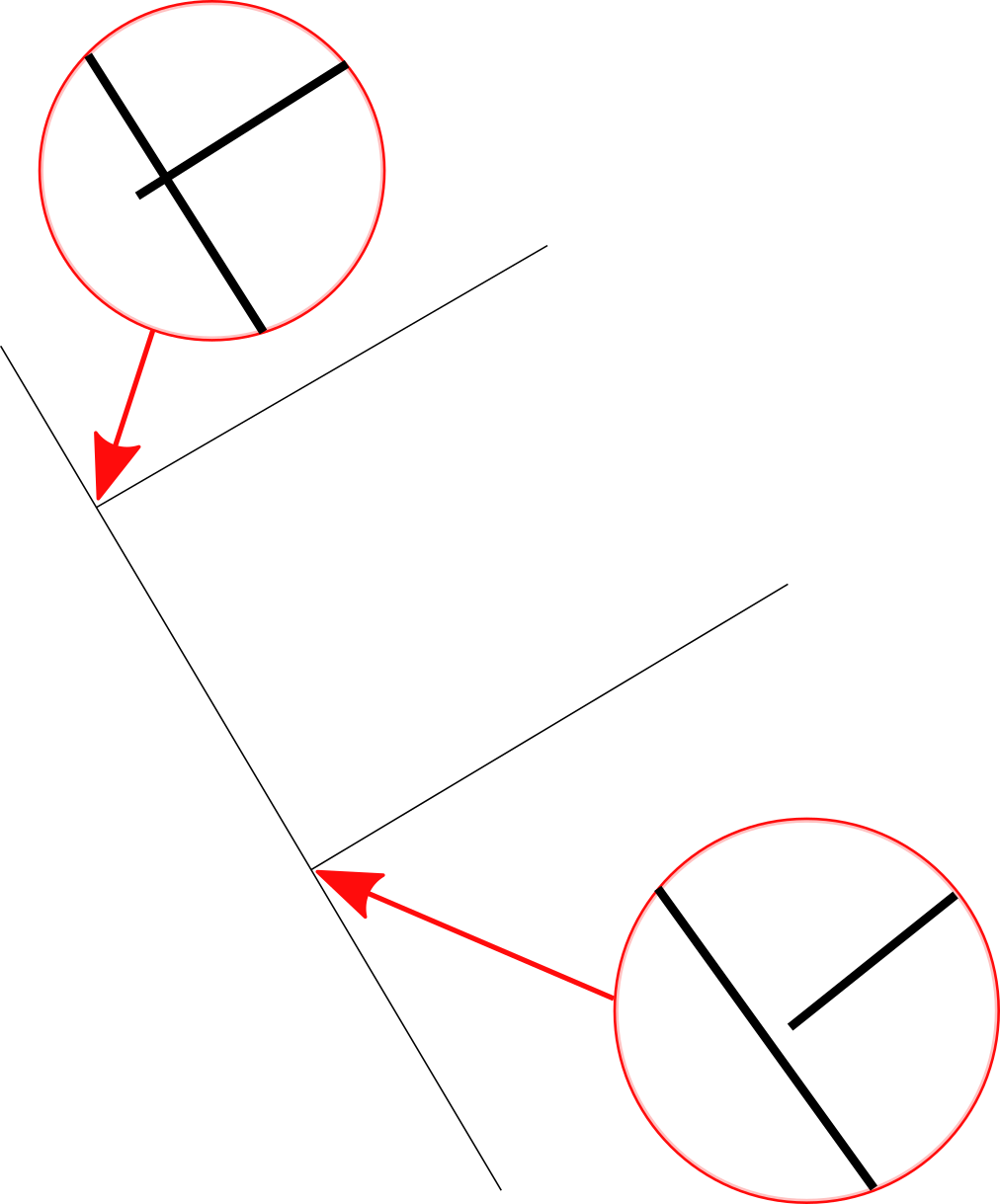
     

    With the new behavior, results are impossible to predict unless I zoom in on each and every intersection to see if (B) is too long or too short; the only way to get the trim to execute as desired is to zoom in and click specifically on the microscopic amount of line that extends beyond. If I were to click near the intersection without being zoomed in and the line happened to be too long, the tool will remove the 99.9999% of the line on the side that I clicked instead of the 0.0001% of the line that I actually want removed but can't actually see or select without manually zooming each intersection. The "extend" works fine if the line happened instead to be too short. This manual zoom-and-check defeats the time-saving convenience of the tool.


    One (semi) automatic way I've found to accomplish this now that the trim/extend tool has changed is the following:

    • Offset (A) in such a way as to be beyond all the stray ends (so that "Extend multiple lines to bounding line" will work as desired)
    • Extend all lines (B) to the offset of (A) (this ensures that all cases where (B) is too short to intersect (A) are eliminated)
    • Use the "Clip" command to break all lines (B) at their intersection with (A)
    • Delete the offset of (A) and clean up all the tiny trimmings, either by Advanced Selecting lines shorter than a specified length or carefully picking them manually.


    I've found other work-arounds as well, each suited to different scenarios but all requiring more care and attention than the trim/extend tool with its old behavior.


    Please bring back the old behavior. If both behaviors are desired at different times, perhaps a toggle box could be used to modify the behavior of the tool to respect the end closest to nearest intersection.