Trimble Business Center

 View Only
Expand all | Collapse all

Earthworks Simulator in Windows 10

  • 1.  Earthworks Simulator in Windows 10

    Posted 09-19-2019 12:38

    Does anybody know how to run the earthworks simulator using windows 10? 

    Thank you


  • 2.  Re: Earthworks Simulator in Windows 10

    Posted 09-20-2019 04:32

    As of right now you will need an android tablet. I will email you the setup.


  • 3.  Re: Earthworks Simulator in Windows 10

    Posted 09-20-2019 09:55

    Thanks Pat. I'll take a look at it.


  • 4.  Re: Earthworks Simulator in Windows 10

    Posted 09-26-2019 13:27

    Patrick, I have been running the earthworks emulator on 10 different PC since last November by using blue stacks. Just tricked the pc into thinking is was talking to another computer by running a short Ethernet cable out one port and back in another port. It worked great for training last winter.


  • 5.  Re: Earthworks Simulator in Windows 10

    Posted 09-20-2019 11:25

    The Earthworks 1.10 sim works great on Windows 10.  The install package includes Bluestacks Android emulator, so they all run on one screen.  You can use an Android display, but it's not required.  


    My first install attempt failed because you need to run the .exe.zip file 'as administrator.'


  • 6.  Re: Earthworks Simulator in Windows 10

    Posted 09-20-2019 12:15

    Thanks Nelson,

    I tried to do that yesterday. I have the bluestacks installed but I don't know what to do after that?

    I can't find a step by step instruction from Trimble or SITECH.


  • 7.  Re: Earthworks Simulator in Windows 10

    Posted 09-20-2019 14:37

    You have to do some stuff with the IP settings on your PC. I'll just got a new laptop and need to re-install the emulator and I'll write up some instructions.


  • 8.  Re: Earthworks Simulator in Windows 10

    Posted 09-22-2019 20:54

    Hi Eric, you will find the instructions that you need in the User Guide, Chapter 2 - Setting up the Trimble Earthworks
    simulator platform. This user guide is a pdf document which can be found in the same folder as the EWSim.exe file that is used to launch the simulator.


    The User Guide also contains other information that you may find useful.


    Mark


  • 9.  Re: Earthworks Simulator in Windows 10

    Posted 09-23-2019 09:55

    Thank you Mark


  • 10.  Re: Earthworks Simulator in Windows 10

    Posted 09-26-2019 09:03

    Mark do you have a link to this guide? The guide i have from Sitech is not showing Chapter 2 - Setting up the Trimble Earthworks simulator platform.


  • 11.  Re: Earthworks Simulator in Windows 10

    Posted 09-29-2019 11:41

    Hi @Roan Blake from v1.10 you can access the User Guide via the F1.Help button, as well as finding it in the folder that you extracted all the files to upon initial launching of the application file.

    For versions earlier than v1.10 it can be found in the folder that you extracted all the files to upon initial launching of the application file.


  • 12.  Re: Earthworks Simulator in Windows 10

    Posted 09-23-2019 14:44

    Right-click to run the Simulator_Earthworks_1_10_0.exe.zip 'as administrator.'  


    Once installed, run the C:\Simulator_Earthworks_1_10_0.exe\EWSim.exe 


    Then you can run the operator app from the shortcut on your desktop, which should automatically launch in Bluestacks.  


  • 13.  Re: Earthworks Simulator in Windows 10

    Posted 09-23-2019 16:44

    Thank you Nelson


  • 14.  Re: Earthworks Simulator in Windows 10

    Posted 12-03-2019 10:00

       I have tried installing 1.10 on 3 laptops using bluestacks.  We have one working, on the other two I get stuck at the blue screen with the message "you have connected to myec520.com but you are likely not currently connected to a ec520."  Any idea's on what to try?


    Thanks,


  • 15.  Re: Earthworks Simulator in Windows 10

    Posted 12-04-2019 13:06

    You need to run the simulator first.  This connects to myec520.com server.  Then you run the Earthworks app.


  • 16.  Re: Earthworks Simulator in Windows 10

    Posted 12-04-2019 13:18

    Nelson, I work with Travis and have also posted a question about this in the thread below.  I have the simulator installed and working on my computer and know how to run it.  The other three computers we have tried to install the Earthworks Simulator on are having the same problem with connecting to the server.


  • 17.  Re: Earthworks Simulator in Windows 10

    Posted 12-04-2019 13:34

    Gotcha.  You'll have to contact your software rep at the Sitech in  your territory.


  • 18.  Re: Earthworks Simulator in Windows 10

    Posted 12-04-2019 13:39

    Thank you sir, Kyle and myself are both software specialists at Sitech MA.  I have Trimble support stumped with this as well. 


  • 19.  Re: Earthworks Simulator in Windows 10

    Posted 12-04-2019 14:18

    Ha, sorry I didn't know.  


  • 20.  Re: Earthworks Simulator in Windows 10

    Posted 12-05-2019 04:48

    Hey Travis,

    We have the same odd issue here as well. I have 3 laptops and the only one that will run it is the one I put 16gb ram in and the others have 8gb. I do have it running on a T10 with no issues as well which was the fastest and easiest. 


  • 21.  Re: Earthworks Simulator in Windows 10

    Posted 12-05-2019 08:40

    We have discovered that replacing the space in the ec520 host file with a tab is allowing the other pc's to work correctly.  They still have quirks, some will only work when connected to internet, others will only work when not connected.


  • 22.  Re: Earthworks Simulator in Windows 10

    Posted 12-05-2019 11:14

    That can't be all the same version of the simulator.  1.10 needs internet to connect to the ec520.com server.  Older versions ran a linux emultor on the local PC, and the network adapter settings had to be set just right to get into the WebUI or connect to a display.  


  • 23.  RE: Re: Earthworks Simulator in Windows 10

    Posted 02-05-2022 09:40
    mine does this even if i run the simulator first 
    You have connected to MYEC520.com. but you are likely not currently connected to an EC523x. 
    if you are connected to an EC52x, disabling other network interfaces, such as Cell or Ethernet, will often fix this issue.

    ------------------------------
    Will Evans
    ------------------------------


  • 24.  Re: Earthworks Simulator in Windows 10

    Posted 09-22-2019 10:43

    Where can I download this from?


  • 25.  Re: Earthworks Simulator in Windows 10

    Posted 09-22-2019 11:49

    I'm getting it from my Sitechdealer


    On Sun, Sep 22, 2019, 11:44 AM michael@takeoffpros.com <trimble@jiveon.com>


  • 26.  Re: Earthworks Simulator in Windows 10

    Posted 09-22-2019 11:52

    Thank you


  • 27.  Re: Earthworks Simulator in Windows 10

    Posted 09-23-2019 09:56

    Thank you Erik.


  • 28.  Re: Earthworks Simulator in Windows 10

    Posted 09-24-2019 07:00

    Would anyone mind putting the install file up on Dropbox, etc to download?  


  • 29.  Re: Earthworks Simulator in Windows 10

    Posted 09-23-2019 18:56


  • 30.  Re: Earthworks Simulator in Windows 10

    Posted 09-23-2019 18:57

    I got to this point and that's it. I'm doing something wrong here.


  • 31.  Re: Earthworks Simulator in Windows 10

    Posted 09-24-2019 10:10

    You need to run EWSim first. Look on your C: drive in the folder with the same name as the install file.


  • 32.  Re: Earthworks Simulator in Windows 10

    Posted 09-24-2019 15:43

    Hi Eric,


    Just so that I can understand the issue that you are having, can you please confirm if you have run through the exact step sequence that is documented in the User Guide, section 2.10.1 Optional—BlueStacks Android emulator.


    I am assuming you are using v1.10 when I say section 1.10.1. Older versions of the guide may apply a different number to this section.


    Mark


  • 33.  Re: Earthworks Simulator in Windows 10

    Posted 09-24-2019 16:09

    I thought i did twice. SITECH also told me that they can't make it work but I don't think they tried hard enough because they have the TD520. It's okay though, I'll ask our company if I can replace my ipad issued to me with android tablet. Thanks for all the help though.


  • 34.  Re: Earthworks Simulator in Windows 10

    Posted 09-24-2019 16:32

    Hi Eric,


    Let me know if you keep having problems and I will be happy to help you look for a solution.


    Many people are using the simulator without any problems and it is thoroughly tested by my team prior to each release, so we know that it works for most people.


    Mark


  • 35.  Re: Earthworks Simulator in Windows 10

    Posted 09-24-2019 16:42

    Mark, do you still use a eithernet jumper to make the connection or is it done in the computer. 

    I made it work with the jumper and BlueStacks last November for training.


  • 36.  Re: Earthworks Simulator in Windows 10

    Posted 09-29-2019 11:25

    Hi @Ken Bork, the connection is done in the pc by editing a particular file. The details of how to do this have been included in the User Guide that is bundled with the simulator since we verified it working with Bluestacks in the v1.9 release.


  • 37.  Re: Earthworks Simulator in Windows 10

    Posted 12-04-2019 12:09

    Mark,


    We are having issues with the Earthworks Emulator 1.10 on three out of four computers.  The only computer that the emulator will work on is an Alienware.  The Alienware computer has an aftermarket network adapter, where the other three computers have Intel network adapters.

    The other computers, when hooked to WIFI, will get stuck on the screen shown below.  When we disconnect from WIFI, the app will launch in BlueStacks, but obviously, none of the sensors are found.  Could this be an IP issue?


  • 38.  Re: Earthworks Simulator in Windows 10

    Posted 09-24-2019 06:35

    I have had this 1.7 version running on windows 10 for about a year and it worked great for training.


  • 39.  Re: Earthworks Simulator in Windows 10

    Posted 09-24-2019 17:49

    Thank you. SITECH came and help me out and it's working now.

    I got it all mixed up. Found out that inside the folder has 1.7 and 1.10 version and mixing all things up.

    Can I add my own design so I can play around with our actual job design?


  • 40.  Re: Earthworks Simulator in Windows 10

    Posted 09-26-2019 22:35

    I`am very intrested in this simulator.

    Is there anybody who can supply me the installation file?


  • 41.  Re: Earthworks Simulator in Windows 10

    Posted 09-27-2019 07:02

    I'm hoping for the same thing. 


  • 42.  Re: Earthworks Simulator in Windows 10

    Posted 10-01-2019 13:18

    @Corbitt Shoffner, @Cees-Jan Klos the Earthworks Training Simulator is published here on Partners with each release of Earthworks. You can find the most recent version on the v1.10 release package page - Trimble Earthworks and Cat GRADE for Dozers, Excavators and Motor Graders Version 1.10.X Release Package 


  • 43.  Re: Earthworks Simulator in Windows 10

    Posted 10-01-2019 13:23

    Thanks for posting!  Unfortunately for me the site is stating "unauthorized" when I click on your link.  


  • 44.  Re: Earthworks Simulator in Windows 10

    Posted 10-04-2019 00:36

    Thanks for posting!  Unfortunately for me the site is stating "unauthorized" when I click on your link.  ??


    Anyone know where i can get i, mybe from an dropbox or so ??


    Best Regards


  • 45.  Re: Earthworks Simulator in Windows 10

    Posted 10-09-2019 01:08

    Mark,

    I get the same message as Flemming Pedersen  :-(


  • 46.  Re: Earthworks Simulator in Windows 10

    Posted 09-27-2019 05:33

    8.1 works great no blue stacks needed

    have it working with Samsung tab A wireless though hotspot on computer 


  • 47.  Re: Earthworks Simulator in Windows 10

    Posted 09-27-2019 05:47

    Yes u can add you files it worked for me in the Dupo folder there is another folder with the job files in it I copied to. 


  • 48.  Re: Earthworks Simulator in Windows 10

    Posted 09-27-2019 09:38

    You can add projects to you emulator by going to your C:Simulator/Files/ Earthworks/Projects and paste in your project from your earthworks library.


  • 49.  Re: Earthworks Simulator in Windows 10

    Posted 09-27-2019 11:14

    Ok thank you


    Sent from my iPhone


  • 50.  Re: Earthworks Simulator in Windows 10

    Posted 10-04-2019 12:57

    I am getting the following screen


    Any thoughts or ideas are much appreciated!


  • 51.  Re: Earthworks Simulator in Windows 10

    Posted 10-09-2019 17:03
      |   view attached

    Hi Will

    I had the same problem so I downloaded 1.8 for windows ---  did not use bluestacks

    Bought a Samsung Tab A and got it to work wireless through my hotspot .


    Sent from Mail for Windows 10


  • 52.  Re: Earthworks Simulator in Windows 10

    Posted 10-31-2019 09:57

    Has anyone got this message with Blue Stack. I'm pretty sure I got the rest of the steps down. I was thinking its something to do with the setting of Blue Stack? Maybe performance  related?  

    Could also be that my PC is a POS.


  • 53.  Re: Earthworks Simulator in Windows 10

    Posted 11-01-2019 07:44

    K, I had to change the display setting to a 16x10 ratio  ( I choose 1600 x 1000) that seem to get me through it. 


    Now, I'm having an issue with the Operator App. I am able to get in and select me site and design but the app crashes when i try to "Start". It will work in 2D just fine, but cant get it to stay open with 3D. Any thoughts?


    Refer to my last comment about my PC. 


  • 54.  Re: Earthworks Simulator in Windows 10

    Posted 11-03-2019 20:04

    Hi Josh, are you having this issue with a 3D design of your own that you are loading, or does it occur with the 3D designs that are bundled with the simulator?


    Mark


  • 55.  Re: Earthworks Simulator in Windows 10

    Posted 11-04-2019 08:50

    I've tried both custom designs and the ones bundled. I've also tried using both v 1.8 and v 1.10.  I am able to trick it on 1.8 by starting the Job in 2D and then switch over to 3D design after its running. However it crashes after little use. Which leads me to think my PC just doesn't have the horsepower to keep up. 


    With v. 1.10 I get a GNSS error. I've gotten it before with 1.10 running on a Samsung Tablet too. It doesn't allow me to even start a design project, custom or bundled. 


  • 56.  Re: Earthworks Simulator in Windows 10

    Posted 11-04-2019 12:33

    The F12.Graphics button in the simulator window puts the simulator into a reduced or no graphics mode. This can help reduce the processing load for those with lower spec PC's. 


  • 57.  Re: Earthworks Simulator in Windows 10

    Posted 11-05-2019 12:09

    Definitely on the right track there. Dropping the Graphics help me out a bit and then changing the frame rate within Blue Stack help out even more (Im set at about 20). I can pretty much do everything now in v1.8. I can use it to look at custom designs and walk through Infield design. Which is a big help on the support side. I have noticed that when I crash the program in a user profile I have to go into the Web UI side and delete that profile and create a new one.


    I have not got 1.10 to work. It still give me the GNSS error. 


  • 58.  Re: Earthworks Simulator in Windows 10

    Posted 11-06-2019 06:49

    I think 1.10 is easier, just change your Ethernet settings on laptop & TD520 and it takes off. The graphics has to be changed on my laptop as well. I also received a YAMS error and have to do go into command prompt and run a command and then I'm good. I have not used or needed the blue stacks thing. 


  • 59.  Re: Earthworks Simulator in Windows 10

    Posted 11-06-2019 08:59

    I completely agree. The TD520 is the best way to go. I wouldn't Demo the product on any other devise. The Blue Stacks is a nice option for support issues. I'm on the road alot so if a customer calls and wants me to walk him through something its much easier to have everything run on the computer verse connecting up an external display. 


    What command prompt do you have to run in v1.10? 


  • 60.  Re: Earthworks Simulator in Windows 10

    Posted 11-06-2019 09:11

    It is a Proxy error within our firewall that requires Port 80. It blocks the application from communicating. I just turn them off in dos with a command and it fixes my issue. 


  • 61.  Re: Earthworks Simulator in Windows 10

    Posted 11-07-2019 23:33

    Soon there have been many who have asked how to get that app to run.
    Incl myself.
    Doesn't anyone bother to make a todo guide on how to install and get it running, I've even tried on Windows-PC, Samsung S10e, Panasonic Touchpad FZ-A2 with no luck. If you are "lucky" it starts up and shows something with EC520 error ....
    Have tried version 1.4 / 1.8 & 1.10 all for Android.
    Has also been through darkcity on Windows with no luck.
    There should have been an opportunity to get that Simulator running so I can test projects before they are put out to the excavators ...


    Thanks and Best Regards

    Flemming Pedersen


  • 62.  Re: Earthworks Simulator in Windows 10

    Posted 11-08-2019 08:39

    If you want to use an Android Emulator here is how we do it.

    Some of our sales reps run it like that and all of us Supporters. One of them is experiencing some graphic glitches but that most likely comes from the icon arranging program he runs on the windows desktop. But not many crashes so far, runs reasonably stable.


    But be aware that you need a rather good computer / CPU with virtualization to run the machine and Android Emulator.

    My old private Surface Pro 3 with i5 and 8 GB wasn't able to run it.

    Our work Thinkpad laptops look like that.


    1. Install a Fake Ethernet Adapter (MS Loopback Adapter) according to this video

    https://www.youtube.com/watch?v=u9lZVhiiH20

    the driver comes with Windows, no need to download

    2. change the IP Address of that Ethernet Adapter to 192.168.168.1

    3. Install the machine side of the Earthworks Simulator, unzip the file to i.e. c:\EW-Sim110

    4. Start the machine simulation, the excavator needs to be on the screen, now a few windows of the firewall should pop up, allow at least the public setting

        - if the windows don't pop up check in the firewall settings that the following programs have at least a tick for "public"

        "C:\EW-Sim110\bin\earthworks\_duplo\CANServer.exe"

        "C:\EW-Sim110\bin\earthworks\_duplo\Duplo.exe"

        "C:\EW-Sim110\bin\earthworks\_duplo\SensorSimulator.exe"

        "C:\EW-Sim110\bin\earthworks\_duplo\www\yams-proxy.exe"

    5. if you start the machine simulator it shouldn't show a pink yams error in the top left corner

       - if it still does you probably need to call "services.msc" and change the settings for the "WWW-Publishing Service" on    the advanced tab to "stop" and "start manual"

    6. if the machine side runs without pink error messages you should also be able to call the web interface from your web browser 192.168.168.1


    Now to the Android side

    7. we use the Nox Android Emulator from www.bignox.com

    8. download and install it

    9. interrupt the first start since Earthworks won't run with the standard Android 4 anyway

    10. on the Windows desktop you should also find a "Multi-Drive" Icon

    11. start that one and add an Android 7 Environment
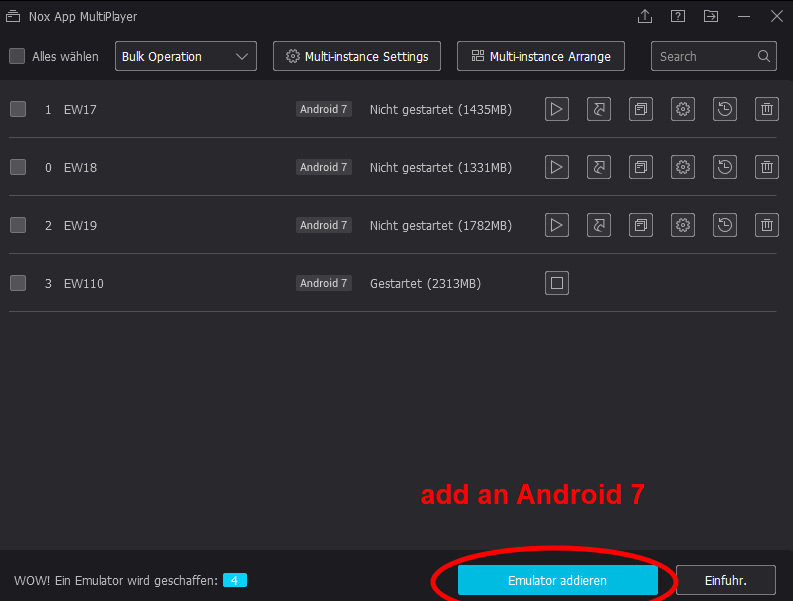
    12. start the environment once and change the settings of the environment as follows

    a user defined ratio of 16/10 is important and resolution above 1000 or so, refer to the EW PDF for minimum requirements for BYO device

       changing the model to "SM-T585" which is a "Galaxy Tab 10" was important, with the standard setting as mobile phone the Android Emulator did crash upon loading Earthworks


    13. close and restart the Android, no need to change any Network settings in Android

    14. now you should be able to start the browser in Android and call 192.168.168.1

    15. enter the web interface using the credentials admin / EarthWorks#1

    16. unlock the lock icon

    17. go to "Advanced - > Install Operator App -> Install Direct"

    18. once the installation is done you should be able to run EarthWorks from the Android Main Screen


    If you use your own models in "C:\EW-Sim110\bin\earthworks\_duplo\projects" then don't use any funny characters in the project name. The Earthworks on the machine will probably handle them but the Android emulator has its problems with ä, ö, ü and the like.


    Have fun digging


  • 63.  Re: Earthworks Simulator in Windows 10

    Posted 11-11-2019 01:22

    Hi Ronny, thanks for the guide.

    I will take a look at it in the near future.

    Thanks again


    Best Regards

    Flemming Pedersen


  • 64.  Re: Earthworks Simulator in Windows 10

    Posted 12-17-2019 05:04

    Hello,


    I have installed the trimble simulator app on a laptop (win 10) using bluestacks 4.0 and no additional display. Everything appears to be working fine. The only problem is that I am based in Belgium and I cannot get the correction stream over the internet. (coordinate system failed to load) I have tried to configure the ntrip for flepos and move rtk (with existing users / passwords) but with no luck (no gateway installed error ???) . I can use the option of the external radio to get the RTK signal but the pre-installed once are only valid for NZ, AUS and Canada... Is there a work around or other option to get RTK in the 3D simulation? Thx


  • 65.  Re: Earthworks Simulator in Windows 10

    Posted 01-24-2020 09:50

    Followed your example and it went well until I install the earthworks apps,

    Both web interface and earthworks app give the message they cannot connect to server.


    But if I open the browser in the nox emulator I can open 192.168.168.1 and login on the EC520.


    That's weird? What could be the difference between the app and browser?


    Windows 8

    sim 1.11

    Nox player 6.6.0.1


  • 66.  Re: Earthworks Simulator in Windows 10

    Posted 10-30-2020 08:57

    Yeah, I'm currently trying this Nox player out and its pointing to Trimbles servers as well. It's not pointing to 192.168.168.1


  • 67.  Re: Earthworks Simulator in Windows 10

    Posted 11-10-2019 23:40

    Hi Flemming,


    The User Guide can be downloaded from Partners along with the simulator software. The most recent version is available here - Trimble Earthworks and Cat GRADE for Dozers, Excavators and Motor Graders Version 1.10.X Release Package 


    In case you download only the simulator software bundle from Partners you can still find the User Guide bundled in with the simulator files that you downloaded. See my earlier post that shows you where to find the User Guide.


    If you follow all of the recommendations in the User Guide you should be able to get the simulator running on your PC. 


    A support case can be raised if you can't get it working after following the recommendations in the User Guide.


    Mark


  • 68.  Re: Earthworks Simulator in Windows 10

    Posted 11-11-2019 01:23

    Hi Mark.

    Thank, but unfortunately, I do not have permission to download this...


    Best Regards

    Flemming Pedersen


  • 69.  Re: Earthworks Simulator in Windows 10

    Posted 11-12-2019 19:10

    Hi Flemming, 


    I don't know who get's access to what areas of Partners but I am keen to see the simulator be used to the best benefits of Trimble.


    Have you applied for and been refused access to this area of Partners.


    Mark


  • 70.  Re: Earthworks Simulator in Windows 10

    Posted 11-08-2019 13:51

    I used a T10 with BlueStacks and the Earthworks 1.10 Sim runs great without all the company IT network restrictions and a touch screen. Our trainer can setup a training class in 5 mins and project the display on a tv in conference room. 


  • 71.  Re: Earthworks Simulator in Windows 10

    Posted 11-14-2019 04:38

    Is the Earthworks Sim Accesseble and free for Earthworks Customers? 


  • 72.  Re: Earthworks Simulator in Windows 10

    Posted 11-14-2019 04:40

    It is free for anyone to use. 


  • 73.  Re: Earthworks Simulator in Windows 10

    Posted 11-14-2019 05:44

    Where can I download it from?


  • 74.  Re: Earthworks Simulator in Windows 10

    Posted 11-14-2019 09:12

    https://community.trimble.com/docs/DOC-33984 


    If the link don't work just search the title below and it will be at the bottom of the page. 

    Trimble Earthworks and Cat GRADE for Dozers, Excavators and Motor Graders Version 1.10.X Release Package


  • 75.  Re: Earthworks Simulator in Windows 10

    Posted 11-15-2019 03:42

    Hi Tony, 

    As I am now just a customer it seems that I dont have access to it. 


  • 76.  Re: Earthworks Simulator in Windows 10

    Posted 11-15-2019 06:46

    Will the emulator allow you to run through and check over your model for any problem and or discrepancy's ??   What are some other benefits of the emulator ??


  • 77.  Re: Earthworks Simulator in Windows 10

    Posted 12-05-2019 11:25

    All 4 of the PC's used the same 1.10 install file and the same install file of bluestacks.  We have them in a shared folder.  I can't explain it, but the faulty PC's would work while disconnected, then a while later would have to be connected in order to continue to work.  the one alienware pc has worked correctly from day 1.


  • 78.  Re: Earthworks Simulator in Windows 10

    Posted 12-05-2019 13:57

    I wonder if someway somehow it's running off the sim from an older version?  


  • 79.  Re: Earthworks Simulator in Windows 10

    Posted 12-13-2019 10:49

      The problem is that the host file edit doesn't work with the latest update for bluestacks.  To get it to work, you have two choices....

    1. Connect to the internet, open the simulator, disconnect from the internet, then open bluestacks.

    2. download an older version of bluestacks from this link...https://drive.google.com/file/d/1e1uIAp4Qv0GAycQv8ufIZTWbSoTSDVXn/view?usp=sharing


  • 80.  Re: Earthworks Simulator in Windows 10

    Posted 01-21-2020 12:35

    Thanks for the info on the connection error.

    With solution #1, I found after you disconnect from the internet and open bluestacks and get everything up and running, you can reconnect to the internet and everything will continue to function.


  • 81.  Re: Earthworks Simulator in Windows 10

    Posted 12-17-2019 05:03

    Hello,


    I have installed the trimble simulator app on a laptop (win 10) using bluestacks 4.0 and no additional display. Everything appears to be working fine. The only problem is that I am based in Belgium and I cannot get the correction stream over the internet. (coordinate system failed to load) I have tried to configure the ntrip for flepos and move rtk (with existing users / passwords) but with no luck (no gateway installed error ???) . I can use the option of the external radio to get the RTK signal but the pre-installed once are only valid for NZ, AUS and Canada... Is there a work around or other option to get RTK in the 3D simulation? Thx