Trimble Business Center

 View Only
Expand all | Collapse all

SX10 scanning file missing in TBC

  • 1.  SX10 scanning file missing in TBC

    Posted 01-30-2019 08:01

    I have a scanning station with SX10. So, I have the JOB file and the respective folder. The problem is related to station configuration because I forget to give station height in the initial configuration.


    In TBC when I import SX10 data, scanning RWCX is not included. After this, I change the height in the properties station but nothing change with the scanning data.


    I have tried to import manually the scan data and to recalculate, but it doesn't take the correct position even with the correction in the height.


    What can I do? Any thoughts?


  • 2.  Re: SX10 scanning file missing in TBC

    Posted 02-04-2019 13:55

    Hi Ariel, have you tried updating the station height from the original Trimble Access job? 


    Rui


  • 3.  Re: SX10 scanning file missing in TBC

    Posted 02-04-2019 14:56

    I've tried but it doesn't work. It seems that TBC and Trimble Acces can't recalculate when station height is not entered (only 2D computation).


  • 4.  Re: SX10 scanning file missing in TBC

    Posted 02-06-2019 13:15

    Hi Ariel, can you send the job file(s) to rui_wu@trimble.com and let me see it? I just tried to remove the instrument height of an existing SX10 job in TA and then import it to TBC. It didn't throw any error message, and the scans are updated when I type in the correct height.


    Did you change the instrument height from Review job, and did you change from the first point in the sequence?


    Thank you. Rui


  • 5.  Re: SX10 scanning file missing in TBC

    Posted 02-06-2019 15:30

    @Ariel Silva

    Hi Ariel, thank you for the file. Here's how you can bring the scan back.

    1. Drag and drop the job file to TBC, ignore the import error.

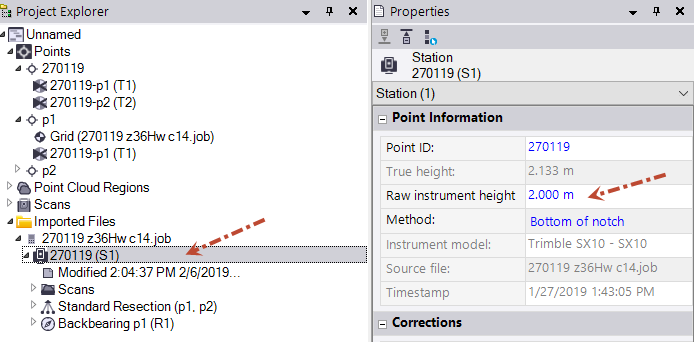
    2. From Project Explorer -> Imported Files, change the raw instrument height of the station to the correct number.
    3. Expand the Backbearing node, change the "Use for" from Horizontal only to Horizontal and vertical. 
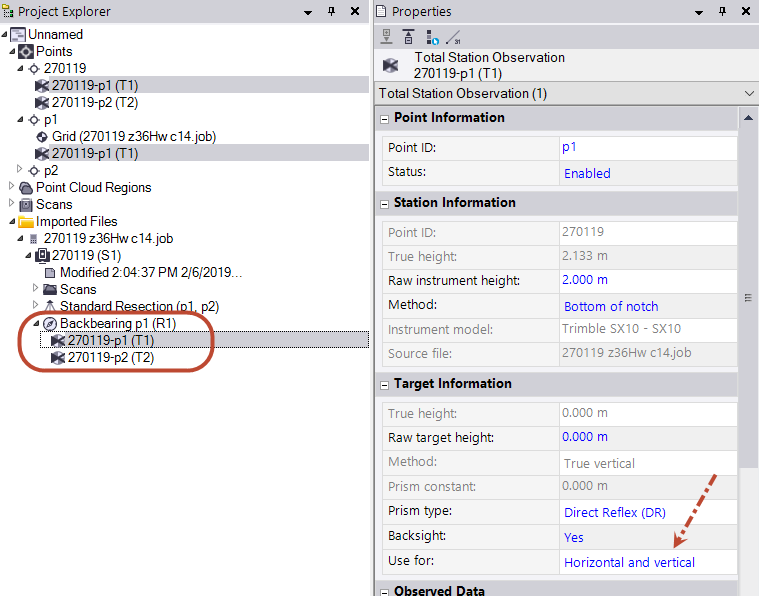
    4. Compute the project. Now the station should have an elevation to start with.


    Let me know if this works for you. Thank you.

    Rui


  • 6.  Re: SX10 scanning file missing in TBC

    Posted 02-07-2019 05:00

    It works only for the station not for the scanning. Scanning file still missing...


    I tried again to import the scan file manually, but it's the same.  


  • 7.  Re: SX10 scanning file missing in TBC

    Posted 02-11-2019 15:28

    Hi Ariel, 

    Thank you for pointing out the mistake. Here's the correct steps:

    1. Open the job file in Trimble Access (not TBC) and modify the instrument height from Jobs -> Review job. Now you may exit Trimble Access.

    2. Drag and drop the new job file to TBC.

    3. From Project Explorer -> Imported Files, expand the Backbearing node, change the "Use for" from Horizontal only to Horizontal and vertical. 

    4. Recompute the project. Now the point cloud should sit at the correct position.


    Sorry for the confusion. Hope it works now.


    Rui