Cut/Fill smart text
Use the Create points at intervals command to create points along the line.
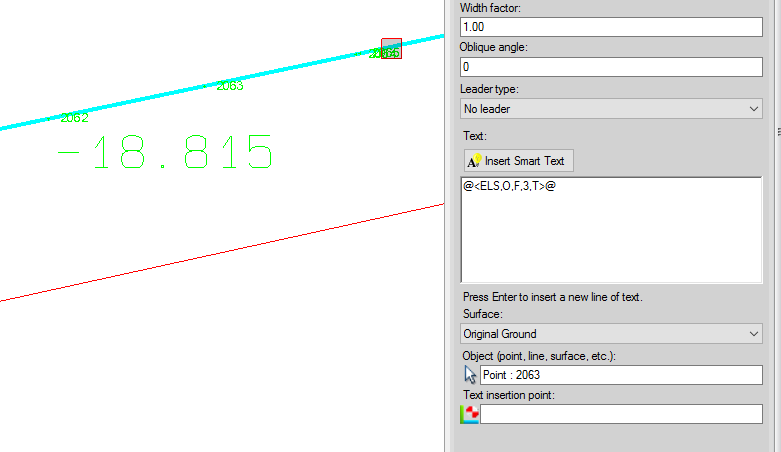
Use the surface elevation smart text and add two more parameters, the number of decimals and T/F to show it as cut/fill or elevation. In this case use @<ELS,O,F,3,T>@. The 3 sets 3 decimals and T sets it to show the cut/fill. In the snap below, the point is 2063 and the -18.815 is the cut from the point to the surface Original Ground.
[An optional way to do this would be to offset the line left and right and create a surface from the lines. Compute the volume between your surfaces and save the isopach. Use the change elevation command to drop the points along the line onto the isopach so that their elevations are now the cut/fill.]
If you line is 3d you can us it as the basis for a new HAL/VAL. When you create the HAL use the line as the basis for your HAL. Because it is 3d you will also get a VAL. You can then view a profile of the HAL and you will see your VAL. You can use the HAL to create a profile from a surface. Place a rectangle around the VAL and use a dynaview to place it on the sheet.
You can also show the line in the profile view if you already have a HAL/VAL. You can do the following to add a second or 3rd line as a VAL.
Create a new vertical alignment
Use the option "append to alignment" and select your line from plan view to append to the blank VAL
You will now see it in the profile view at station zero
Move it to the correct station
You can create a rectangle around the line in the profile view and use the dynaview command to place the view onto the plan view sheet.
There is not a direct way to label the cut/fill in the profile view, but the cut/fill can be shown by creating plan and profile sheets as shown below. (The VAL can be selected as a surface and compared to another surface.) If you have not used the sheet view plan and profile plotting you may want to get some additional training from your dealer as this is more than we can cover in the forum.

I hope this give you a few ideas that will work for you.