There seems to be a bug with surface transparency once this setting is enabled. Doesn't seem to be a new one, is the same in 5.60.2 and 5.70.
Any transparency value you've set before enabling this setting will be honored.
BUT, afterwards, no matter what you set any surface transparency to, it will be shown with 0% transparency.
We had to enable this setting for CutFill maps on projected surfaces.
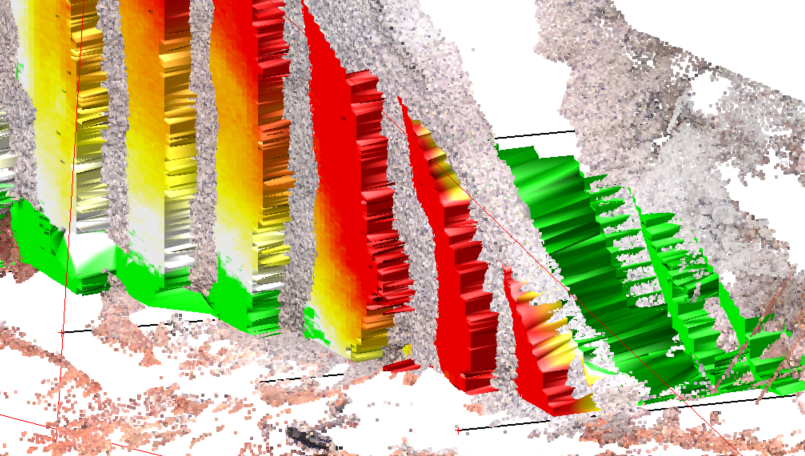
With double precision the CF-Map looks ok.
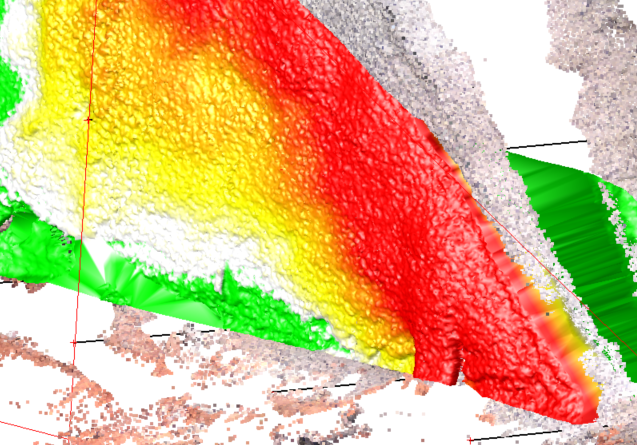
But only previously set transparency values are honored. Changing it will show the surface with 0%. See attached video.
------------------------------
Ronny Schneider
------------------------------
Original Message:
Sent: 01-21-2020 11:20
From: Tim McClannahan
Subject: Re: Double-precision patches use?
"Patches" are an object type that we use internally to represent surfaces. Using "Double precision" uses a 64 bit number to store and manipulate the verticies of the object. This is needed for very large sizes and or extremely small precision. Single precision uses 32 bit numbers which require 1/2 the memory with the loss of some precision.
Either should work fine for almost all projects. This setting allows us to fine tune the program for special cases. Stick with default setting of not being checked unless directed otherwise is my recommendation.
tim