Trimble Business Center

 View Only
Expand all | Collapse all

Label Table Style Manager

  • 1.  Label Table Style Manager

    Posted 12-18-2018 05:37

    Is there a way to split a label table at a certain spot or is there a way to automatically split the table? If not, I would like the option to set a number of rows or a table height and then create a new table column when this is reached, shown below.


    Thank you.


  • 2.  Re: Label Table Style Manager

    Posted 12-19-2018 16:41

    The way I would do this today Pat is to use the Selection Set to pick all of the Points and then pick a selection of the points from the Selection Set and produce the first table and then a second selection from the Selection Set to create the second table.etc. If you want 50 points per table then you can select from e.g. 1000 to 1049 For Table 1 and from 1050 to 1099 for Table 2 etc.


    If however you want to break a table, you can explode it and then use the Clip Lines command to break the vertical lines of the table at the desired break point and then the Move command to move the part of the table that you are trying to move etc. You can then also copy the Table Header down to the broken off part of the table if you want a Header on the second table also.


    So it is possible to do what you want to do - I understand that you may want to limit the Table to only a certain number of points and to maybe lay out multiple tables automatically each with headers of their own etc. but that is for sure not in the product currently


    Here is an example of what I did - The offset Table was a part that I broke away after an Explode - I clipped lines and moved the data and then copied the header across to give it the same look. Each of the three tables have 50 points in them and I created those using Selection sets.
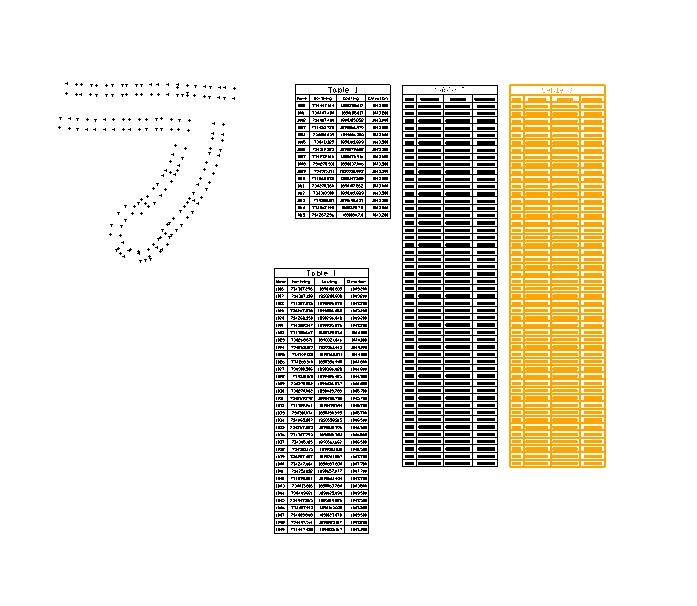
    Here is a video of how I used the Selection Sets


    Hope that this helps


    Alan


  • 3.  Re: Label Table Style Manager

    Posted 12-20-2018 05:17

    Thanks Alan. 


    I did fuss around with exploding the tables and that seems to work well. As you know, the issue with this is that you lose the dynamic capabilities when you do this so you need to make sure you have all of the data that you want. If you have all the data you need and  just need to reorganize, this works well. 


    The selection sets is another good point. This is something I do not use and I need to try and incorporate into my workflow more. I think this would help tremendously with things such as stockpile information and other intermingled points data. 


    There are some very viable work arounds but long term I think the capability to change the height dynamically would be very useful. The biggest need/want for the ability to set table heights is for arranging on the plan set sheets to fit as much information onto a sheet as possible while still looking organized. The changing of height is more dependent on avoidable space versus a standard number. My dynaviews are not always consistent in shape and size depending on what I am trying to show. Sometimes I will use a rectangle and sometimes I will use a custom shape. It is an art trying to get everything to fit on a page but still be visible (size wise) and clearly display key information.   


    Potential options in the future:

    Max Height of table

    Distance between new tables