Trimble Business Center

 View Only
Expand all | Collapse all

Side Slope - Building Foundation Comments

  • 1.  Side Slope - Building Foundation Comments

    Posted 03-28-2019 12:37

    Here are a few comments on using the create side slope tool to model a building foundation model and what I think would help speed up the process.


    Summary:

    • Layers need to default to the last layers used
    • Copy definition
      • Needs a recently used category
      • Maybe 5 last used


  • 2.  Re: Side Slope - Building Foundation Comments

    Posted 03-29-2019 10:05
      |   view attached

    Finished Product


    The VCL attached has some errors. That is because TBC reran the side slope templates when you import it into a new TBC project and it voided some of the line work cleanup I did. I should have turned the rebuild to by user


    Attachment(s)

    zip
    Building.vcl.zip   651 KB 1 version


  • 3.  Re: Side Slope - Building Foundation Comments

    Posted 03-29-2019 14:13

    Pat - another Trick for you here - if you have your Station 0 on a closed rectangle line in the middle of the side - you will not have to tidy up the corners - so Break one of the sides in the mid point location and then rejoin the lines - you will find that works much better


    Also - if you name the Master Reference Lines - The sideslopes take that name by default when you create them. 


    I have asked if we can remember the Last Used, and remember the Layers etc between executions - 


    I also tried to use Copy Template from Here to Here - Here - Here etc but the Template is not a supported object - but that would be a good fix to a problem where you have to do the same thing over and over with different lines - not fully automatic but could be executed quickly.


    Good to see you using my Direction Line Trick ...


    I get the diagonal corners when I use the Mid Side Trick - here is my example - no breaklines added 


    I did a Containment Area project example a few weeks ago using this tool - you should take a look at that video -it highlights many of these Tips and Tricks - and it did an awesome job of a very complex sideslope set - we will be doing that example at PUG - and we will have a few improvements for you there I am sure


    If you use the tricks above and use a smaller interval setting you will likely get better results than you were seeing - however when you get complex shapes with small cut outs and use large projected slopes - that will likely never work - and in reality I would be surprised if your cut slopes would actually follow those - I think I would create a simplified Cut Shape for the base that eliminated those little cut outs and project the slope from the simplified shape - ie if you have a 2' x 2' cut out in a corner - take that cut out away for the footing line and you will get an easier shape to excavate and little to no extra cost - because the resulting shape will be simpler for machines and faster to dig, and the savings on material movement will be low in relation to the extra cost of excavating a complex shape. Also if you have a spacing of say 50' between two walls  and you project a slope that needs 30' to reach OG then they will overlap - sideslope is not trying to fix that problem - to fix it you would have to create a tie slope for one half and then project the other half to a surface made by the first tie slope or steepen the slope if possible so it doesnt need the same amount of room - you will shortly be able to explode the Sideslope and use the 3D Lines that it created and CAD tools to fix it manually.


    Alan


  • 4.  Re: Side Slope - Building Foundation Comments

    Posted 03-29-2019 15:15

    I took the big building pad in the project and just did the following


    1)Changed the Mid point of the middle south side as the start station - used Break and Join to do that.

    2) Used your sideslope definition to create the sideslope

    3) Built a surface from the Sideslope lines and the source line (Optional)

    4) Lastly you should change the property ofthe surface "Adjust Flat Triangles to "Yes" - that will force the sharp corners - you had it set to No and that allows flat triangles to form at the "Internal Corners which you dont want.

    5) I used a random  sampling distance eg 2.18 so that it is less likely to hit a corner spot on (Tolerance issue wehave addressed in next release


    It looks like this in a few seconds.
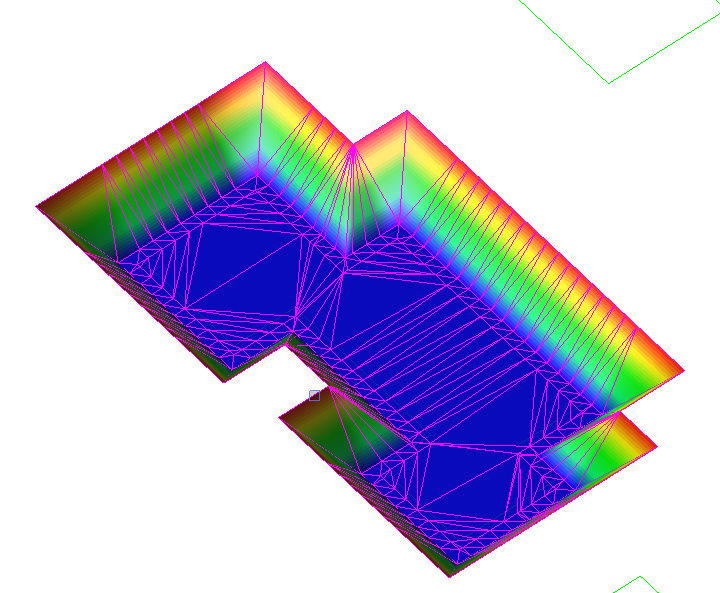


    The others would follow suit I think as shown below
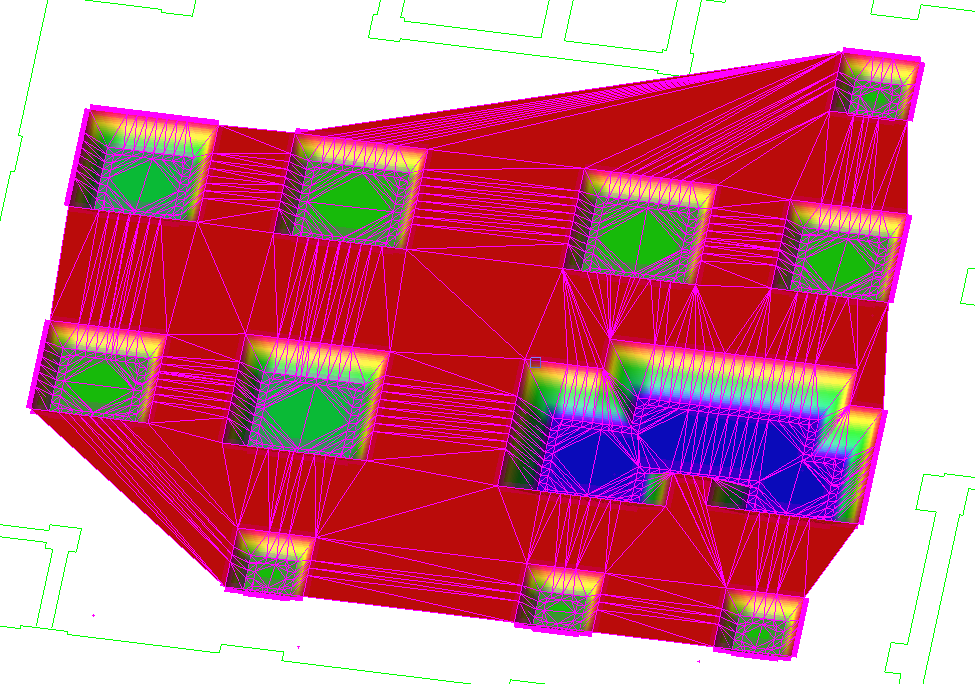


    This was zero editing, zero trimming and extending, no corners to close using the above steps only. The only change I had to make on some sideslopes was the Interval computation because I was hitting the Tolerance issue on some of the pads with the tolerance I was using.


    This took me less than 5 mins to get this far


    The Surface properties has a lot to do with the success here.


    Alan


  • 5.  Re: Side Slope - Building Foundation Comments

    Posted 03-30-2019 03:45

    Would you recommend having Adjust Flat Triangles  set to yes all the time such as in project settings? Mine was set to no and honestly would have never thought to adjust this. I think it came through with the default settings and besides this case I have not seen  "issues" that would have prompted me to change this.


  • 6.  Re: Side Slope - Building Foundation Comments

    Posted 03-30-2019 08:15

    Whenever you have sideslopes in a surface or when you do stockpiles I would always do this - it forces triangles to form up and down the slopes as opposed to between points on a Breakline


    Alan


    Sent from my iPhone


  • 7.  Re: Side Slope - Building Foundation Comments

    Posted 03-30-2019 04:45

    Good trick on moving the starting point of the linestring. I noticed this on a few and I actually maybe a comment in my video but foolishly forgot to set my mic so the audio was lost.


    One idea I had was a macro for moving the starting station of a linesting. It would essentially do what you mentioned in the break and join work flow. Your trick works great but I think a macro that would allow you to click a line and then click the new starting position would be quicker especially for larger, more complex buildings as the one shown below. 


    With the join and break you lose the side slope. So this is a step that you want to perform before you apply the side slopes. Maybe with this macro you could avoid losing the side slope if it "shifts" the starting position. 


  • 8.  Re: Side Slope - Building Foundation Comments

    Posted 03-30-2019 09:08

    We should just support closed polygons better or do this trick automatically on closed polygons - I don't think anyone would care where the 0 Station is on a line would they?


    Alan


    Sent from my iPhone


  • 9.  Re: Side Slope - Building Foundation Comments

    Posted 04-01-2019 03:49

    From a CAD stand point


    No repercussions come to mind. It doesn't matter to me as long as everything that builds upon it works correctly like sides slopes and it sounds like this would help.


    For field software like SCS900 and Siteworks:


    I did some quick testing today and didn't see any potential issues. Your starting station would be at the middle of the segment which could be a potential compliant from some users but you could scale the distance and update the starting station to reflect this difference. Besides this, the station functions work the same. 


    Nothing of hindrance comes to mind but I will keeping testing and thinking about this. 


    Something I did notice in Sitworks with a side slope line is that horizontal segments based on the station interval can be bloated. I would like to keep this as clean as possible so. The video explains this better. 


    GCS900 and Earthworks


    Nothing that I can think of.


  • 10.  Re: Side Slope - Building Foundation Comments

    Posted 03-30-2019 09:18

    Depends actually - when you break the sideslope remains on one part of the line (where the template is placed - the part with the 0 Station typically - so when you join back if you pick that first and the other segment second it should retain it


    We should try to avoid creating additional commands or macros to solve problems like these and do them either programmatically or solve the root problem - in this case closed lines - I hate work arounds and multi step processes when the problem can actually be solved


    I also don't really want the sideslope editor to even open - I have the line - I have the sideslope - I define the interval and the layers - go - go - go - allow multiples and Place only - that would be really good for many repetitive functioms


    Sent from my iPhone


  • 11.  Re: Side Slope - Building Foundation Comments

    Posted 03-30-2019 04:20
      |   view attached

    For the outside walls and interior walls with more traditional left and right "mirrored" instructions. 


    I tried using the create side slope using a centerline of the wall and a typical left and right template. I got close but the results were weird on the inside corner especially with the side slope to surface instruction. I tried adjusting the sampling distance but that didn't seem to help. 


    This maybe a limitation of the side slope or maybe it is a bug. It seems like it maybe a bug though because I can get the results that I want when I model the sides of the wall independently as shown in the full model I sent.


    Ultimately this is how I would like to be able to model the wall footings. 


    I forgot to turn my mic on but this at least shows the process. 


    Attachment(s)

    zip
    Side slope with CL.vcl.zip   44 KB 1 version


  • 12.  Re: Side Slope - Building Foundation Comments

    Posted 04-10-2019 12:20
      |   view attached

    @Alan Sharp not sure if you saw this one. Instead of modeling each side of the wall in opposite directions with the same side slope template, I tried using a center of wall master alignment and then model both sides of the wall with one template, more of a mirrored approach. The latter yielded odd results. 


    Here is a better video (with audio) that demonstrates the issue I was running into. I also attached VCE with the data. I couldn't get the VCL export to work with this data for some reason. 


    Attachment(s)

    zip
    Demo 2.vce.zip   611 KB 1 version


  • 13.  Re: Side Slope - Building Foundation Comments

    Posted 04-01-2019 07:18

    Pat

    I hope that when the Tolerance issue at sharp corners is resolved, that you will only need the tighter interval when you have curved sections of lines - I am also asking if we can use the Breakline Approximation Parameters because then it will chord the arcs but not the straights (unless breakline approximation parameters are applied for straights), and then you are down to what you need as an interval to tie to e.g. OG (becausewhile your example is flat and needs less tie points - in a normal OG you will need more tie points to model the slope correctly / accurately. 


    You could run Project Cleanup on the sidelsope Lines (after exploding them as you have to detach them from the Interval setting) and filter the line vertices before sending to the field. In Siteworks if you set Interval of 10 but had a interval of 1.5 in Sideslope I guess it still stops at all nodes because it sees them as Corners - The source line that was used to create the sideslope should however still be a "Simple Line" and have fewer nodes in it.


    Alan


  • 14.  Re: Side Slope - Building Foundation Comments

    Posted 04-11-2019 07:36

    I m looking at this extra issue today - will let you know what comes of the discussion


    Alan


  • 15.  Re: Side Slope - Building Foundation Comments

    Posted 04-12-2019 08:15

    Pat

    We discussed this yesterday - the challenge with this Sideslope Tool is that it uses the Corridor Modeling Engine which computes everything perpendicular to the Center Line / Master Line. In a Corridor - when the Edge Detail strays significantly away from "Paralleling" the Master Alignment you need to stop the corridor at that point and either start a second corridor / sideslope that now parallels the line that was deviating significantly - this is the same issue - while we can build a shape from the Wall Centerline to the WallLine (using 2D Line control) that has all the kinks in it, the next lines that are offset to the Wall Line are not at all calculated perpendicular to the Wall Center Line - they have to be computed perpendicular to the Wall Line (the Corner Angles are computed at 45 / 135 degrees (the diagonal) to the Wall Line - that is why this will work "well" from the wall line and not from the wall center line because the shapes considerably deviate at the Wall Line.


    This is not to say that there should not be a more dedicated tool that could do what you are asking - it would just have to have different computation logic to the corridor model technique.


    However when you get the updated Sideslope command where you don't need to actually edit the template as it is deployed - I don't think you will have an issue applying it separately to the two individual lines - it is so damn quick and does a fine job of modeling these examples. Like anything it is primarily knowing when to / not to use a tool to get the job done right and quickly. We can discuss at PUG next week once you have had a chance to "experiment"


    Alan


  • 16.  Re: Side Slope - Building Foundation Comments

    Posted 07-04-2019 08:22

    Hi Alan,

    I've seen the recent power hour video on that and played around with that function.

    One thing I've stumbled about is that the "template" is actually copied and not referenced/linked to. In your example, after applying/copying the template to all the pads, how do you apply changes. Usually a change in slope or work space has to be applied to all of them.

    Since now we have dozens of copies, we have to edit each one of them, or delete all of them except the first and redo the copy part.

    Or maybe I miss something?


    Cheers

    Ronny


  • 17.  Re: Side Slope - Building Foundation Comments

    Posted 07-05-2019 15:14

    Ronny

    The Sideslope command only has a Copy or Copy no edit function and does not

    today have a reference function (where all copies are referenced to a

    master template - this is available in Corridors but not in Sideslope. You

    are right that Sideslope likely needs the reference function as well and I

    will add t to my list of further enhancements to that command.


    Alan


    On Thu, Jul 4, 2019 at 9:22 AM ronny.schneider@sitech.ch <trimble@jiveon.com>


  • 18.  Re: Side Slope - Building Foundation Comments

    Posted 07-22-2019 07:10

    Thanks Alan,

    I'm looking forward to it.


    Ronny