Some PDF Writers when they encounter BOLD lineweights (especially on Dashed Linestyles) output the lines as Closed Polygons and then when we read them we don't really know the difference between a Filled Polygon for e.g. a Building and a Filled Polygon for a dashed line with heavy lineweight. That is why as Henry points out we read those as Fill Boundaries and not as Lines (because that is how they are in the PDF File.
Different PDF Print Drivers do things differently unfortunately and different software products write to the Print Drivers differently also and we have no control over that. While we can of course "mess with the data" during import, these types of things are highly ambiguous and hard to get right when you start over interpreting the source data.
As you will find, the solid polygons that represent the Bold Dashed Lines are pretty useless for anything, and you would need to recreate those lines manually by offsetting some normal linework in the file - trying to find the center of those polygon linestyles is hard in any automated way, especially around corners because the lines overlap each other in the corners.
The lines are however relatively easy to trace over in this case because at all the corners there is an Intersection Snap that you can use to find the center of the intersecting lines as shown below.
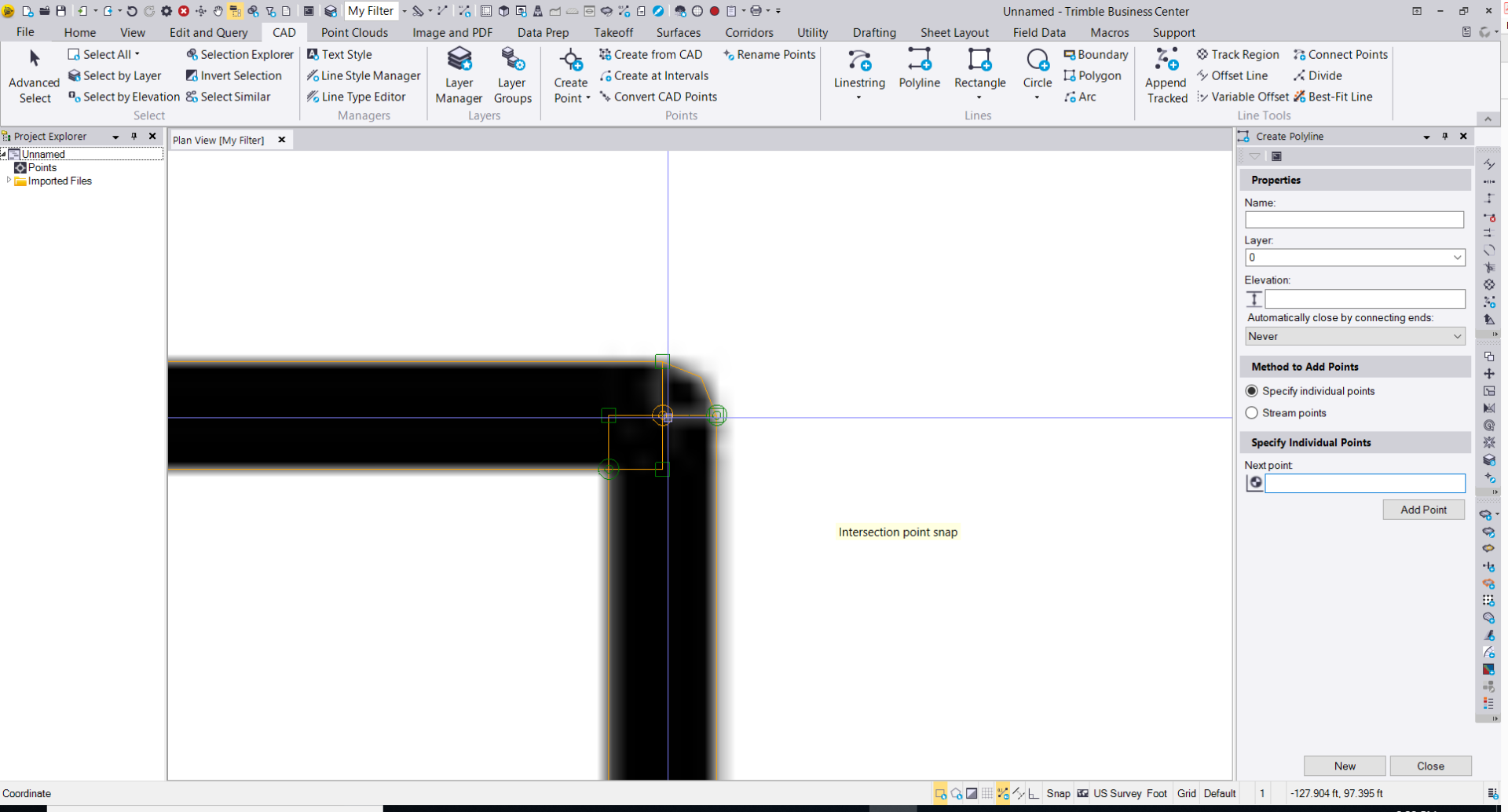
I rattled round one of the lines in a couple of minutes - a pain I know but what we have to do with PDF Vector Data unfortunately
Alan