Trimble Business Center

 View Only
Expand all | Collapse all

Enhance Request - Trench Template Bottom Offset Conditional Statement

  • 1.  Enhance Request - Trench Template Bottom Offset Conditional Statement

    Posted 03-07-2019 14:02

    In the Trench Template manager, there needs to be an option for a conditional statement for the Bottom Offset. I went through a bunch of plan sets today for different projects and found the following detail on every other project.


    Thank you!


  • 2.  Re: Enhance Request - Trench Template Bottom Offset Conditional Statement

    Posted 03-07-2019 14:32

    You can just create a Trench Template for Earth and a second Template for Ledge and then apply the Trench Template that is applicable at each station where the Earth / Ledge Transition occurs.


    If you need to find where those transitions occur, you could add a Ledge condition into the Template and then the Soil Condition and put something in the Template that changes when the different conditions prevail - this is like the Rock / Soil Trench Template where your Trench can be Vertical in Rock but needs to slope in Soil or can be Max 4' (OSHA) deep vertical walls before slopes or benches or using a Trench Box. I would put a small ledge where the Ledge / Soil Transitions occur - build one Template for the dual scenario and apply it, and then where Ledge shows up in the Trench, I would drop a new Template at each of those locations where you want the transition to apply.


    This could be a challenge if the Ledge is coming and going all the way along the pipe, then you would need some type of conditions in the Trench


    If you can share a project where you have the Pipes, the Trenches and the Ledge Material defined, I can create a Test Project to see what this looks like and then we can consider the request for the future


    For me this is a bit like the Trench Template has to change under Roads (Structural Backfill) vs under landscape areas (non Structural Backfill).


    I have logged the request with Product Management


    Alan


  • 3.  Re: Enhance Request - Trench Template Bottom Offset Conditional Statement

    Posted 03-08-2019 05:38
      |   view attached

    Alan,


    Here is that data and a quick explanation video. I did not get a chance to go through and try and create conditional side slopes. I will try to tackle that next week.


    Attachment(s)

    zip
    Utilities Example.vcl.zip   9.81 MB 1 version


  • 4.  Re: Enhance Request - Trench Template Bottom Offset Conditional Statement

    Posted 03-12-2019 16:24

    For me this is a simpler approach.

    Create strata surfaces with at least both materials.

    Strata for utilities is a little tricky. You build the strata layers using site based boreholes.

    Then you run the Define Corridor Strata command, set the method to surfaces and pick the site based strata surfaces

    Utilities are based on corridor technology so it needs the corridor type of strata.

    Create two templates one for each condition. You can copy the first and change the offset from 6" to 12".

    Apply the 6" offset template to each run and run the utility takeoff report

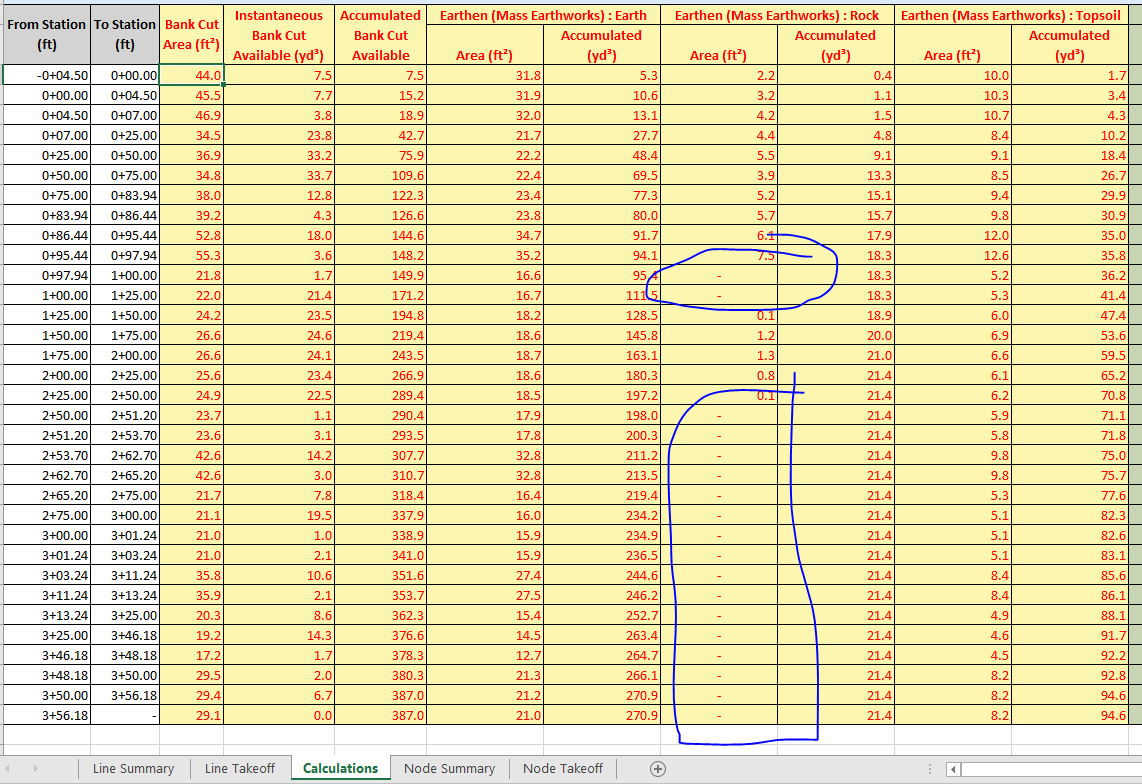
    The calculation tab of this report will detail where the 6" offset bottom will cut into the Ledge or Rock material

    Add templates to transition in and out as needed

    Remember that strata is a big guess and you are working for an estimate (keep the transitions to a minimum #)

    In the following table, where you see an area for Rock this is where the template cuts into the Rock material

    Now you know the stations where you need to change templates.

    In the following run I would start with the 12" template insert it again at 225 and then insert the 6" template at station 250. This will transition the change in depth over a 25' distance.  You can make this transition as short as needed.

    Use the surface slicer command, profile viewer and view the surfaces in 3d to confirm your decisions.

    Keep the maximum sampling distance to 10' for greater detail.`
     

    The feature I like the best about the utility modeling is that you can visually confirm your design with each adjustment.


    tim