Trimble Business Center

 View Only
Expand all | Collapse all

Is it possible to set a starting elevation in a profile plan set?

  • 1.  Is it possible to set a starting elevation in a profile plan set?

    Posted 02-08-2019 06:41

    I am trying to capitalize on some real estate in one of my profile views and was wondering if it is possible to set the starting elevation of a profile? I would like to start the elevation in this case at 245 because this would move my profile up and allow me to sneak some more text in below the profile without over crowding data. 


    Is there another trick to doing this? I could possible measure the distance, reducing the profile height to this distance and add the text below the station access but this seems like more work and potential for error.


    Thanks!


  • 2.  Re: Is it possible to set a starting elevation in a profile plan set?

    Posted 02-08-2019 15:11

    Patrick


    Can you change (reduce) your Profile Diagram Height for just that sheet? 


  • 3.  Re: Is it possible to set a starting elevation in a profile plan set?

    Posted 02-09-2019 04:20

    I tried doing that but then I would have to change the elevations for all of interval text to below the station grid lines. Not impossible but definitely adds some steps and fussing


    I did try "drawing " the profile table for the heck of it and for some reason that gave me enough space to do exactly what I needed it to. I have no idea what this is for and did not have a chance to investigate it yet but it did give me enough room. Thee is no guarantee these will work every time.


    Before drawing profile table


    With drawing the Profile Table


  • 4.  Re: Is it possible to set a starting elevation in a profile plan set?

    Posted 02-10-2019 09:40

    I have no doubt there is a way but I have always found the profile drafting settings difficult to navigate and find myself just changing stuff and seeing what happens, often with surprising results.   Maybe we can get a tutorial webinar on this is the future??


    #webinar  #videotutorial


  • 5.  Re: Is it possible to set a starting elevation in a profile plan set?

    Posted 02-11-2019 04:01

    Wayne if you haven't checked out the Retrieve Library, try these https://trimble.retrieve.com/title/?titleId=2914#/content . Mike Carris has a few videos on this that are pretty helpful.


    I agree the profile and cross section can be a little difficult to navigate at times but they are way easier than some of the competitor's versions that I have used.


    I think a few things that would make it more user friendly:

    • The ability to set default layers for new entities in both interfaces
      • All the new entities dump on layer 0. I want to set this to 
    • Object Explorer
      • Sometimes there are entities that I have no idea what they are and the only way to find out what they are is to go in and change properties until something stands out


    #enhancementrequest


  • 6.  Re: Is it possible to set a starting elevation in a profile plan set?

    Posted 02-11-2019 12:52

    I think I've got all the cross-section settings pretty well sorted, my biggest issue is getting the size of the profile how I want it.  The issue is I'll get the size how I want it but then the profile will be broken and offset vertically seemingly randomly.  I'll have to make a new post with some screenshots the next time it comes up.


  • 7.  Re: Is it possible to set a starting elevation in a profile plan set?

    Posted 02-12-2019 05:50

    A lot of the controls in the Profile View are based off the Grid Settings. It is not the most intuitive way to set the Profile position, however it is how it was defined. So for example if you change the Major Grid to 0.5" or 1" or 2" or 2.5" will affect the position of the Profile in the grid.


    I will take the action to record a detailed video on this when I get a chance - maybe on Friday this week to give you some guidance.


    The other thing that I have found, is that the offsets of certain values that you label, whether or not they are checked to be visible, also has an effect on how the profile is positioned - so if there are labels that you don't use you can maybe manipulate those to get more real estate below the profile - be aware that many of the Labels will label above the sag curve and below the crest curves so if the Sags are your low points that dictate the vertical position of the profile this may not always help either.


    I will try to pull a video together for you on this


    Alan


  • 8.  Re: Is it possible to set a starting elevation in a profile plan set?

    Posted 02-13-2019 11:41

    The main controls that affect the vertical position of the profile in the Profile drawing are the following


    1. The Grid and Axes Settings for Minor Elevation Interval. The smaller the number you enter here the closer the profile will be to the center of the vertical of the Profile drawing box.
    2. The Elevation Major Interval - the closer to 1 that you set this, the closer to the center of the vertical of the Profile drawing box the profile will be.
    3. Curve Table Offset values - if you enter large offsets, then the profile will eventually start getting pushed downwards making more room above the vertical profile for the label


    While you cannot enter the Start Elevation, the Grids are by far the easiest thing to control to move the profile Up. The highest you can go however is the center of the available box leaving equal space above and below the Profile. The space below the profile is taken away if necessary depending on your settings.


    Alan


  • 9.  Re: Is it possible to set a starting elevation in a profile plan set?

    Posted 02-13-2019 12:35

    The profile Table is for Metric Users and typically European / Australian Style Profiles and Sections. The way these regions generate their Profiles is without Grids (as per US Methods) and they have "Drop Lines" from the profile and then Labels in Tables below the profile as shown below
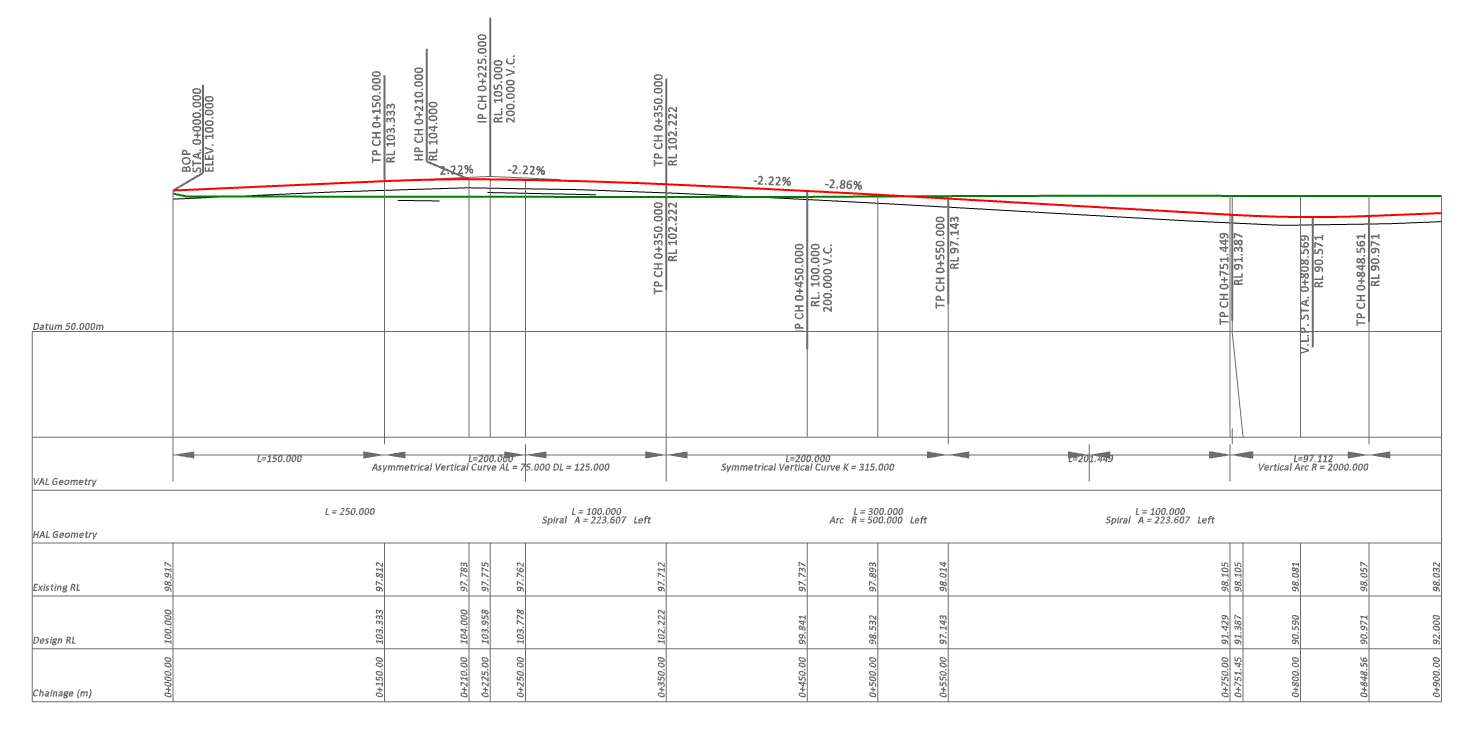
     

    In this mode you do have a Datum Elevation that can be defined and then the Table that you define below the Profile will occupy space of the available Profile Box, so this when used in combination with the Grid Method of plotting profiles will have an effect - however the Grid Method and Table Method of creating profile drawings were designed to be exclusively different, so if you use them in combination (not designed to do that), you will get some unexpected results for sure, however you may be able to find ways to use the Table Settings to push the profile Higher in the available drawing box - and then not display the Tables at all (switch off the content


    If you go into the Profile Table and do the following, it will have the effect of pushing the profile Up in the drawing pane


    1. Go to Profile Table and set the check box to "Draw" - this alone will force some additional space below the Profile which may be sufficient for what you are trying to achieve. In my test case clicking this moves my test profile up by ~1 major grid interval. This always depends on the size of the sheet, the height of the Profile drawing Box, the vertical exaggeration, your grid settings and how many labels you have and where they sit above and below the profile, as well of course as the shape of the profile.
    2. Now other settings you make will dictate how much space will be consumed by the table below the profile - ie the Kink Row Height (this kinks the drop lines so that text in the tables do not overwrite each other in the table below), row height (each label in the table goes in a row, each row has a row height to accommodate the labels), the number of table rows you want (for the values like Station, Elevation, Cut Fill, HAL Geometry, VAL Geometry etc. Each addition you actually draw will consume space below the profile, however turning these on will likely overwrite on the Grid (and this is the area where I doubt you will get a good solution as Grids and Tables were not designed to work together.


    Hope that this helps here guys


    Alan


  • 10.  Re: Is it possible to set a starting elevation in a profile plan set?

    Posted 02-13-2019 12:59

    When the splitting of the profile starts to happen, it is because the profile will run out below the base or above the top of the grid.


    The splitting will happen at your nearest major grid intervals - so if you have those set to a large distance apart, then the splits happen at much shorter distances, the smaller the major interval setting, the tighter the control over where the splits are placed. The Automated split locations are an indicator as to where the splits could be placed, if you want to control that specifically you can enter your own split locations (recommend that you split at a Major Grid Interval only not some random station value.


    Alan