Trimble Business Center

 View Only
Expand all | Collapse all

Copy Smart Text Setup

  • 1.  Copy Smart Text Setup

    Posted 08-16-2019 04:48

    Is there a way to "copy" smart text properties to reuse them?


    For instance, this morning I am applying smart text to contours (another question/idea that I need to compose some thoughts on). I went through and labeled 10 contours. I had to step away for a minute so I saved. I want to go back and continue labeling but I have to reset all of the properties basically from scratch. I could copy but this doesn't work for object dependent text. It does work well for things such as surface elevation and slope but only when the extract property is at the leader line or text insertion. 


    There needs to be a "copy smart text properties" or "continue smart texting" command. This would be very valuable for drafting. 


    I know I could save the data in the text field to an external doc but I want to take it one step further. Especially if the desired text is within the project the user is working in. 


  • 2.  Re: Copy Smart Text Setup

    Posted 08-16-2019 04:53

    The command " Label Contours by Crossing" is actually want I wanted to use but the above is still a valid request.


  • 3.  Re: Copy Smart Text Setup

    Posted 08-16-2019 05:32

    Understood - a smart text definition that could be saved and reused would be very handy - I have that already as a request but I will resubmit so it is fresh in the teams minds.


    I use Excel to keep a record f all mine, but that doesn't hold all the properties either and having it in the software would be way better and Label Styles while pretty good in many ways don't support Smart Text or Leaders for spot labels. 


    Alan


  • 4.  RE: Re: Copy Smart Text Setup

    Posted 09-11-2022 23:42
    Hi Guys, 

    I'm just new to implementing smart text in TBC. Was/is there a way to replicate smart text setups between projects?

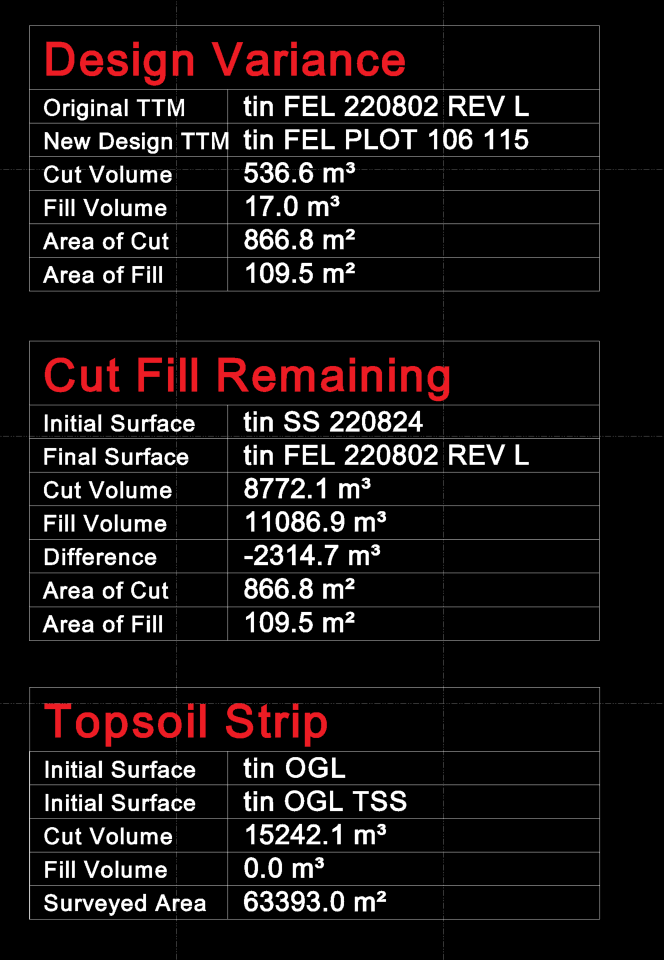
    i.e. We'll always have an OGL TTM, and we'll always do a Topsoil Strip survey (say OGL TSS TTM).  Therefore always need Topsoil Strip volumes.
    Likewise, we'll use OGL TSS TTM, and a "Super Surface", which is our evolving site. (This is our ongoing cut fill operation and always need updates on these volumes.
    We'll also have design changes. 

    The table would be something similar to that below.

    If we could export this generic setup (noting that the stored measurements may change)and then import to other projects and relink the stored measurements, or automatic association by name would be great.

    Any assistance or knowledge regarding if this was updated would be great. I had a brief look around the community, but didn't find an answer.

    Thanks,
    Julius


    ------------------------------
    Julius Newman
    ------------------------------


  • 5.  RE: Re: Copy Smart Text Setup

    Posted 09-13-2022 02:12
    Natively in TBC? I don't think there is a clean way. You could try VCL but that would copy over your referenced surfaces and make a mess.  Wondering if RPS copy and paste would work for this application?

    If you don't need the grid, you could simple copy the text from the old project, store in a text dox and then copy into whatever project you want. 

    https://community.myrockpile.com/t/rps-copy-to-clipboard-command/1357

    ------------------------------
    Patrick L'heureux
    ------------------------------