TBC does a great job with data management and there are some fantastic tools in program. Some that I will admit I neglect to use. Some for good reason (clunkiness, issues in the past) and some I have not found the time to investigate enough to integrate into my workflow. The other issue with some of these methods is that they are not automated nor always the easiest. I agree that you can compare within TBC but I could make that argument with most programs in one form or another.
The TML you mention, is very helpful and actually a request of mine.
I am looking for a simple tool/UI (which I understand is a loaded statement) that you can import two cad files and either a novice or pro can quickly analyze the differences between the two. I understand that there is a lot of metadata that you will not necessarily see the difference of but this would at least highlight the horizontal differences of the linework. Saving the users lots of time microanlyzing linework differences. The next step would be to be left with the differing components of the 2 files.
Isn't that the ultimate goal if we want to get into a CAD forward future? I believe TBC has the tools to make this possible.
How I think this could work:
There are a couple of things in my opinion that need to be present for this to be successful:
- A separate module or function – “CAD Comparison”
- The reason for this is because the data that is a prepared TBC file will have been manipulated and tweaked and will have become part of the BC file
- You will need to compare the raw initial CAD that you received from the engineer to the new raw revision in order to get a true comparison on changes.
- Therefore the user needs the ability to have a prompt to pick the original cad file (should be in the TBC folder) and the new cad file that was received to run a comparison
- Need the ability to select a original dxf, dwg and new dxf, dwg and set a prefix/suffix to both respective files
- The reason for the prefix/suffix would be so that when the duplicate linework has been delete you know which line work is from the old and which is from the new
- You could probably use the view filter manager but I think the prefix is a good safe guard
- Also useful for an audit trial
- Workflow:
- I could use my layers with the hypothetical “og-“ and go in and delete the necessary linework in my model and keep theses layers as a reference in a new layer group so I have and audit trail of changes
- Layer group Revisions 02012019
- then take the layers with ”new-“ and add this linework to the active model. Again I could take this layers and add them to a layer group for an audit trail. I would probably accomplish this using the copy command. This way the linework stays on that audit trial layer but I get the new linework on my modeling layers
- Add these to layer group Revisions 02012019
- Now you would just see the import stuff when you turn on that layer group and can quickly defend and educate on changes
- Linework that overlaps
- Edge of pavement is a good example of linework that would overlap but would deviate with a chance
- Is there a way to look for the overlap and break the line where the overlap and delete the duplicate linework, leaving the user with only the change?
- Could we:
- Explode the linestrings down to their smallest segments
- Then run the linework comparison to delete linework
- I think we would have more success in only seeing the differences this way
- Option to join linework after the comparison command has been performed.
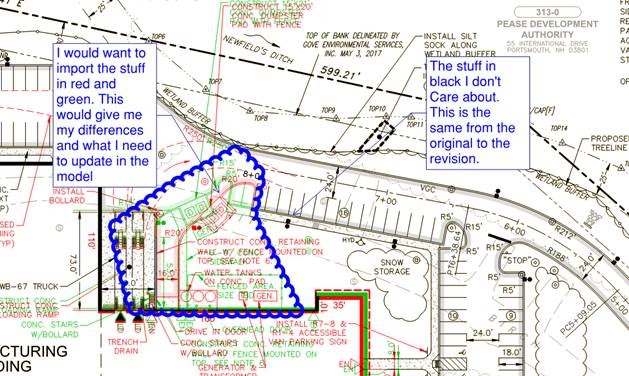
- Deleting the duplicate text is a must to help clean up what the user is looking at
- I have a feeling that the text may cause a world of headaches just because there is probably a lot of variables to check
- Insertion points
- Style
- Widths
- I would say first iteration of this module/function focus on linework comparison and the other easy stuff and then slowly work on integrating text comparison and the more complex components
- I can accomplish a very quick and easy text comparison with Bluebeam. The bigger issue is adding and deleting the necessary linework to the model which Bluebeam cannot do
- End goal is definitely for the function/module to compare it all without a doubt.
- Delete the duplicate linework from both the original file and the new file
- If the information is the same I don’t care. I just want to see the differences
- This duplicate linework is already part of the model and is unnecessary
- Blocks
- With the revisions to the block handling in TBC 5.001 I have a lot more success with entities relayering according. I have also notice that if the proxy graphics are set to 1 when exported out of an AutoCAD environment you get better results as well.
- I think you are better of exploding down to the smallest components you can, unless you can do block analysis
As you mention, most of these tools are are integrated into TBC, I think there is more of a need for a script, TML, or UI that combines these tools and makes it happen in a "simple" form factor.
I understand there could be a lot of work in something like this but it would save a lot of time and aggravation.
Example from Civil 3D's tools: