Trimble Business Center

 View Only
Expand all | Collapse all

5.10 - Anyone else having issues importing georeferenced images?

  • 1.  5.10 - Anyone else having issues importing georeferenced images?

    Posted 06-26-2019 07:22

    TBC imports the files but all I get is the rectangle for the georeferenced image, no image. 


  • 2.  Re: 5.10 - Anyone else having issues importing georeferenced images?

    Posted 06-26-2019 10:29

    Pat, I'm running 5.0, but I ran into this exact thing the other day when importing a large drone jpeg orthophoto (122MB). 


    I changed my display setting from "no tiles" to "tile with multi-resolutions" and it displayed correctly for me


  • 3.  Re: 5.10 - Anyone else having issues importing georeferenced images?

    Posted 06-26-2019 21:13

    I have the same issues with photos with to high resolution and choosing "no tiles" makes it work for me.


  • 4.  Re: 5.10 - Anyone else having issues importing georeferenced images?

    Posted 06-27-2019 15:10

    I haven't had this problem with 5.1 but did quite a bit with 4.8. Any older projects that I need to revisit need to have the PDF's re-imported. I've also set the image properties to no tiling with the highest resolution, it also seems to fix some of the quality issues. With very large geotiffs I've used a program called "IrFan View" to re-sample the picture, in many cases it can be set to UHD 8K and still reduce the file significantly and hold an acceptable image quality. Only down side is it's no longer georeferenced so it needs to manually be done.


  • 5.  Re: 5.10 - Anyone else having issues importing georeferenced images?

    Posted 03-23-2020 20:14

    I've got a similar issue with TBC 5.20.2 when importing images from Propeller.


    I've tried the "no tiles" setting. That way it doesn't crash but it only shows the empty frame.


    While set to tiles the following happens.

    Trying to import a 100 MB (41000x65500 pixel) GeoJPEG stops eventually at 40 % and the Taskmanager shows that the memory "Image Tile" uses is increasing steadily until it reaches about 2.8 GB, then everything stops.
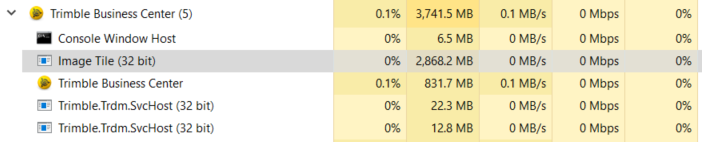
     

    During the import of a GeoTIFF of the same site (840 MB - 24107x36666 pixel) that task "Image Tile" doesn't use as much memory, only about 120 MB, and disappears at some stage. The import summary shows one error "1. Global (degree) units could not be used; Grid (metre) units were used instead."

    After that TBC is not responding anymore.

     

    My computer is a 8-core i9 with 32 GB RAM and Nvidia Quadro chip. On my colleagues computer with 16 GB RAM the JPEG will actually load, but the TIFF won't either, ends up with the same "not responding".


    My guess would be some kind of memory limitation due to the fact that "Image Tile" is 32 Bit only.


    Or it's another issue with the Nvidia Quadro graphics driver. Latest driver, but will crash to a BSOD when using DirectX. In OpenGL2 it works fine with point clouds and the like.


    Smaller images from previous flights with smaller sizes do load, haven't found the threshold yet where it stops working.


    From my point of view we need both, the ability in Propeller to export smaller Orthophotos, preferably the same way we export small portions of the point cloud and DTM. And TBC needs to be able to import those large scale Orthophotos.