Trimble Business Center

 View Only
Expand all | Collapse all

Cooridor Station and Offset report from a surface

  • 1.  Cooridor Station and Offset report from a surface

    Posted 01-19-2019 05:03

    When reporting station and offset at specific offsets from a surface, the software generates more offsets than those specified. How can I restrict the software to report only at the specified offsets. It looks like the report is generated wherever the cross section intersects a surface triangle edge. Secondly, how can I report more than one offset only on one side of the alignment for example if i need a report at offsets +5 and +10 or only at -5 and -10?


  • 2.  Re: Cooridor Station and Offset report from a surface

    Posted 01-25-2019 07:53

    This kind of all depends on the data that you are starting out with and what you select


    In the case shown below, I have a TIN Surface, I created a 2D Alignment to give me stationing, I created lines at an offset to the Alignment that I want to report at 10' Stations - in my case I created 3' L, 4.7' L, 5' R and 8' R (the offsets that you say you want to report.


    I then used Change Elevation to elevate the offset lines to the surface elevation along their length.


    I then run the report picking the Alignment, the Surface and the 4 offset lines and this is what I get when I do the Internal Report - if you run this to excel I believe all the line items have Station filled in - once in Excel you can sort the data if needed using the Data - Sort function and then sort by e.g Offset and then Station etc.


    You can add Slope, N, E and Delta Elevation to the reported items if needed.


    I am not sure if this answers the question 100% - as I said at the start here, it really does depend on your starting data - so you would likely need to share something with me here (send to me at alan_sharp@trimble.com if you don't want to share publicly) and highlight which items you are trying to report to me in the email so I can find them easily.


    You may have to create the offset lines that you are trying to report - they don't have to be a constant offset either if you have a line that transitions in offset (like a road widening section or something (the offset is computed from the line - mine just happened to be fixed offsets. If you have a corridor model you can explode it to create the linework and then use those lines with the alignment against an As Built Surface for example to compute this report.


    I also ran the report to CSV and opened in Excel and then sorted it as suggested above. Note my HAL was 2D only which is why the Depth field is always 0 - I also reported all the linework nodes so Station 0 and 350 get reported 2x as a result as they coincide with the 10'intervals that i selected for Station reporting.


  • 3.  Re: Cooridor Station and Offset report from a surface

    Posted 02-05-2019 07:32

    Hi Alan

    Please see below the report that I am getting after using a road alignment (or it can be any alignment) to report offsets from the natural ground surface, on the left is my parameters and on the right are the results. I thought the software should extract elevations from the specified surface at specified offsets only. Creating extra lines to report against is not quite ideal in my opinion because I may need to report various offsets for different purposes thus, it means each time I have to create lines and drape them to a surface for reporting.

    The offsets I need are being reported here but why do I have extra offsets that I didn't specify.

    Secondly Why am I restricted to report only one offset on the left and one on the right as per the screen below.


    Can we have a flexible offset reporting option such as the screen shot below from another software where I can specify more than one offset.


  • 4.  Re: Cooridor Station and Offset report from a surface

    Posted 02-06-2019 16:02

    You are not restricted to just one offset on Left and Right - that is the limits of the reporting to Left and Right (i.e. you have a HAL plus a TIN that is say 1000' Left and Right of CL but you only want to report out as far as +-50' from centerline. These settings limit the width of the report.


    You can have as many offsets as you want to report - you just have to draw them - the benefits of this approach are


    1) The lines don't have to be at a constant offset

    2) The lines can be named - that drives naming in the report

    3) The lines are there so you can report at the exact same offsets over and over as surfaces are constructed / work progresses


    Use the Offset Line command to create the Offset Lines and the Change Elevation command to elevate them to the reference surface elevation - this takes a few seconds before running the report.


    We took this approach rather than the define up to 6 offsets - what happens if you have 7 offsets that you want to chase? Both methods have their merits, both methods deliver similar results.


    If you have a Template that defines the locations to report you can also use that to define the offset locations - On Road Projects that is often the case of course.


    If you survey Points and lines and want to report those against a Surface you can also do that with this same report


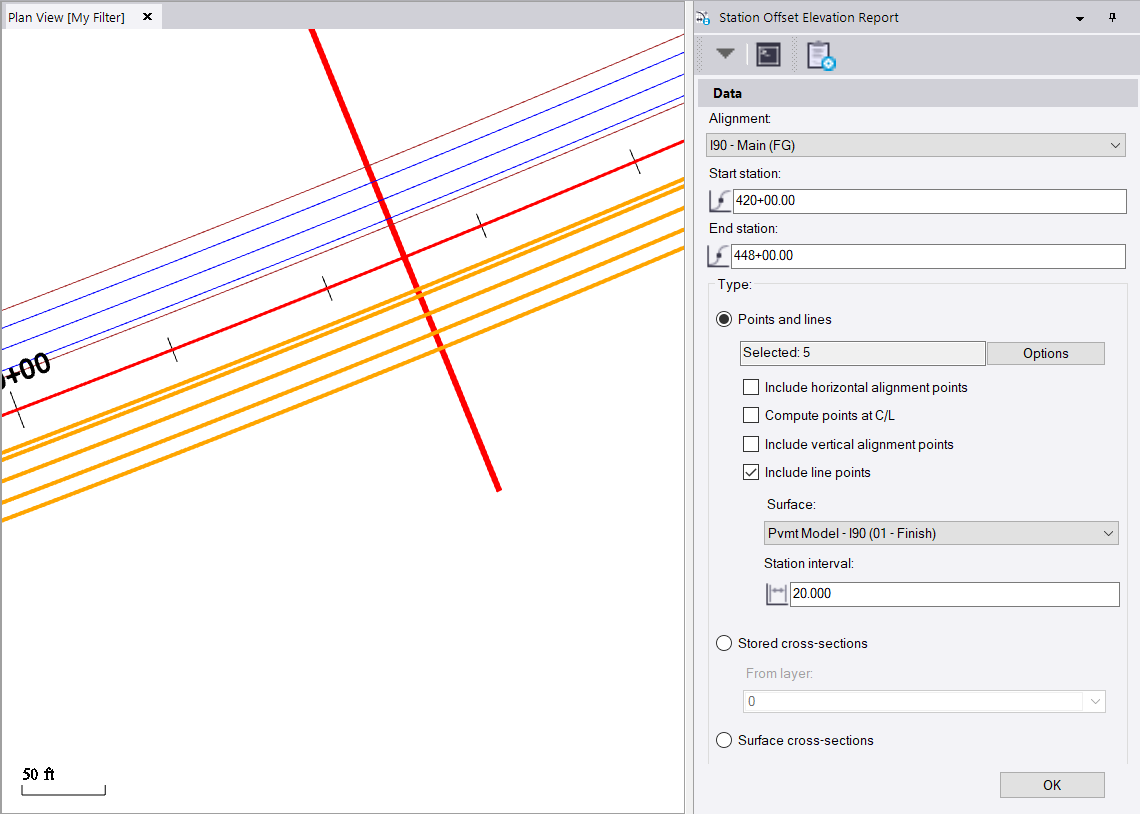
    With this setup below, I have a Surface Model (Turned Off), The highlighted Lines (that are the offsets that I want to report on), and the settings using the Main Alignment, the Report Station Range and Interval and the reporting of the "Line Points" that will pick up additional changes in direction of the lines e.g. if they are not constant offset lines. If the lines are 2D I will only get the Station and Offset of the lines, but if the lines are elevated to the reference surface (or elevated by other means), then I will get their Elevation and Delta Elevation to the reference surface. I think in your case at these offsets at the station intervals you want the Elevations of the reference surface right?


    This is the report I get back - each line is the same - I just filtered to IEOP here to show you those entries
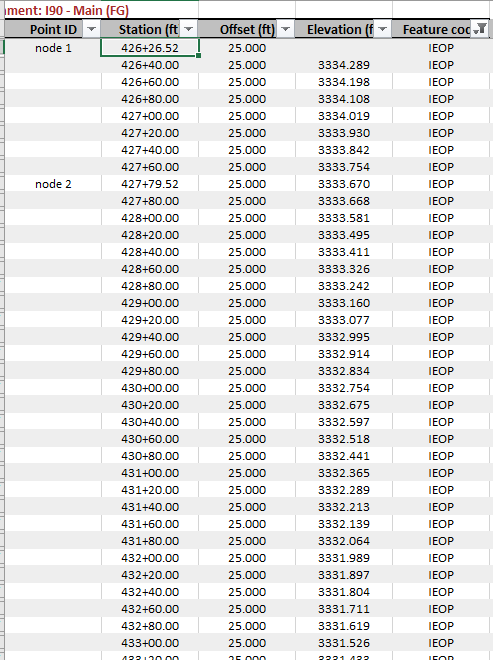


    In this case I do not get any added nodes from where the station interval crosses a Triangle edge, all my reported items are named (based on the lines selected which I can reuse over and over each week I do a progress Survey or my final As Built Survey). Where no elevation is reported, the surface actually starts fractionally after the start of the lines drawn so the first node will have no elevation values.


    If my lines are Surveyed Lines and have a Z value different to that of the reference surface then I will also get a Delta Z column between the Measured Line and the reference surface etc. My offsets would then also be the measured offsets not a design offset etc.


    While I can see that entering a random number of offset values to generate an identical report is a different approach to the same problem, and like all things software could be beneficial to have that as an option, I think this approach works and gives good results today.


    With it being an Excel Report you can easily hide or delete columns, and can put filters on the headers to reduce the data to show what you want to see. You can also sort by Feature Code to get all like features together or by Station and offset to group the data by Station range etc.


    Hope that this helps


    Alan


  • 5.  Re: Cooridor Station and Offset report from a surface

    Posted 02-07-2019 03:09

    Well explained thanks.