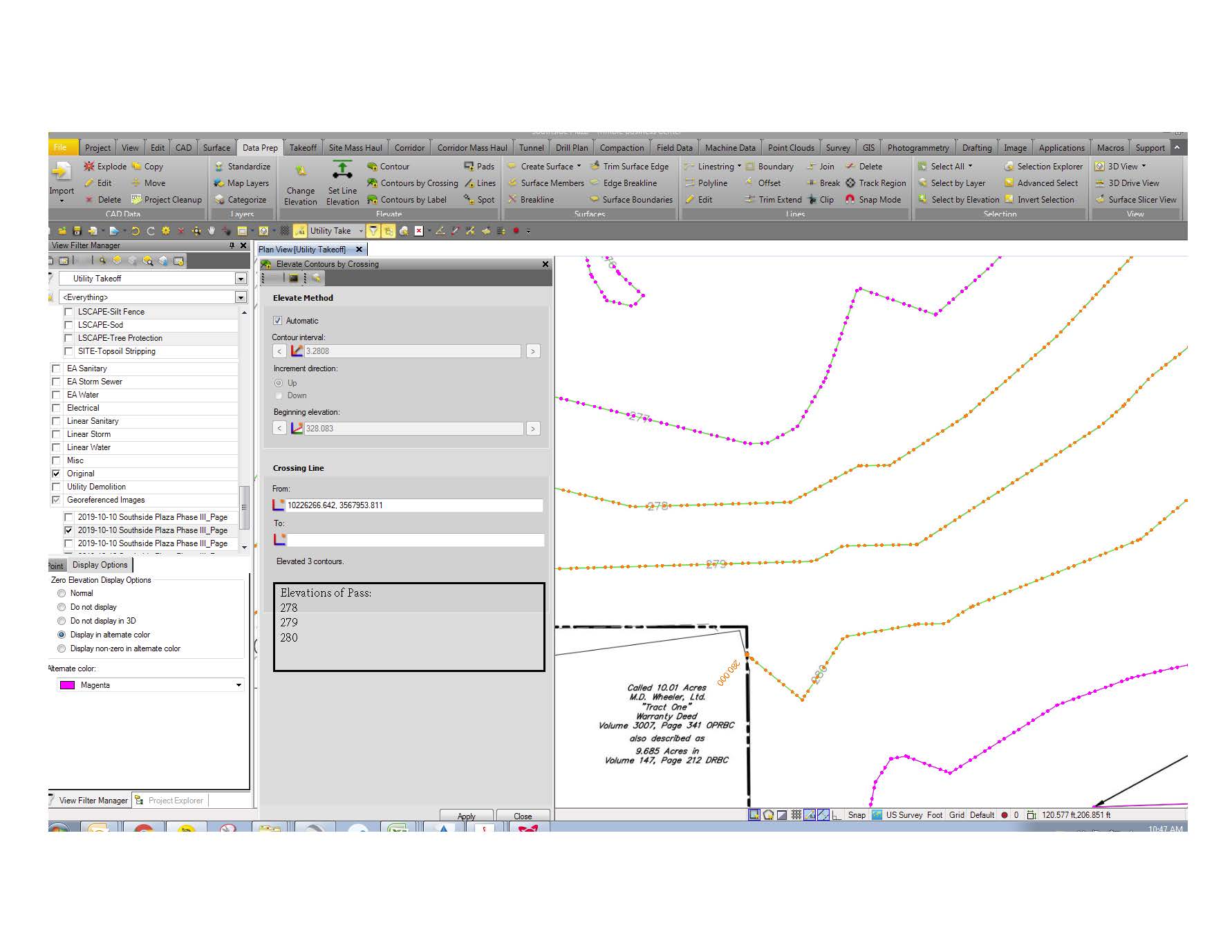
I agree with the above, was it enabled as an option?
My preference would be a "toggle" option on the view tab, toggle on/off "text, elevation, vertices", etc
Having a setting option whereby the z values only turn on once you zoom in a certain distance (i.e. 1:20 / 1:50 real world) would be great also so when you zoom out, you don't see the data, but zoomed in you do.
------------------------------
Julius Newman
------------------------------
Original Message:
Sent: 01-07-2020 10:03
From: Ben Wall
Subject: Re: Feature Request - List Elevations when using Contours by Crossing
The problem I usually have is that the pdf line work I get is often times really bad. Lines on top of lines that the project cleanup does not catch since they are not directly on top of each other. This leads to contours getting off of sync and being raised to the wrong grade. The only way to spot the mistake is to double check every so often and then back track when a problem is found. If the command pane shows the elevations that have been assigned to the contours in real time the user can see if things are getting off. You expect the contours from 278 to 280 to be assigned to the contours but when you get 278 to 281 then you know something is off.
I like Patrick's idea of labeling the contours as you use the command. You can technically do this using the Toggle line Markings button but they only appear at the end points. It's helpful on small projects but bigger jobs you have to pan too often. His way they show up where you raise them. It could be a problem where contours are very close together on purpose though as text would be on top of text. The preview idea could work too but not sure which option would be easier to code.
See pdf image of what I originally had in mind; I apologize for the poor jpg quality. The output already shows how many lines are being raised but just adding which elevations are being applied right beneath it. Having some kind of output so the user can more easily track what is being done would be a great help.