Ben
Those small vertical walls will not affect the Machine at all - this has been tried many times and the machines are all ok - so no fears there. The Spikes are created because you cannot have vertical faces in a TIN Model, so we offset the base of the Site Improvement a little to stop the wall of the SI being vertical. Where you have different thicknesses of material either side of a source line results in creating the base of either one at a slight offset to the source line, and the source line remains in the model - causing the spike.
If you want to try to remove the spike - you can try the recently updated Explode Surface Command - and in that you can now select "Only at slope break" and then define a Break Angle eg 45 degrees - this will find anywhere that you have a vertical wall and create you a set of 3D Linework on a layer that you can edit to try and remove the wall tops - you will have to break the lines where they need to be broken and then remove the elements not needed and then create your subgrade adjusted surface
Here is a simple example where I had 3 Pad Areas with different subgrade thicknesses. I exploded the subgrade adjusted surfaces and broke the lines as shown here and then deleted the segments shown in Orange
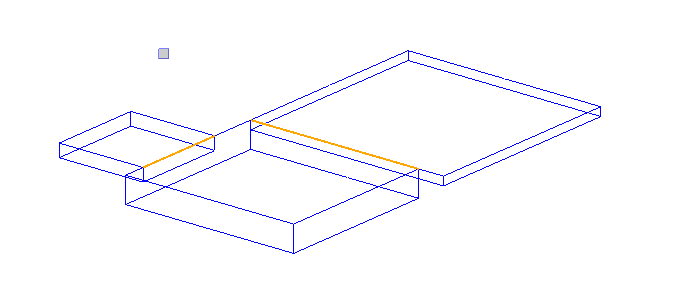
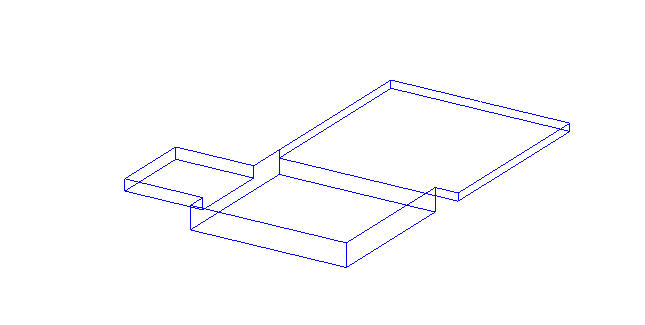
and then made a surface out of the lines remaining
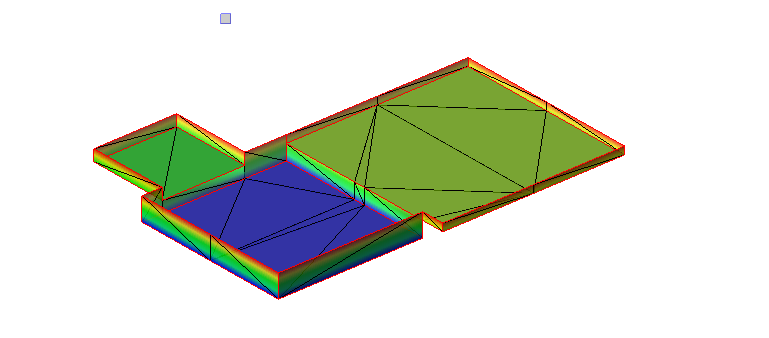
This gives a pretty nice result. On a more complex job this would of course take some extra time - the above was just a few seconds work. and now the remaining lines are all at the correct elevations (and I have all the Subgrade Lines as well.
Hope that this helps - if you try this and it works could you post some screen shots of your results. We have a command to be released soon called Explode Lines that would help here also - it explodes lines down into single elements and you can control where it breaks them using a max angle setting - but the Break command will also work just fine here as well.
Alan