I have discussed this many times with development and it is a known but hard to consistently reproduce issue because it can be Project and or hardware / system configuration dependent. What I would say is the following
1) TBC uses a Graphics System called Hoops for all of its Graphical Views. This system is also used by other industry players like Autodesk in AutoCAD etc. so it is a well developed system. We use this as it supports all of the Graphics Acceleration Packages like OpenGL and DirectX (and all versions of those) as well as all Graphics Card Providers like Nvidia, Quadro, Intel etc. It provides fast clean graphics for Points, text, Linework, Solids, Surfaces etc. and provides PDF Print Controls that we also utilize.
2) The Hoops system gets updated regularly by the vendor, however depending on where we are in our release cycle, we cannot always implement the latest version (at the last minute etc.) without delaying our releases (which sometimes can be difficult because we are tied to releases of Trimble field systems also). In addition Hoops is often updated after a TBC release and we will not incorporate the update until our next planned release. As a result we may not always have the very latest Hoops engine installed in the software, and that may create some issues of compatibility, especially on brand new hardware.
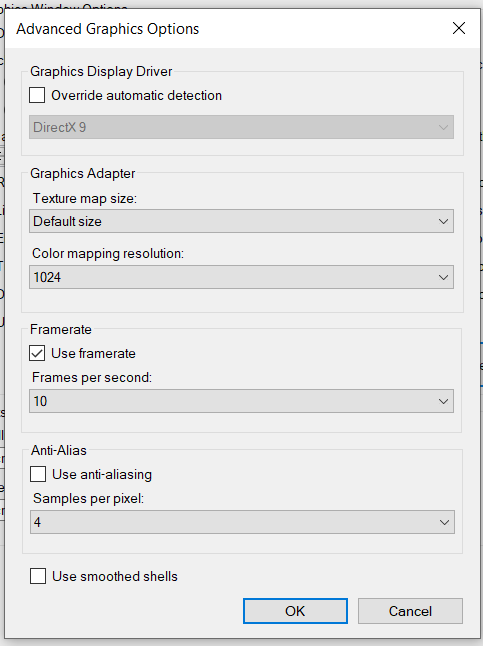
3) Some combinations of Hoops, Graphics Cards, Graphics Accelerators don't work well together or are poorly tested - for example you have an older laptop with an older graphics card and you try to use the latest version of DirectX in TBC - that may cause graphics issues like those that you are seeing. In the case where you see a problem rarely, that could be a pure TBC implementation issue, however if you are seeing the issue a lot or all the time, it is more likely a combination issue that can only be resolved by using an older version of DirectX or OpenGL etc. You can change this in Support / Options / Advanced - Override automatic detection and select "Override automatic detection" and then select e.g. DirectX 9 (DirectX 11 is the default currently), or OpenGL or OpenGL2 or Windows GDI from the pull down list provided. Simply downgrading to DirectX9 or OpenGL or OpenGL2 often changes the performance from a regular problem to a rare occurrence. We know that this solves a lot of this type of issue, and we know that much of the cause of this issue is caused by people having slightly older hardware, or hardware that has some degree of incompatibility or some settings on their graphics cards etc. that cause these issues, because we test internally with many combinations and people like Tim McClannahan and Myself are running the software all the time, and I for example do complete projects with users and I don't see this as a regular occurrence with my setup - I have seen it, however keeping everything up to date (Graphics Card Drivers, System Tools, Windows Updates etc.) does help keep the system working best, and these changes are the fall back when nothing else seems to cure the problem. There are many combinations that we of course do not test - we assume the tools we use which are tested cover those scenarios.
4) Sometimes a deinstall, complete Clean Out using Cleanup Utility, Reinstall from scratch can also clean out a Gremlin or two - not sure why but sometimes when people install a new version, the deinstall process for the prior version doesn't clean out everything. Also sometimes people install a different software after TBC is installed and that piece of software installs older versions of tools that TBC uses creating an incompatibility issue. TBC depends on specific versions of certain tools like .Net Framework etc. that can get updated by other applications. We had issues this Tax season with TurboTax PC doing that for example.
Having said all of the above - if something is easy to reproduce or you have a file where the same steps create the same problem repeatedly on your hardware, we can have our support team call you to go through your setup and configuration to try and solve the issue with you, and that sometimes does shine a light on a TBC problem that we can fix - but it has to be a reproduceable problem at our end so the development team can see and recreate it to track it down.
Of course when TBC fails for some reason the immediate thought is that TBC is at fault, very often however it is not TBC at all that is causing the TBC problem, this is what makes it so hard for us to track dfown, and why the first steps are always
1) Check Windows for Updates - sometimes companies suppress Windows Updates (Trimble does this for example) so you have to force the process manually and not rely on your corporate IT procedures to keep your PC updated with all Windows updates
2) System Tools like Bios, Graphics Cards, Processor etc upgrades from your PC supplier (like Dell). Make sure that all these are fully installed and updated.
3) Graphics Card Updates - make sure that the latest drivers from your supplier are installed for e.g. Nvidia Cards etc. Sometimes also reset defaults for the card with the latest drivers can solve problems
4) Deinstall, run the cleanup utility and reinstall TBC cleanly - the problems above are for sure solved doing this and then closely track extra software that you install on your PC - if you suddenly find that TBC is not working right, also look at the software you just / recently installed that could be causing the problem.
If all these have been done, and you are still getting failures as described - then change the Advanced Setting described above, quit and restart TBC and see if it helps solve the issue or reduce the occurrence of the issue. If you find a config that is more stable
Hope this helps