Hi Juan,
The root cause is the feature codes used in your dataset. I suppose you created all the linework by connecting the dots with CAD fucntions, not with feature code processing, did you? Many points in your dataset have more than one feature codes assigned, or they miss the proper start/end line control codes. When you export the data, the action will trigger the project recompute and activate feature code processing. Then all the wrong feature codes will be exposed.
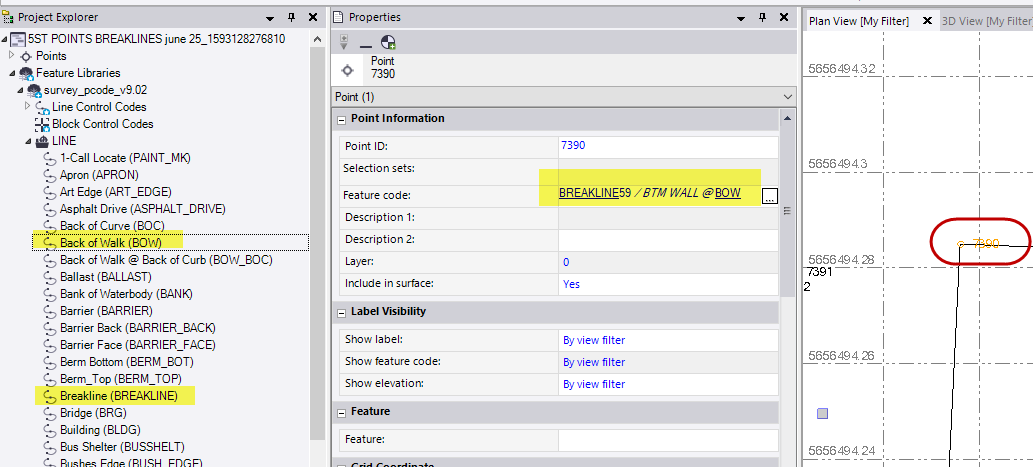
To give you an example, Point 7390 has this feature code: BREAKLINE59 / BTM WALL @ BOW. "BREAKLINE59" tells TBC this point should be a vertex in brealine59. Meanwhile, "BOW" tells TBC the point is also part of the Back of Walk line. As a result, there are two lines created upon this point now.
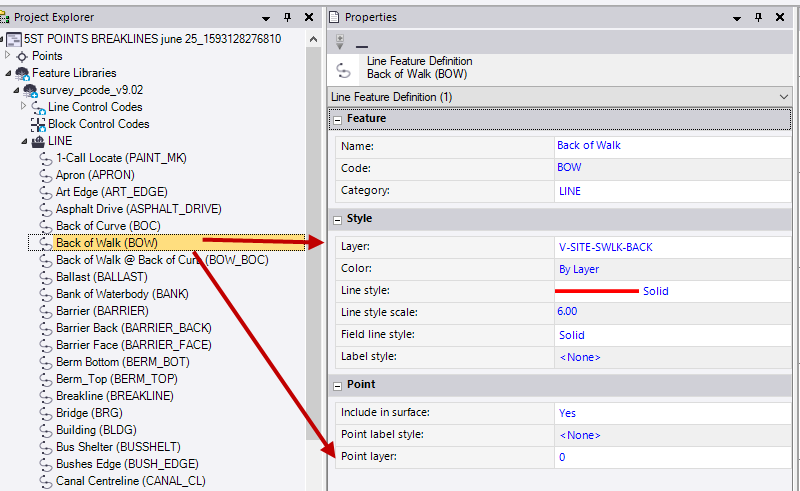
Also, your feature code library defines that these point vertices should stay in Layer 0. Therefore, after the feature code processing, these points are moved to Layer 0.
Since there are many points in the project and it's not realistic to correct them all in one post, I propose we move this offline and get the local dealer involved, so we can sort it out together. What do you think? Here's my email address, please let me know when would be a good time for the talk: rui_wu@trimble.com