Trimble Business Center

 View Only
Expand all | Collapse all

4k Monitor Support

  • 1.  4k Monitor Support

    Posted 06-10-2019 06:21

    My current 1080p monitor is on its way out and I was thinking of buying a 4K one to replace it.  I have a 4K monitor on my laptop and know that there is/was scaling issues when running TBC.  Does anyone know if these problems are being resolved any time soon?  Or is there any changes I need to make in windows to resolve.  I do not want to buy another 1080p when I could get a 4K. 

    Thanks for any advice


  • 2.  Re: 4k Monitor Support

    Posted 06-10-2019 06:54

    If you have a video card with lots of horsepower get the 4K monitor. I have a Samsung 39 inch and run Windows at 125 or 150 percent (I forget, not at home.) I have had no problems with video and v5.x.


  • 3.  Re: 4k Monitor Support

    Posted 06-10-2019 07:08

    Thanks George.  I have a Nvidia 1080 video card.  My laptop screen is 15inch and set to 250%.  If I go any smaller than that (150%) its too small to see, so I guess the bigger the monitor the better.  I might try a 27" or 32".  I think 39 would be too big for my desk!!


  • 4.  Re: 4k Monitor Support

    Posted 06-10-2019 07:22

    Get a bigger desk! ;-) I just check an old email and my monitor is only a 32 inch. I had thought about the 39 and mounting it on the wall but went with the 32. (I’m on vacation in Canmore, Alberta and everything seems bigger here.) Since your laptop is 4K it seems like it should push a second monitor. When I was shopping here in the US the folks at Best Buy said I could bring my laptop in and try it out. I seem to recall that two 4K devices are the max that can be used for many laptops.


  • 5.  Re: 4k Monitor Support

    Posted 06-10-2019 09:08

    All good questions. I have a DELL XPS15 with a 4K screen and a 27" 4K Monitor and it works well for me. I typically run my Laptop at 1920 x1080 and 125% text size and the external monitor at 3840 x 2160 and 200%. I run TBC normal size Icons on my Quick Access Toolbars and Side Toolbars if using TBC on either the Laptop Screen or on the 4K Monitor 


    There is a trick here also - if you select your 4K Monitor as the Primary Screen and your Laptop as an Extended / Secondary Screen, then when the Laptop sizes things it does so based off the 4K Monitor vs the opposite if you have your Laptop screen as the Primary Monitor. This approach gives better sizing of everything in TBC (this is a Windows issue and nothing to do with TBC.


    While when you make these changes to your Display Settings, it looks like it has introduced the new settings, there are some settings that don't take effect until you sign out of Windows and resign in again. This affects things like the [+] characters for expanding and shrinking Layer Groups etc. So always get your settings right and then Sign Out and Sign in again


    This is what TBC looks like on my 4K Monitor


    This is what TBC Looks like on my Laptop Screen
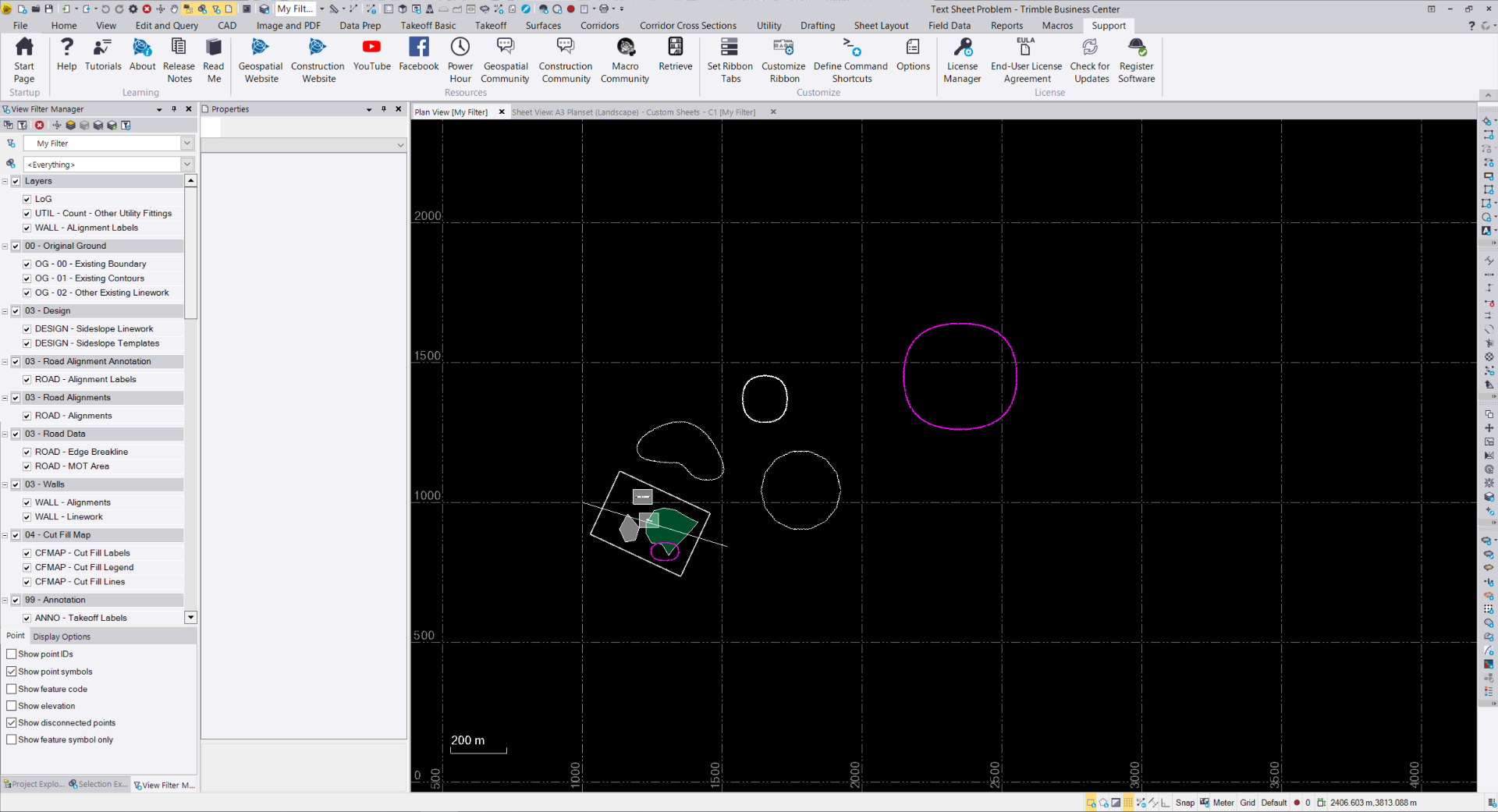


    I find this very usable in this setup configuration.


    I have a nvidia GeForce Graphics Card on my Laptop.


    Remember however that when you split across two or three monitors that you are halving or thirding your graphics memory and if you use a docking station that can reduce it further still, so having multiple screens may be good for some things, when running TBC you may want more Graphics Memory and therefore running fewer screens and running direct from your laptop will give better performance than multiple screens and running through a Docking Station.


    Hope this helps


    Alan


  • 6.  Re: 4k Monitor Support

    Posted 06-10-2019 09:55
      |   view attached

    I have been running a 4K 32” 3840x2160 it has been great so far it took a bit to get use to the small text.